







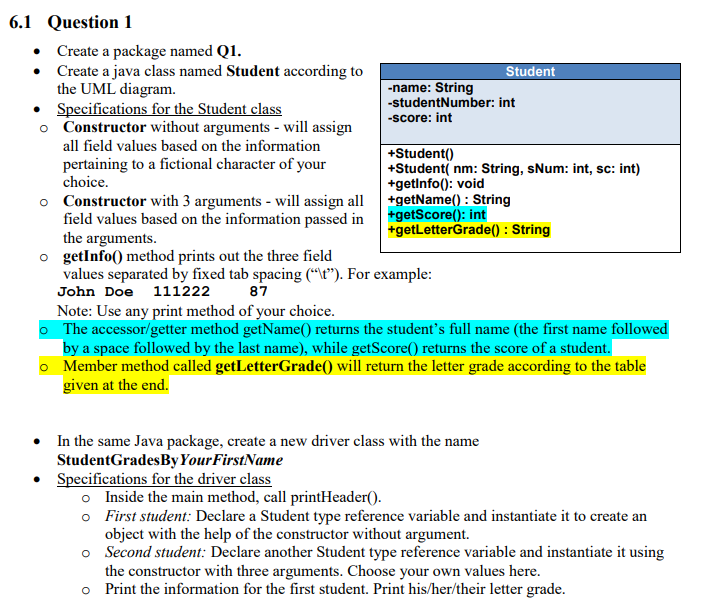
Question: undefined 6.1 Question 1 Create a package named Q1. Create a java class named Student according to Student the UML diagram. -name: String Specifications for
 undefined
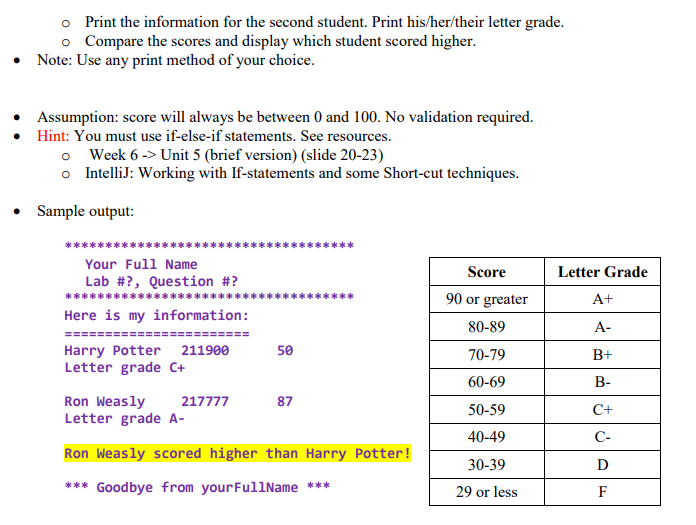
6.1 Question 1 Create a package named Q1. Create a java class named Student according to Student the UML diagram. -name: String Specifications for the Student class -studentNumber: int -Score: int Constructor without arguments - will assign all field values based on the information +Student() pertaining to a fictional character of your +Studenti nm: String, sNum: int, sc: int) choice. +getInfo(): void Constructor with 3 arguments - will assign all +getName(): String field values based on the information passed in +getScore(): int the arguments. +getLetterGrade(): String getInfo() method prints out the three field values separated by fixed tab spacing ("\t). For example: John Doe 111222 87 Note: Use any print method of your choice. The accessor/getter method getName() returns the student's full name (the first name followed by a space followed by the last name), while getScore() returns the score of a student. Member method called getLetterGrade() will return the letter grade according to the table given at the end. In the same Java package, create a new driver class with the name StudentGrades By Your FirstName Specifications for the driver class Inside the main method, call print Header(). First student: Declare a Student type reference variable and instantiate it to create an object with the help of the constructor without argument. o Second student: Declare another Student type reference variable and instantiate it using the constructor with three arguments. Choose your own values here. o Print the information for the first student. Print his/her/their letter grade. o Print the information for the second student. Print his/her/their letter grade. o Compare the scores and display which student scored higher. Note: Use any print method of your choice. Assumption: score will always be between 0 and 100. No validation required. Hint: You must use if-else-if statements. See resources. o Week 6 -> Unit 5 (brief version) (slide 20-23) IntelliJ: Working with If-statements and some Short-cut techniques. Sample output: Score Letter Grade Your Full Name Lab #?, Question #? Here is my information: A+ 90 or greater 80-89 A- 50 Harry Potter 211900 Letter grade C+ B+ 70-79 60-69 B- 87 Ron Weasly 217777 Letter grade A- 50-59 C+ 40-49 C- Ron Weasly scored higher than Harry Potter! D 30-39 29 or less *** Goodbye from your FullName *** F
Step by Step Solution
There are 3 Steps involved in it

Get step-by-step solutions from verified subject matter experts
 Study Help