



Question: undefined GOAL: Write a JavaFX application that displays a picture. The image should be about 800 pixels wide by 600 pixels high. Your picture should
 undefined
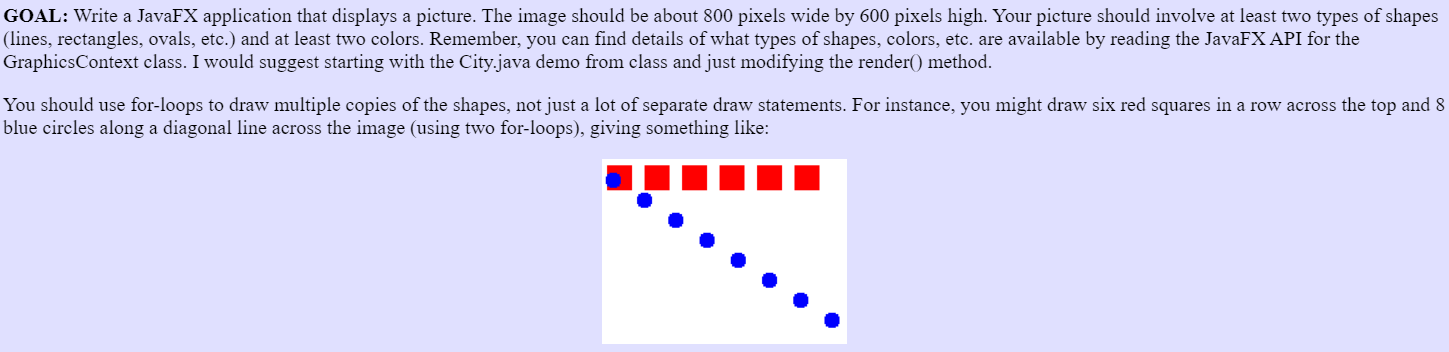
GOAL: Write a JavaFX application that displays a picture. The image should be about 800 pixels wide by 600 pixels high. Your picture should involve at least two types of shapes (lines, rectangles, ovals, etc.) and at least two colors. Remember, you can find details of what types of shapes, colors, etc. are available by reading the JavaFX API for the GraphicsContext class. I would suggest starting with the City.java demo from class and just modifying the render() method. You should use for-loops to draw multiple copies of the shapes, not just a lot of separate draw statements. For instance, you might draw six red squares in a row across the top and 8 blue circles along a diagonal line across the image (using two for-loops), giving something like: GOAL: Write a JavaFX application that displays a picture. The image should be about 800 pixels wide by 600 pixels high. Your picture should involve at least two types of shapes (lines, rectangles, ovals, etc.) and at least two colors. Remember, you can find details of what types of shapes, colors, etc. are available by reading the JavaFX API for the GraphicsContext class. I would suggest starting with the City.java demo from class and just modifying the render() method. You should use for-loops to draw multiple copies of the shapes, not just a lot of separate draw statements. For instance, you might draw six red squares in a row across the top and 8 blue circles along a diagonal line across the image (using two for-loops), giving something like
Step by Step Solution
There are 3 Steps involved in it

Get step-by-step solutions from verified subject matter experts