



Question: undefined You are working on a spreadsheet to calculate marks. You want to test out your vlookup, so you craft a formula and apply it
 undefined
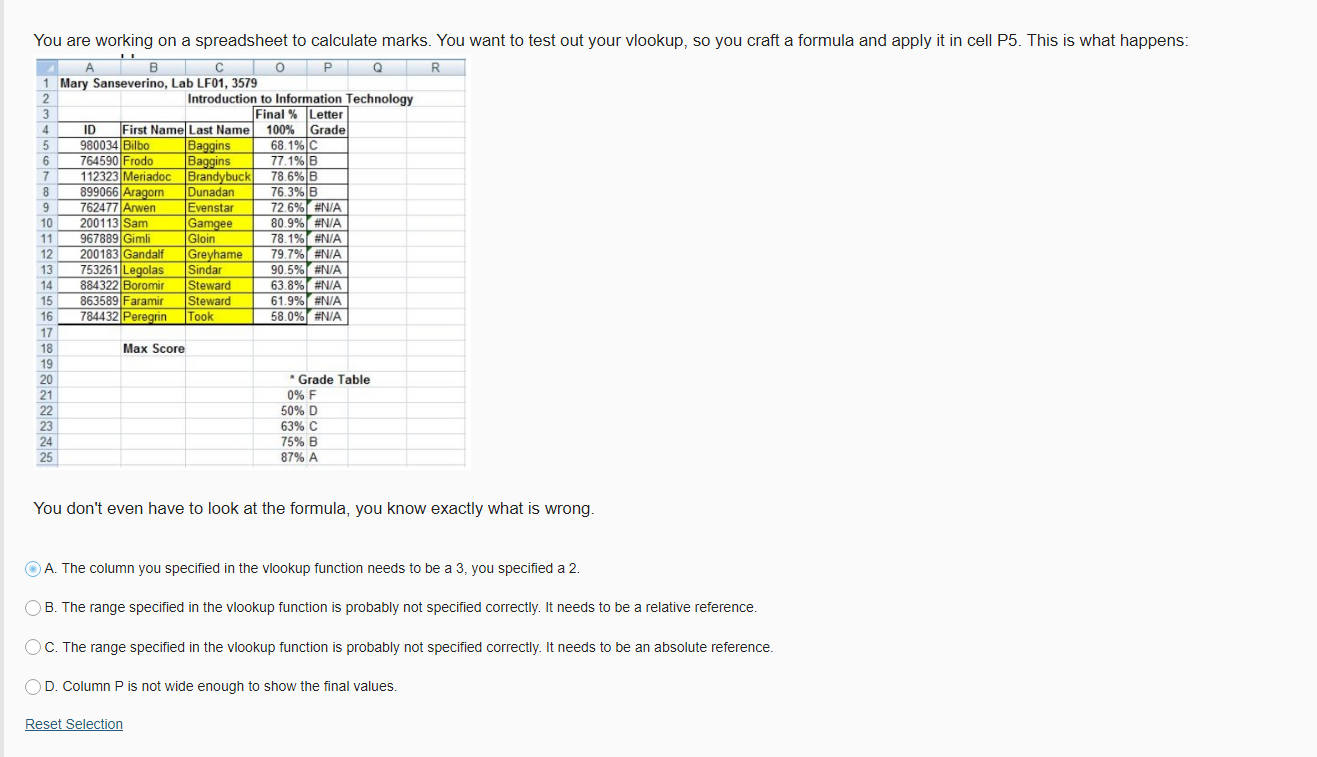
You are working on a spreadsheet to calculate marks. You want to test out your vlookup, so you craft a formula and apply it in cell P5. This is what happens: I B O Q R 1 Mary Sanseverino, Lab LF01, 3579 2 Introduction to Information Technology 2 3 Final % Letter 4 ID First Name Last Name 100% Grade 5 5 980034 Bilbo Baggins 68.1%C 6 6 764590 Frodo Baggins 77.1%B 7 7 112323 Meriadoc Brandybuck 78.6%B 8 899066 Aragorn Dunadan 76.3% B 9 762477|Arwen 3 Evenstar 72.6% #N/A 10 10 200113 Sam Gamgee OV.9% 80.9% #N/A 11 967889 Gimli Gloin 78.1% #N/A 12 200183 Gandalf Greyhame 79.7% #N/A 13 753261 Legolas Sindar 90.5% #N/A 14 884322Boromir Steward 63.8% #N/A 15 863589 Faramir Steward 61.9% #N/A 16 784432 Peregrin Took 58.0% #N/A 17 18 Max Score 19 20 * Grade Table 21 0% F 22 50% D 63% C 24 75% B 25 87% A 23 You don't even have to look at the formula, you know exactly what is wrong. O A. The column you specified in the vlookup function needs to be a 3, you specified a 2. OB. The range specified in the vlookup function is probably not specified correctly. It needs to be a relative reference. OC. The range specified in the vlookup function is probably not specified correctly. It needs to be an absolute reference. OD. Column P is not wide enough to show the final values. Reset Selection
Step by Step Solution
There are 3 Steps involved in it

Get step-by-step solutions from verified subject matter experts