







Question: Understanding an example database and write basic SQL queries [12 Marks] We provide you with an Oracle sample database which is based on a
![Understanding an example database and write basic SQL queries [12 Marks] We provide you with an Oracle sample](https://dsd5zvtm8ll6.cloudfront.net/si.experts.images/questions/2023/09/64f1b53b0a2c3_1693562170008.jpg)
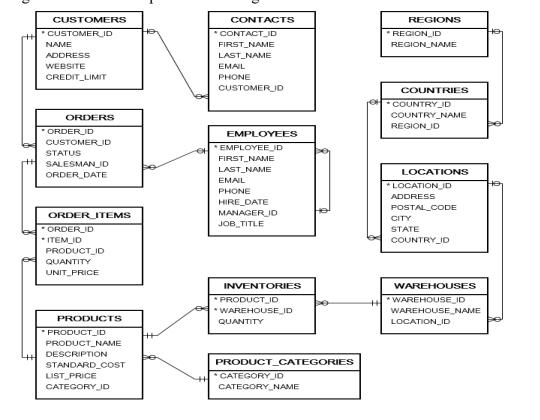
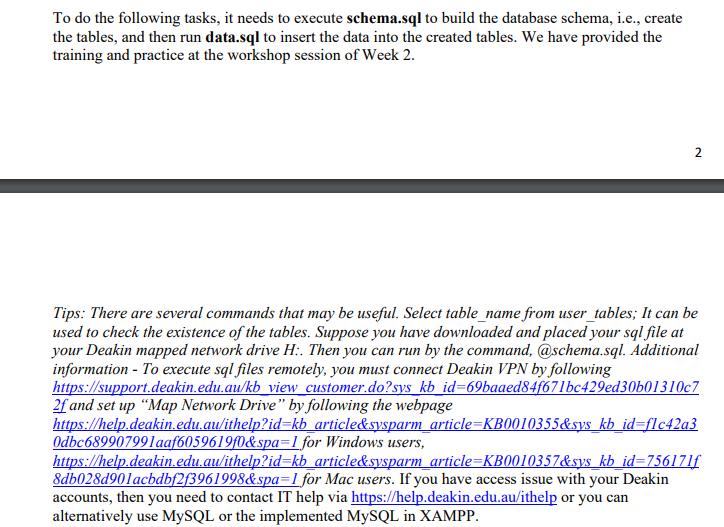
Understanding an example database and write basic SQL queries [12 Marks] We provide you with an Oracle sample database which is based on a global fictitious company that sells computer hardware including storage, motherboard, RAM, video card, and CPU https://www.oracletutorial.com/getting-started/oracle-sample-database/. The company maintains the product information such as name, description standard cost, list price, and product line. It also tracks the inventory information for all products including warehouses where products are available. Because the company operates globally, it has warehouses in various locations around the world. The company records all customer information including name, address, and website. Each customer has at least one contact person with detailed information including name, email, and phone. The company also places a credit limit on each customer to limit the amount that customer can owe. Whenever a customer issues a purchase order, a sales order is created in the database with the pending status. When the company ships the order, the order status becomes shipped. In case the customer cancels an order, the order status becomes canceled. In addition to the sales information, the employee data is recorded with some basic information such as name, email, phone, job title, manager, and hire date. The following illustrates the sample database diagram: CUSTOMERS CUSTOMER_ID NAME ADDRESS WEBSITE CREDIT LIMIT ORDERS ORDER D CUSTOMER ID STATUS SALESMAN ID ORDER DATE ORDER ITEMS ORDER ID *ITEM_ID PRODUCT_ID QUANTITY UNIT_PRICE PRODUCTS *PRODUCT_ID PRODUCT_NAME DESCRIPTION STANDARD COST LIST PRICE CATEGORY_ID 49- ++ CONTACTS CONTACT_ID FIRST NAME LAST NAME EMAIL PHONE CUSTOMER_ID EMPLOYEES *EMPLOYEE D FIRST NAME LAST NAME EMAIL PHONE HIRE_DATE MANAGER ID JOB_TITLE INVENTORIES PRODUCT_ID *WAREHOUSE_ID QUANTITY PRODUCT_CATEGORIES CATEGORY_ID CATEGORY_NAME REGIONS *REGION_ID REGION NAME COUNTRIES COUNTRY_ID COUNTRY NAME REGION ID LOCATIONS *LOCATION ID ADDRESS POSTAL CODE CITY STATE COUNTRY_ID WAREHOUSES +H *WAREHOUSE ID WAREHOUSE_NAME LOCATION_ID He He To do the following tasks, it needs to execute schema.sql to build the database schema, i.e., create the tables, and then run data.sql to insert the data into the created tables. We have provided the training and practice at the workshop session of Week 2. 2 Tips: There are several commands that may be useful. Select table_name from user_tables; It can be used to check the existence of the tables. Suppose you have downloaded and placed your sql file at your Deakin mapped network drive H:. Then you can run by the command, @schema.sql. Additional information - To execute sql files remotely, you must connect Deakin VPN by following https://support.deakin.edu.au/kb view customer.do?sys kb id=69baaed84f671bc429ed30b01310c7 2f and set up "Map Network Drive" by following the webpage https://help.deakin.edu.au/ithelp?id=kb_article&sysparm article=KB0010355&sys kb_id=flc42a3 Odbc689907991aaf6059619f0&spa-1 for Windows users, https://help.deakin.edu.au/ithelp?id=kb_ article&sysparm article-KB0010357&sys_kb_id=756171f 8db028d901acbdbf2f3961998&spa=1 for Mac users. If you have access issue with your Deakin accounts, then you need to contact IT help via https://help.deakin.edu.au/ithelp or you can alternatively use MySQL or the implemented MySQL in XAMPP.
Step by Step Solution
There are 3 Steps involved in it
Solution 11 Task 11 requires us to write an SQL query to list the Customer Name and the total purchase amount for all orders This query will help you identify the total amount each customer has spent ... View full answer

Get step-by-step solutions from verified subject matter experts
 Study Help