







Question: Unit K Independent Challenge 3 (continued) c. Return to styles.css in your editor, then in the main conten rule, add a declaration that creates a
 Unit K
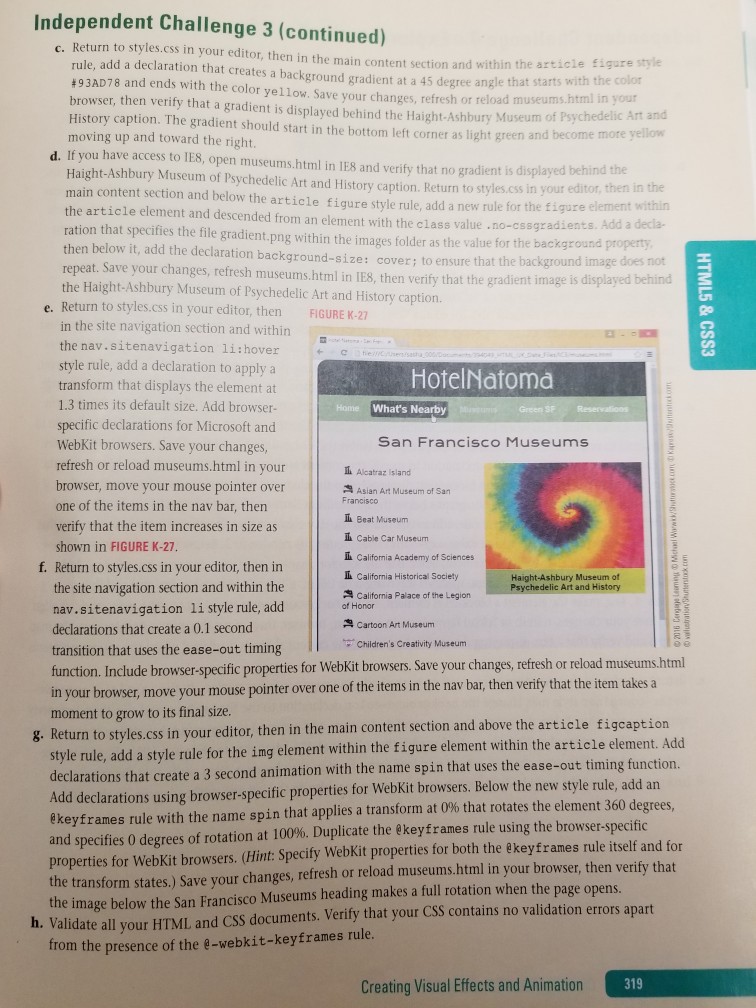
Independent Challenge 3 (continued) c. Return to styles.css in your editor, then in the main conten rule, add a declaration that creates a background gradient at a 45 degree angle that starts hearticle Eigure style #93AD78 and ends with the color yellow. Save your changes, refresh or reload museums-h with the color browser, then verify that a gradient is displayed behind the Haight-Ashbury Museum of tml in History caption. The gradient should start in the bottom left corner as light green and become Art and moving up and toward the right d. If you have access to IES, open museums.html in IE8 and verify that no gradient is displayed Haight-Ashbury Museum of Psychedelic Art and History caption. Return to styles.css in your behind t editor, then in the within adients. Add a decla- main content section and below the article figure style rule, add a new rule for the figure el the article element and descended from an element with the class value .no-cssgz ration that specifies the file gradient.png within the images folder as the value for the backgrou then below it, add the declaration background-size: cover; to ensure that the bac repeat. Save your changes, refresh museums.html in IES, then verify that the gradient image is image does not the Haight-Ashbury Museum of Psychedelic Art and History caption. isplayed behind e. Return to styles.css in your editor, then FIGURE K-27 in the site navigation section and within the nav.sitenavigation li:hover style rule, add a declaration to apply a transform that displays the element at 1.3 times its default size. Add browser specific declarations for Microsoft and WebKit browsers. Save your changes, refresh or reload museums.html in your browser, move your mouse pointer over one of the items in the nav bar, then verify that the item increases in size as shown in FIGURE K-27 HotelNatom What's Nearby San Francisco Museums ?Alcatraz island Asian Art Museum of San Il Beat Museum l Cable Car Museum Ll California Academy of Sciences f. Return to styles.css in your editor, then in California Historical Society Haight-Ashbury Museum of delic Art and History the site navigation section and within the nav.sitenavigation li style rule, add declarations that create a 0.1 second transition that uses the ease-out timing function. Include browser-specific properties for WebKit browsers. Save your changes, refresh or reload museums.html in your browser, move your mouse pointer over one of the items in the nav moment to grow to its final size California Palace of the Legion Cartoon Art Museum Children's Creativity Museum bar, then verify that the item takes a ap tion 8. Return to styles.css in your editor, then in the main content section and above the article fige style rule, add a style rule for the ing element within the figure element within the article element. Add declarations that create a 3 second animation with the name spin that uses the ease-out tim dd declarations using browser-specific properties for WebKit browsers. Below the new style rule @keyframes rule with the name spin that applies a transform at 0% th and specifies 0 degrees of rotation at 100%. Duplicate the @keyframes rule using the browser.specific properties for WebKit browsers. (Hint: Specify WebKit properties for both the ekeyframes rule itself and for the transform states.) Save your changes, refresh or reload museums.html in your browser, then verify that the image below the San Francisco Museums heading makes a full rotation when the page opens. ng function. , add an at rotates the element 360 degrees h. Validate all your HTML, and CSS documents. Verify that your CSS contains no validation errors apart trom the presence of the e-webkit-keyframes rule Creating Visual Effects and Animation
Step by Step Solution
There are 3 Steps involved in it

Get step-by-step solutions from verified subject matter experts
 Study Help