



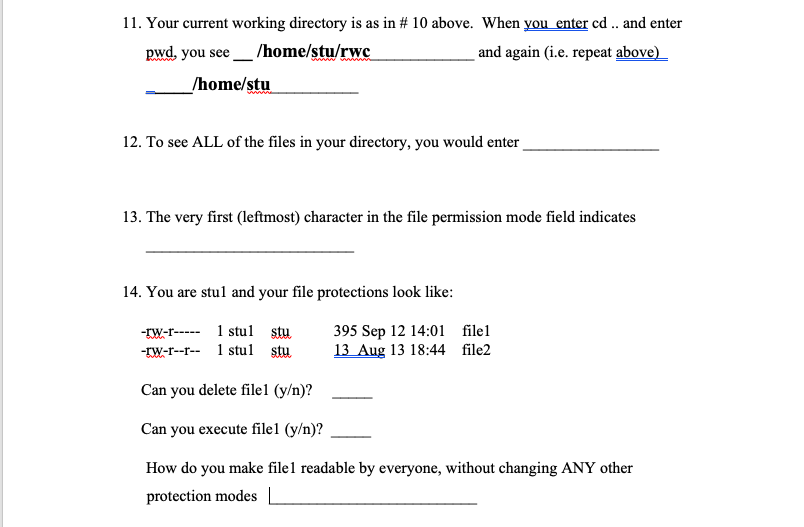
Question: Unix 11. Your current working directory is as in # 10 above. When you enter cd .. and enter pwd, you see __ /home/stu/rwc and
Unix
11. Your current working directory is as in # 10 above. When you enter cd .. and enter pwd, you see __ /home/stu/rwc and again (i.e. repeat above) /home/stu 12. To see ALL of the files in your directory, you would enter 13. The very first (leftmost) character in the file permission mode field indicates 14. You are stul and your file protections look like: -IW-r----- 1 stul stu -IW-r--r-- 1 stul stu 395 Sep 12 14:01 file1 13 Aug 13 18:44 file2 Can you delete filel (y)? Can you execute filel (y)? How do you make filel readable by everyone, without changing ANY other protection modes
Step by Step Solution
There are 3 Steps involved in it
1 Expert Approved Answer
Step: 1 Unlock

Question Has Been Solved by an Expert!
Get step-by-step solutions from verified subject matter experts
Step: 2 Unlock
Step: 3 Unlock