







Question: Unix Problem 9 Create 1 shell scripts, . Put it in a new file, and name them script3.sh . Make sure to run the command
Unix
Problem 9 Create 1 shell scripts, . Put it in a new file, and name them script3.sh . Make sure to run the command chmod 777 script3.sh to give full permissions to read, write, and execute script
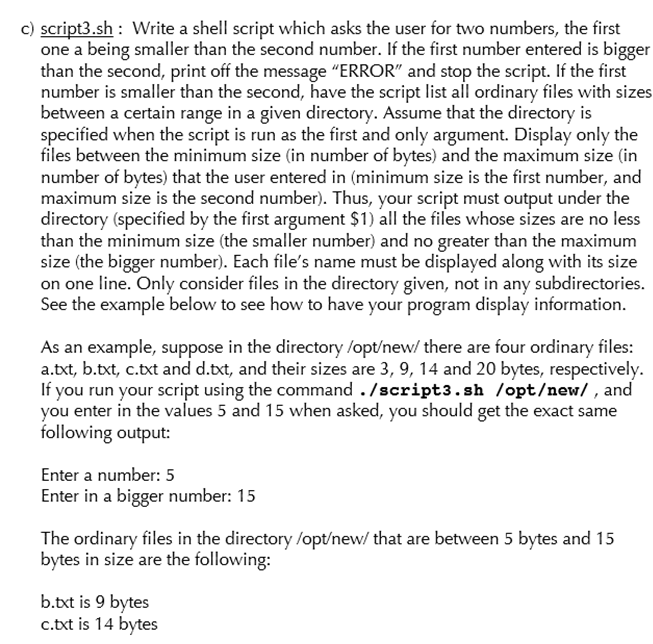
c) script3.sh: Write a shell script which asks the user for two numbers, the first one a being smaller than the second number. If the first number entered is bigger than the second, print off the message "ERROR" and stop the script. If the first number is smaller than the second, have the script list all ordinary files with sizes een a certain range in a given directory. Assume that the directory is specified when the script is run as the first and only argument. Display only the files between the minimum size (in number of bytes) and the maximum size (in number of bytes) that the user entered in (minimum size is the first number, and maximum size is the second number). Thus, your script must output under the directory (specified by the first argument $1) all the files whose sizes are no les than the minimum size (the smaller number) and no greater than the maximurm size (the bigger number). Each file's name must be displayed along with its size on one line. Only consider files in the directory given, not in any subdirectories. See the example below to see how to have your program display information s an example, suppose in the directory /optew/ there are four ordinary files a.txt, b.txt, c.txt and d.txt, and their sizes are 3, 9, 14 and 20 bytes, respectively. If you run your script using the command ./script3.sh /optew/, and you enter in the values 5 and 15 when asked, you should get the exact same following output: Enter a number: 5 Enter in a bigger number: 15 The ordinary files in the directory /optew/ that are between 5 bytes and 15 bytes in size are the following b.txt is 9 bvtes c.txt is 14 bytes
Step by Step Solution
There are 3 Steps involved in it

Get step-by-step solutions from verified subject matter experts
 Study Help