



Question: Upload the formulas for all the yellow boxes 4. 10 points - Make the Table of Free Cash Flows showing each year of the project's
Upload the formulas for all the yellow boxes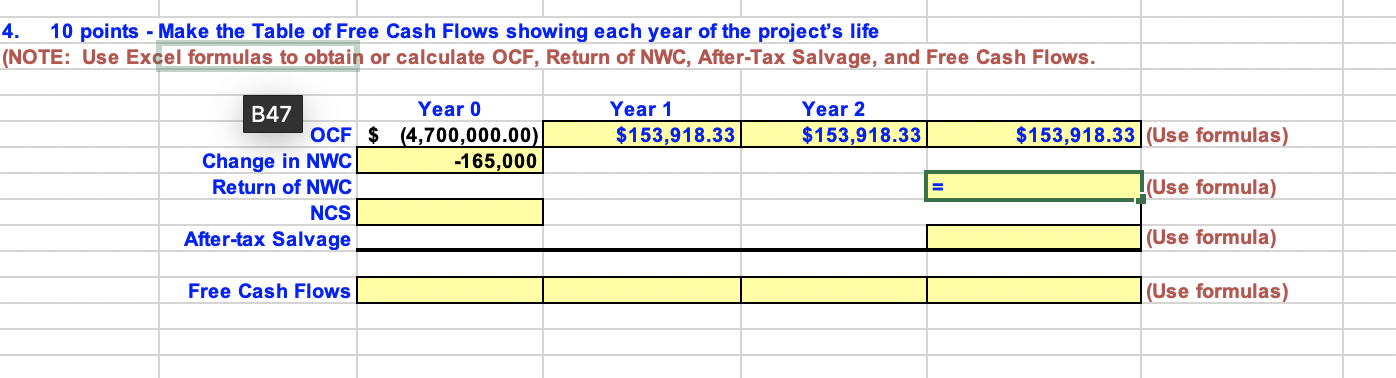
4. 10 points - Make the Table of Free Cash Flows showing each year of the project's life (NOTE: Use Excel formulas to obtain or calculate OCF, Return of NWC, After-Tax Salvage, and Free Cash Flows. Year 1 $153,918.33 Year 2 $153,918.33 $153,918.33 (Use formulas) B47 Year 0 OCF $ (4,700,000.00) Change in NWC -165,000 Return of NWC NCS After-tax Salvage l(Use formula) (Use formula) Free Cash Flows (Use formulas) 4. 10 points - Make the Table of Free Cash Flows showing each year of the project's life (NOTE: Use Excel formulas to obtain or calculate OCF, Return of NWC, After-Tax Salvage, and Free Cash Flows. Year 1 $153,918.33 Year 2 $153,918.33 $153,918.33 (Use formulas) B47 Year 0 OCF $ (4,700,000.00) Change in NWC -165,000 Return of NWC NCS After-tax Salvage l(Use formula) (Use formula) Free Cash Flows (Use formulas)
Step by Step Solution
There are 3 Steps involved in it

Get step-by-step solutions from verified subject matter experts