







Question: URGENT!!! all required codes to solve the question are provided recipies.json { Poppy seed roll : [ poppyseed , sugar , milk , egg ,
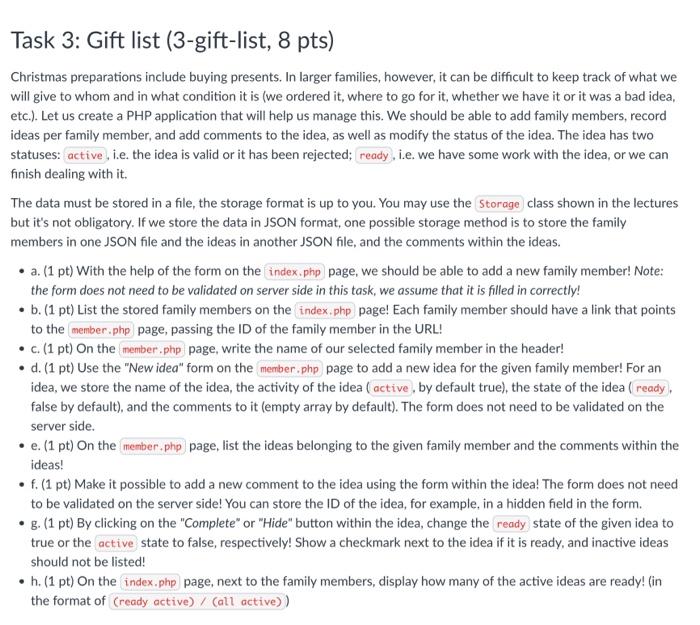
Christmas preparations include buying presents. In larger families, however, it can be difficult to keep track of what we will give to whom and in what condition it is (we ordered it, where to go for it, whether we have it or it was a bad idea, etc.). Let us create a PHP application that will help us manage this. We should be able to add family members, record ideas per family member, and add comments to the idea, as well as modify the status of the idea. The idea has two statuses: i.e. the idea is valid or it has been rejected; , i.e. we have some work with the idea, or we can finish dealing with it. The data must be stored in a file, the storage format is up to you. You may use the class shown in the lectures but it's not obligatory. If we store the data in JSON format, one possible storage method is to store the family members in one JSON file and the ideas in another JSON file, and the comments within the ideas. - a. (1 pt) With the help of the form on the page, we should be able to add a new family member! Note: the form does not need to be validated on server side in this task, we assume that it is filled in correctly! - b. (1 pt) List the stored family members on the page! Each family member should have a link that points to the page, passing the ID of the family member in the URL! - c. (1 pt) On the page, write the name of our selected family member in the header! - d. (1 pt) Use the "New idea" form on the page to add a new idea for the given family member! For an idea, we store the name of the idea, the activity of the idea I_ by default true), the state of the idea (ready. false by default), and the comments to it (empty array by default). The form does not need to be validated on the server side. - e. (1 pt) On the page, list the ideas belonging to the given family member and the comments within the ideas! - f. (1 pt) Make it possible to add a new comment to the idea using the form within the idea! The form does not need to be validated on the server side! You can store the ID of the idea, for example, in a hidden field in the form. - g. (1 pt) By clicking on the "Complete" or "Hide" button within the idea, change the state of the given idea to true or the state to false, respectively! Show a checkmark next to the idea if it is ready, and inactive ideas should not be listed! - h. (1 pt) On the page, next to the family members, display how many of the active ideas are ready! (in the format of
Step by Step Solution
There are 3 Steps involved in it

Get step-by-step solutions from verified subject matter experts
 Study Help