







Question: -Use a conditional format to highlight the Amount over $300 with Light Red Fill a Dark Red Text. 0. Add a Total row to
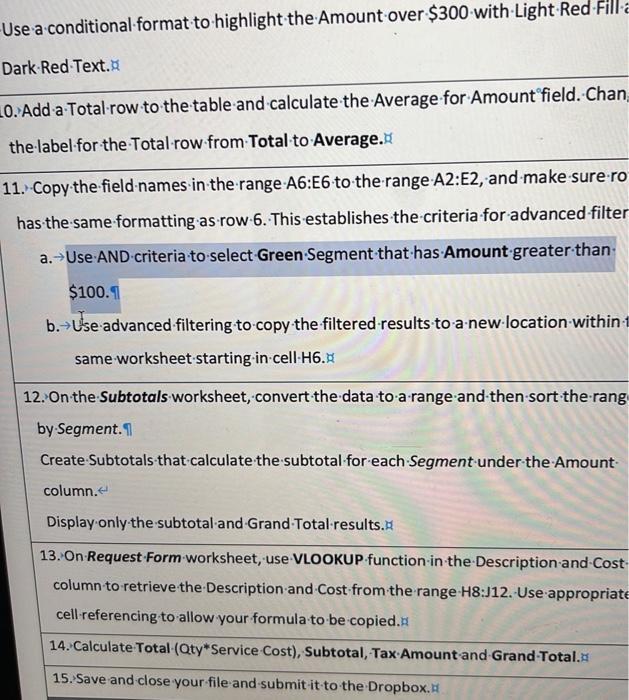
-Use a conditional format to highlight the Amount over $300 with Light Red Fill a Dark Red Text. 0. Add a Total row to the table and calculate the Average for Amount field. Chan the label for the Total row from Total to Average. 11. Copy the field names in the range A6:E6 to the range A2:E2, and make sure ro has the same formatting as row 6. This establishes the criteria for advanced filter a. Use AND criteria to select Green Segment that has Amount greater than $100.1 b. Use advanced filtering to copy the filtered results to a new location within same worksheet starting-in-cell-H6. 12. On the Subtotals worksheet, convert the data to a range and then sort the rang by Segment. Create Subtotals that calculate the subtotal for each Segment under the Amount- column. < Display only the subtotal and Grand Total results. 13. On Request Form worksheet, use VLOOKUP function in the Description and Cost column to retrieve the Description and Cost from the range H8:J12. Use appropriate cell-referencing to allow your formula to be copied. 14. Calculate Total (Qty Service Cost), Subtotal, Tax Amount-and-Grand-Total. 15. Save and close your file and submit it to the Dropbox.
Step by Step Solution
There are 3 Steps involved in it

Get step-by-step solutions from verified subject matter experts
 Study Help