







Question: Use any Layout Manager and code the events for FA4. The event is triggered by the Button (Submit) to display a message saying Hello Last
Use any Layout Manager and code the events for FA4. The event is triggered by the Button (Submit) to display a message saying "Hello Last Name". You may use the command prompt or any GUI component to display the "Hello Last Name" . You may use the given code (as seen in the image) as an initial template and save the final code as Photon_Lastname_FA4.java
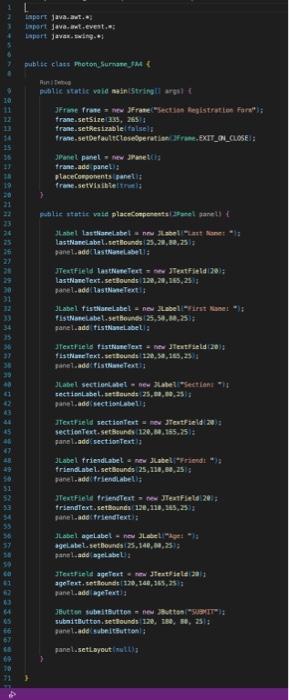
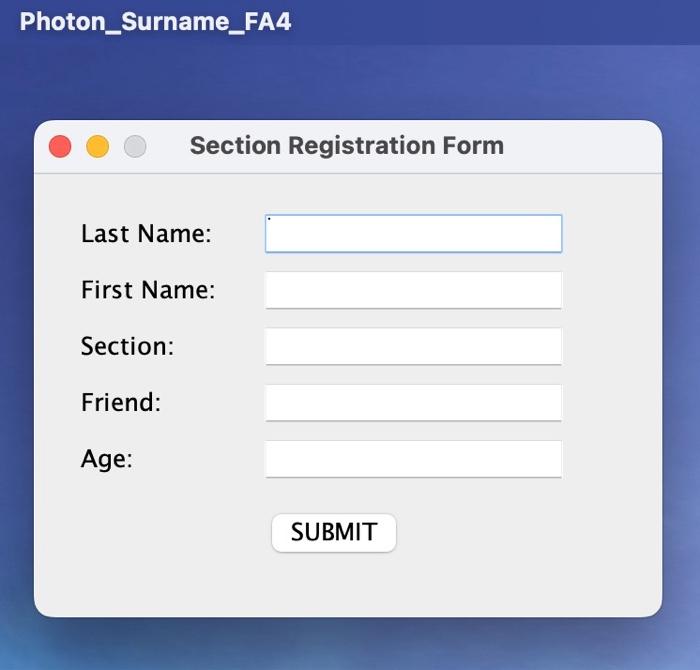
You may use the initial code template in the image or just create a new one as long as the code displays the same information for the Section Registration Form using Swing or AWT.
Then, use any layout manager to code an event triggered by the Button (Submit) to display a message saying "Hello Last Name". You may use the command prompt or any GUI component to display the "Hello Last Name" . Save the file as Photon_Lastname_FA4.java
tapert java.aet, tapert java- ent-evest, = : oubltic clatt Fioten_Sumane tat I Ain I Petuse trane.set5izel3as, 25314 trane-sethersableitalsely JPanet pavel a tatw Jranethis trane-add panel. : ptaceConopents panelif frene.setvioibitithieif Habet Lastianelabel a nrw fubelinat kaner * is paneliadd 1astuatelabeli: lastfane Text, sethounds, 120,20,155,24ig panel-add ' Ias imene Texti: Jtabel. fistuarelabel a nex Iabeli-First maset =17 pane Ladd tis thisselabelig fisthigrefekt. senteundt 120,30, 159, 25)/ faneladedifstameteatil panel,add isctiontebelis sectionText, setbsunes. 180, 19,135,25/2 panel. add pectiontext II JLabel frieddabel a rew Jubel Firimedt of triendabeli setbsunts :25, 110, B4, is: panet-add frienalabeli; trienatext, seteounda 28,110,14323y panei-gad triciendexti : J abel agelabel - new JLabeti "get *ig pane thaddi apeLabe Lit agetext, nestounde 120,198,758,25 if pane Lade baetent? pane t.add sabritsutionl; pane lasetilayout insithy Photon_Surname_FA4 Section Registration Form Last Name: First Name: Section: Friend: Age: SUBMIT
Step by Step Solution
There are 3 Steps involved in it

Get step-by-step solutions from verified subject matter experts
 Study Help