







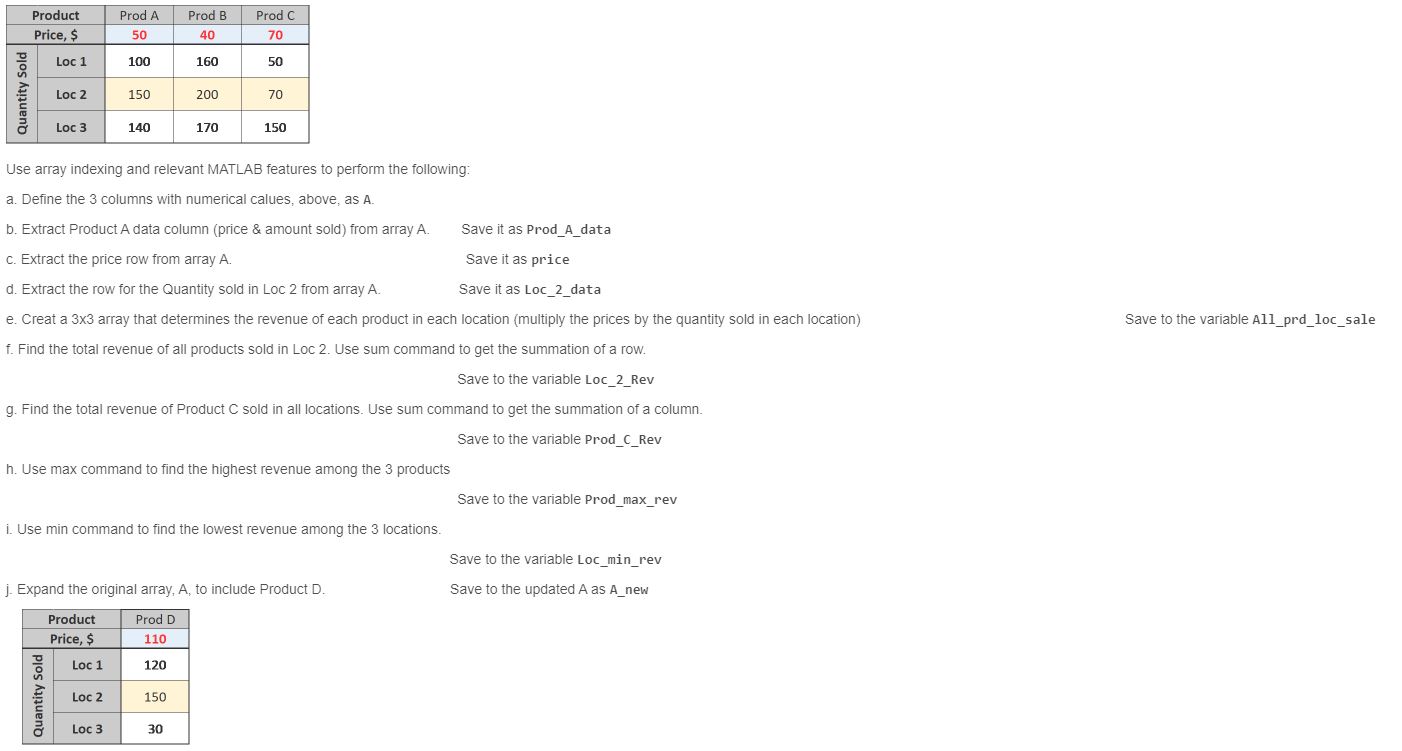
Question: Use array indexing and relevant MATLAB features to perform the following: a . Define the 3 columns with numerical calues, above, as A . b
Use array indexing and relevant MATLAB features to perform the following:
a Define the columns with numerical calues, above, as A
b Extract Product A data column price & amount sold from array A
Save it as ProdAdata
c Extract the price row from array
Save it as price
d Extract the row for the Quantity sold in Loc from array A
Save it as Locdata
e Creat a array that determines the revenue of each product in each location multiply the prices by the quantity sold in each location
Save to the variable Allprdlocsale
f Find the total revenue of all products sold in Loc Use sum command to get the summation of a row.
Save to the variable LocRev
g Find the total revenue of Product sold in all locations. Use sum command to get the summation of a column.
Save to the variable ProdCRev
h Use max command to find the highest revenue among the products
Save to the variable Prodmaxrev
i Use min command to find the lowest revenue among the locations.
Save to the variable Locminrev
j Expand the original array, to include Product
Save to the updated as new
Step by Step Solution
There are 3 Steps involved in it
1 Expert Approved Answer
Step: 1 Unlock

Question Has Been Solved by an Expert!
Get step-by-step solutions from verified subject matter experts
Step: 2 Unlock
Step: 3 Unlock
 Study Help