







Question: use C program to create these two functions: print integer(int n, int radix, char prefix) with return type : void Print the number n to
use C program to create these two functions:
print integer(int n, int radix, char prefix) with return type: void
-
Print the number n to the console (stdout) in the specified number base (radix), with the prefix immediately before the first digit. radix may be any integer between 2 and 36 (inclusive). n may be any int. For values of radix above 10, use lowercase letters to represent the digits following 9. print_integer() should not print a newline ('n' or 'r'). Examples:
- print integer(768336, 10, "") should print 768336 because the number seven-hundred sixty-eight thousand three-hundred thirty-six would be written as 768336 in base 10 (decimal).
- print integer(-768336, 10, "") should print -768336.
- print integer(-768336, 10, "$") should print -$768336. Notice that the prefix ("$") comes after the "-" and before the first digit.
- print integer(768336, 16, "") should print bb950 because the number seven-hundred sixty-eight thousand three-hundred thirty-six would be written as bb950 in base 16 (hexadecimal).
- print integer(768336, 16, "0x") should print 0xbb950. The 0x prefix is added only because it is passed as an argument to print_integer().
- print integer(-768336, 16, "0x") should print -0xbb950.
- print integer(-768336, 2, "0b") should print -0b10111011100101010000.
- print integer(768, 10, ""); print integer(-336, 10, "") should print "768336".
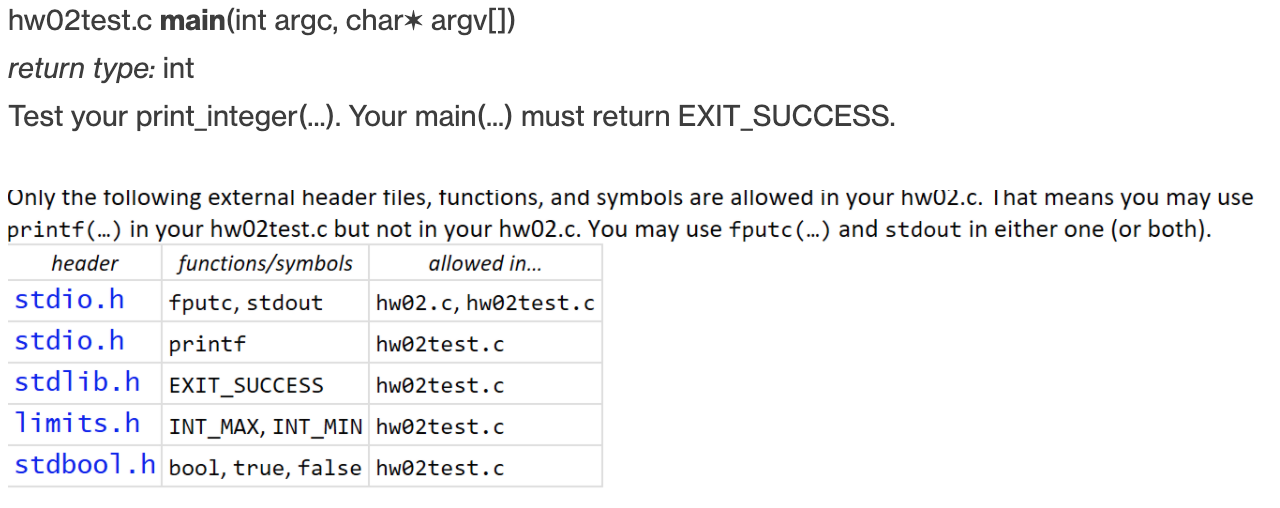
hwo2test.c main(int argc, char* argv[]) return type: int Test your print_integer(...). Your main (...) must return EXIT_SUCCESS. Only the following external header files, functions, and symbols are allowed in your hw02.c. That means you may use printf(...) in your hwo2test.c but not in your hw02.c. You may use fputc(...) and stdout in either one (or both). header functions/symbols allowed in... stdio.h fputc, stdout hwo2.c, hwo2test.c stdio.h printf hwo2test.c stdlib.h EXIT SUCCESS hwo2test.c limits. h INT MAX, INT MIN hwo2test.c stdbool.h bool, true, false hwo2test.c
Step by Step Solution
There are 3 Steps involved in it

Get step-by-step solutions from verified subject matter experts
 Study Help