







Question: use excel after complete take a picture this is a engineering problem solving question AalbCeDdE Aalibccbdb Normal No Soucing Heading ENGT 105 Assignment 1. Develop
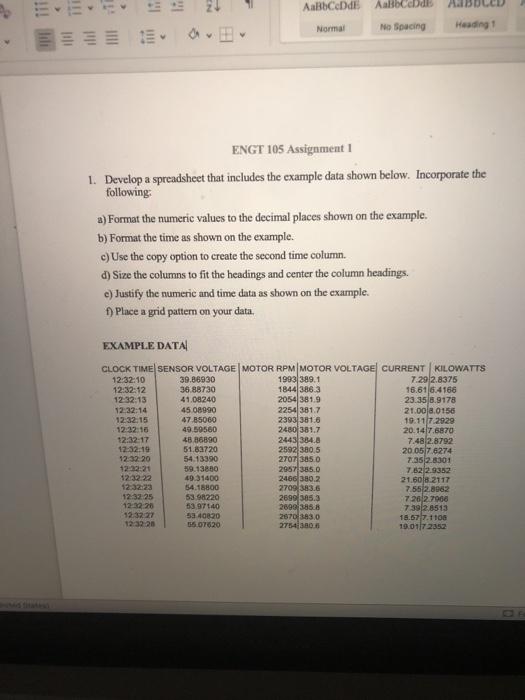
AalbCeDdE Aalibccbdb Normal No Soucing Heading ENGT 105 Assignment 1. Develop a spreadsheet that includes the example data shown below. Incorporate the following: a) Format the numeric values to the decimal places shown on the example. b) Format the time as shown on the example. c) Use the copy option to create the second time column. d) Size the columns to fit the headings and center the column headings. e) Justify the numeric and time data as shown on the example. 1) Place a grid pattern on your data. EXAMPLE DATA CLOCK TIME SENSOR VOLTAGE MOTOR RPM MOTOR VOLTAGE CURRENT KILOWATTS 12:32:10 39.86930 1993389.1 7.29 2.8375 12:32:12 36.88730 1844 386.3 16.616.4166 12:32:13 41.08240 2054381.9 23.35 8.9178 12:22:14 45 08990 2254 3817 21.00 3.0156 1232.15 47.85060 2393 381.6 19.11172929 12:32:10 49.59560 2480 381.7 20.147.6870 12:32:17 48 86890 2443 384.8 7.48 2.8792 12:32:19 51.83720 2592 380,5 20.057.6274 12:32. 20 54.13390 2707 3850 7.35 2.8301 39.13860 2957385.0 7.62 2.9352 1232.22 49.31400 2466 380.2 21.506.2117 12:32:23 54.15800 2709 383.6 7.552.8982 12:32:25 53 98220 2699 585.3 7.26 27900 12 32:20 53 97.40 2009 385.8 7.39 2.8513 123227 5240820 2870 33.0 18.577.1100 55 07620 275430 19.0117 2352
Step by Step Solution
There are 3 Steps involved in it

Get step-by-step solutions from verified subject matter experts
 Study Help