







Question: Use Excel VBA especially on the REMARK part Evaluate MG(Midterm Grade) if PASS or FAIL from the ff criteria: (FILENAME: 9_MidtermGrade) 50% Quiz Average (4
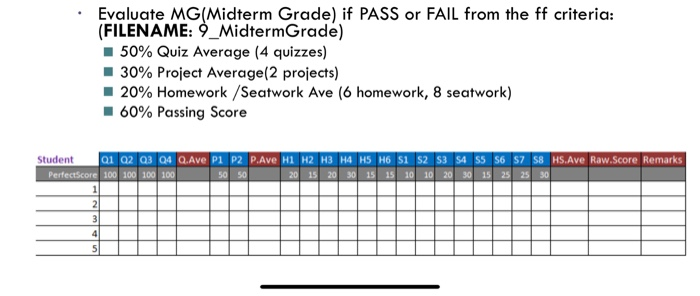
Evaluate MG(Midterm Grade) if PASS or FAIL from the ff criteria: (FILENAME: 9_MidtermGrade) 50% Quiz Average (4 quizzes) 30% Project Average(2 projects) 20% Homework /seatwork Ave (6 homework, 8 seatwork) -60% Passing Score Student 01 02 Q3 04 QAve P1 P2 P.Ave H1 H2 H3 H4 H5 H6 S1 S2 S3 S4 S5 S6 57 S8 HS.Ave Raw.Score Remarks 50 50 20 15 20 30 15 15 10 10 20 30 15 25 25 30 Evaluate MG(Midterm Grade) if PASS or FAIL from the ff criteria: (FILENAME: 9_MidtermGrade) 50% Quiz Average (4 quizzes) 30% Project Average(2 projects) 20% Homework /seatwork Ave (6 homework, 8 seatwork) -60% Passing Score Student 01 02 Q3 04 QAve P1 P2 P.Ave H1 H2 H3 H4 H5 H6 S1 S2 S3 S4 S5 S6 57 S8 HS.Ave Raw.Score Remarks 50 50 20 15 20 30 15 15 10 10 20 30 15 25 25 30
Step by Step Solution
There are 3 Steps involved in it

Get step-by-step solutions from verified subject matter experts
 Study Help