







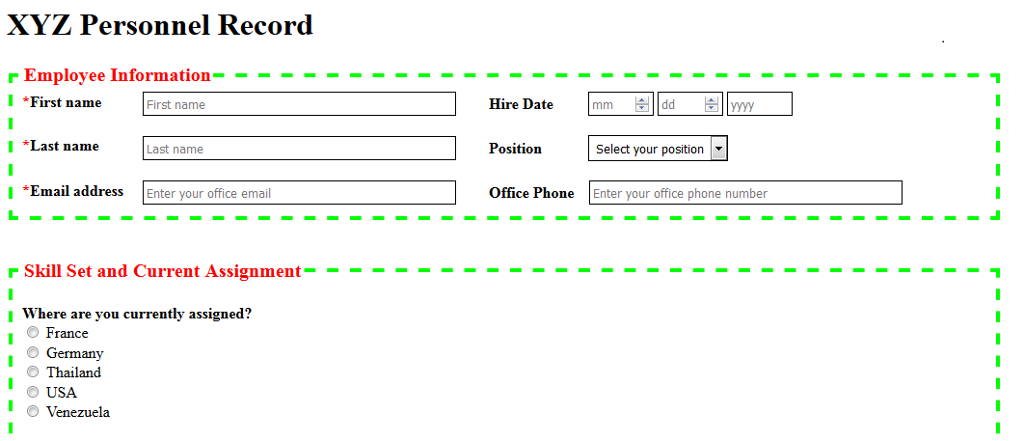
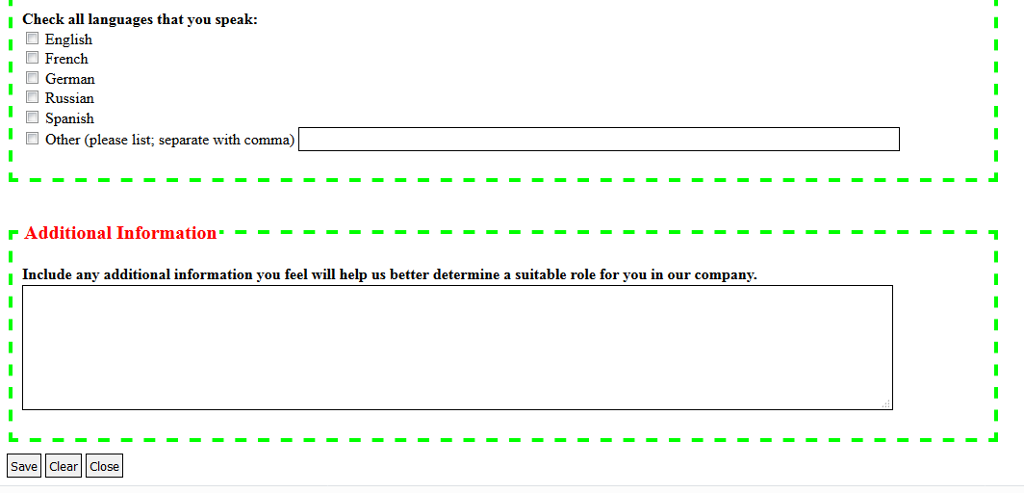
Question: Use HTML to create the template (one form) as illustrated in the screen print below, and Style your form with CSS to render as shownplacement,
Use HTML to create the template (one form) as illustrated in the screen print below, and Style your form with CSS to render as shownplacement, colors, border style, margins, etc.
--Use the "label for" option to provide text box labels
--Incorporate a placeholder to render the default comments in the name, email, hire date, etc. boxes
--Add a * (use a character code for the *) to the name and email address to indicate required fields.
--Use a number type for the month and day and allow numbers between 1-12 for month and 1-31 for day.
--The combo box for position should allow only one selection from the options: Manager, Supervisor, Sales Rep, Clerk
--Find (and use) appropriate graphics for the three buttons instead of the text.
--Since the template is to be distributed to a variety of companies, use JS to
--let the user provide the title (for illustrative purposes, shown as "XYZ Personnel Record")
--let the user decide the group type (for illustrative purposes, shown as Employee Information)
--user should provide type (i.e., employee, applicant, project member); JS should add the word Information
--apply a light beige background color to the form
--below the Close button, add the statement: Rendered: and the current date the form is being rendered
--provide the user a message that says Thank you for using our template.
I am currently using Notepad ++ to do this assignment. Any help would be appreciated!
Step by Step Solution
There are 3 Steps involved in it

Get step-by-step solutions from verified subject matter experts
 Study Help