







Question: use java Defining Multiple Classes We want to develop a minimal, simple object-oriented application for a university. A university has three major entities: Students, Faculties
use java
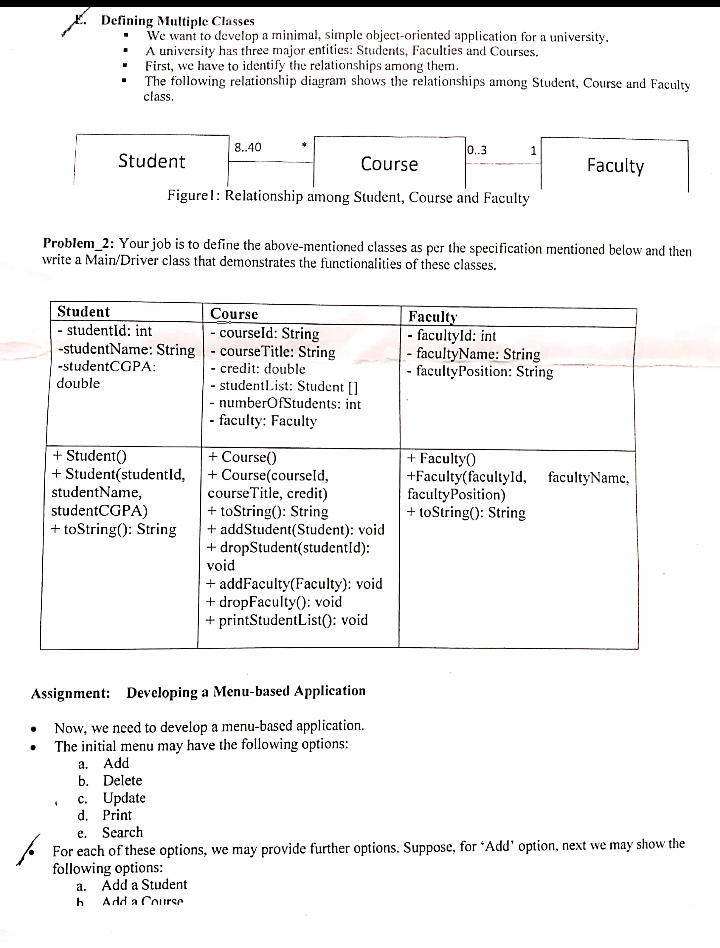
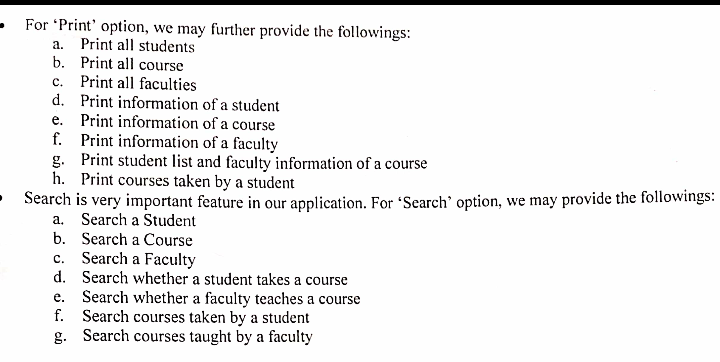
Defining Multiple Classes We want to develop a minimal, simple object-oriented application for a university. A university has three major entities: Students, Faculties and Courses. First, we have to identify the relationships among them. The following relationship diagram shows the relationships among Student, Course and Faculty class. 8..40 0..3 1 Student Course Faculty Figurel: Relationship among Student, Course and Faculty Problem_2: Your job is to define the above-mentioned classes as per the specification mentioned below and then write a Main/Driver class that demonstrates the functionalities of these classes. Student Course - studentId: int - courseld: String -studentName: String - course Title: String -studentCGPA: - credit: double double - studentList: Student (1 - numberOfStudents: int - faculty: Faculty Faculty - facultyld: int - facultyName: String - facultyPosition: String + Student + Student(studentld, studentName, studentCGPA) + toString(): String + Faculty +Faculty(facultyld, facultyName, facultyPosition) + toString(): String + Course) + Course(courseld, courseTitle, credit) + toString(): String + addStudent(Student): void + dropStudent(studentId): void + addFaculty(Faculty): void + dropFacultyo: void + printStudentList(): void a. Assignment: Developing a Menu-based Application Now, we need to develop a menu-based application. The initial menu may have the following options: Add b. Delete c. Update d. Print Search For each of these options, we may provide further options. Suppose, for 'Add' option, next we may show the following options: a. Add a Student Add a Chuirer e. h a. For Print' option, we may further provide the followings: Print all students b. Print all course Print all faculties d. Print information of a student e. Print information of a course f. Print information of a faculty g. Print student list and faculty information of a course h. Print courses taken by a student Search is very important feature in our application. For Search' option, we may provide the followings: a. Search a Student b. Search a Course c. Search a Faculty d. Search whether a student takes a course Search whether a faculty teaches a course f. Search courses taken by a student g. Search courses taught by a faculty e. Defining Multiple Classes We want to develop a minimal, simple object-oriented application for a university. A university has three major entities: Students, Faculties and Courses. First, we have to identify the relationships among them. The following relationship diagram shows the relationships among Student, Course and Faculty class. 8..40 0..3 1 Student Course Faculty Figurel: Relationship among Student, Course and Faculty Problem_2: Your job is to define the above-mentioned classes as per the specification mentioned below and then write a Main/Driver class that demonstrates the functionalities of these classes. Student Course - studentId: int - courseld: String -studentName: String - course Title: String -studentCGPA: - credit: double double - studentList: Student (1 - numberOfStudents: int - faculty: Faculty Faculty - facultyld: int - facultyName: String - facultyPosition: String + Student + Student(studentld, studentName, studentCGPA) + toString(): String + Faculty +Faculty(facultyld, facultyName, facultyPosition) + toString(): String + Course) + Course(courseld, courseTitle, credit) + toString(): String + addStudent(Student): void + dropStudent(studentId): void + addFaculty(Faculty): void + dropFacultyo: void + printStudentList(): void a. Assignment: Developing a Menu-based Application Now, we need to develop a menu-based application. The initial menu may have the following options: Add b. Delete c. Update d. Print Search For each of these options, we may provide further options. Suppose, for 'Add' option, next we may show the following options: a. Add a Student Add a Chuirer e. h a. For Print' option, we may further provide the followings: Print all students b. Print all course Print all faculties d. Print information of a student e. Print information of a course f. Print information of a faculty g. Print student list and faculty information of a course h. Print courses taken by a student Search is very important feature in our application. For Search' option, we may provide the followings: a. Search a Student b. Search a Course c. Search a Faculty d. Search whether a student takes a course Search whether a faculty teaches a course f. Search courses taken by a student g. Search courses taught by a faculty e
Step by Step Solution
There are 3 Steps involved in it

Get step-by-step solutions from verified subject matter experts
 Study Help