







Question: Use JAVA. Please create GUI by JFrame Form in Netbeans and code from there. Thank you for your help. I will give a thumb up
Use JAVA. Please create GUI by JFrame Form in Netbeans and code from there. Thank you for your help. I will give a thumb up for correct answer.
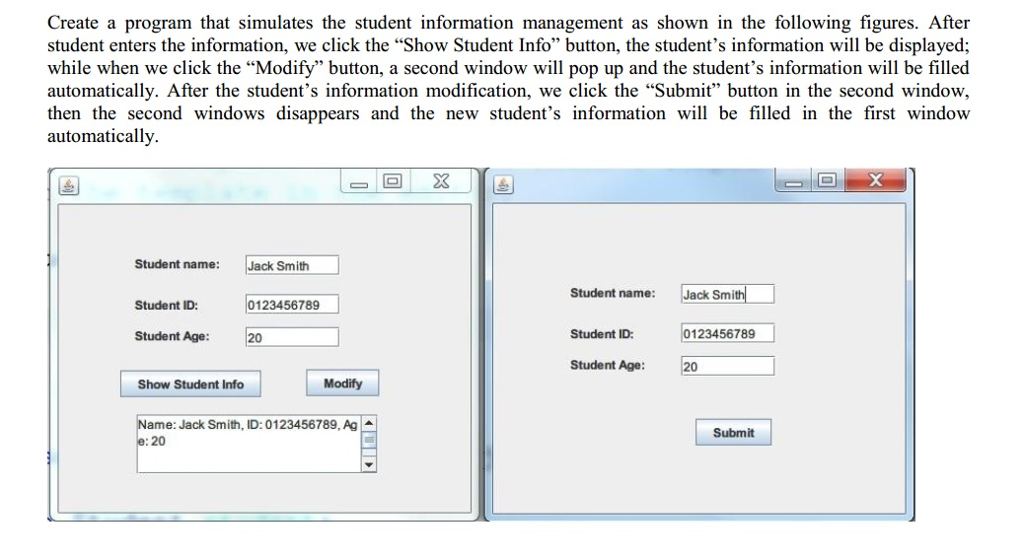
Create a program that simulates the student information management as shown in the following figures. After student enters the information, we click the "Show Student Info" button, the student's information will be displayed; while when we click the "Modify" button, a second window will pop up and the student's information will be filled automatically. After the student's information modification, we click the "Submit" button in the second window then the second windows disappears and the new student's information wil be filled in the first window automatically. Student name: Jack Smith Student name: Jack Smith Student ID: 0123456789 Student Age: 20 Student ID 0123456789 Student Age: 20 Show Student Info Modify Name: Jack Smith, ID: 0123456789, Ag Submit 20
Step by Step Solution
There are 3 Steps involved in it

Get step-by-step solutions from verified subject matter experts
 Study Help