







Question: Use LabVIEW Software for this plz... Use La In the following exercises, you will create a VI that compares an input signal with a user
Use LabVIEW Software for this plz...
Use La
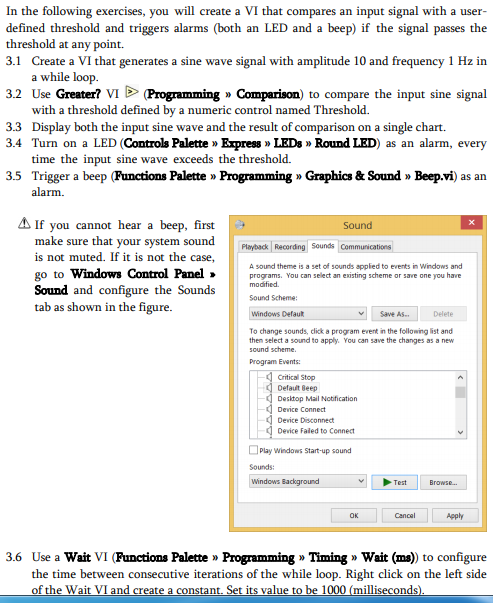
In the following exercises, you will create a VI that compares an input signal with a user defined threshold and triggers alarms (both an LED and a beep) if the signal passes the threshold at any point. 3.1 Create a VI that generates a sine wave signal with amplitude 10 and frequency 1 Hz in a while loop 3.2 Use Greater? VI D (Programming Comparison) to compare the input sine signal with a threshold defined by a numeric control named Threshold. Display both the input sine wave and the result of comparison on a single chart. Turn on a LED (Controls Palette Erpress LEDs Round LED) as an alarm, every time the input sine wave exceeds the threshold. Trigger a beep (Functions Palette Programming Graphics & Sound Beep.vi) as an alarm. 3.3 3.4 3.5 If you cannot hear a beep, first make sure that your system sound is not muted. If it is not the case go to Windows Control Panel programs. You can select an existing scheme or save one you have Sound and configure the Soun s tab as shown in the figure. Sound Playback Recordng Sounds A sound theme is a set of sounds applied to events in Windows and Sound Scheme: Windows Defaut vSave As Delete To change sounds, click a program event in the following list and then select a sound to apply. You can save the changes as a new sound scheme. Program Events: Critical Stop Defaut Beep Desktop Mail Nobfication Device Connect Device Dsconnec Device Faled to Connect Play Windows Start-up sound Sounds: Windows Background Browse Apply 3.6 Use a Wait VI (Functions Palette Programming Timing Wait (ms)) to configure the time between consecutive iterations of the while loop. Right click on the left side of the Wait VI and create a constant. Set its value to be 1000 (milliseconds In the following exercises, you will create a VI that compares an input signal with a user defined threshold and triggers alarms (both an LED and a beep) if the signal passes the threshold at any point. 3.1 Create a VI that generates a sine wave signal with amplitude 10 and frequency 1 Hz in a while loop 3.2 Use Greater? VI D (Programming Comparison) to compare the input sine signal with a threshold defined by a numeric control named Threshold. Display both the input sine wave and the result of comparison on a single chart. Turn on a LED (Controls Palette Erpress LEDs Round LED) as an alarm, every time the input sine wave exceeds the threshold. Trigger a beep (Functions Palette Programming Graphics & Sound Beep.vi) as an alarm. 3.3 3.4 3.5 If you cannot hear a beep, first make sure that your system sound is not muted. If it is not the case go to Windows Control Panel programs. You can select an existing scheme or save one you have Sound and configure the Soun s tab as shown in the figure. Sound Playback Recordng Sounds A sound theme is a set of sounds applied to events in Windows and Sound Scheme: Windows Defaut vSave As Delete To change sounds, click a program event in the following list and then select a sound to apply. You can save the changes as a new sound scheme. Program Events: Critical Stop Defaut Beep Desktop Mail Nobfication Device Connect Device Dsconnec Device Faled to Connect Play Windows Start-up sound Sounds: Windows Background Browse Apply 3.6 Use a Wait VI (Functions Palette Programming Timing Wait (ms)) to configure the time between consecutive iterations of the while loop. Right click on the left side of the Wait VI and create a constant. Set its value to be 1000 (milliseconds
Step by Step Solution
There are 3 Steps involved in it

Get step-by-step solutions from verified subject matter experts
 Study Help