







Question: Use Matlab Simulink to do your project Steps: 1) 2) Compress your sample values using A-law or Mu-law compressor and display the new 3) Using
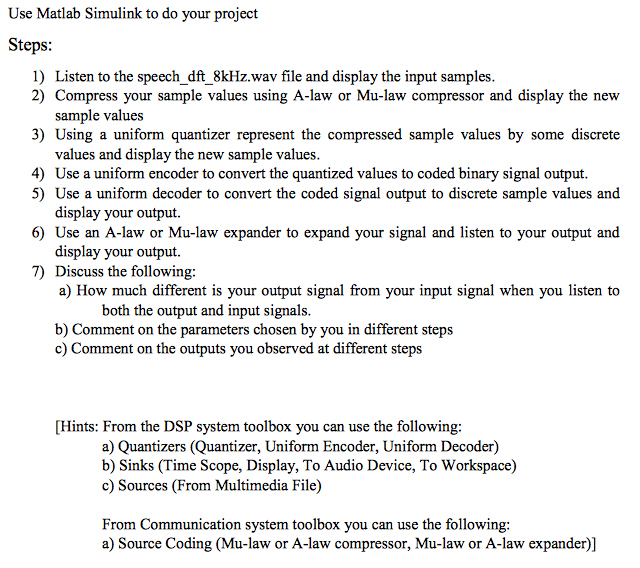
Use Matlab Simulink to do your project Steps: 1) 2) Compress your sample values using A-law or Mu-law compressor and display the new 3) Using a uniform quantizer represent the compressed sample values by some discrete 4) Listen to the speech _dft 8kHz.wav file and display the input samples. sample values values and display the new sample values. 5) Use a uniform decoder to convert the coded signal output to discrete sample values and 6) Use an A-law or Mu-law expander to expand your signal and listen to your output and 7) Discuss the following: Use a uniform encoder to convert the quantized values to coded binary signal output. display your output. display your output. a) How much different is your output signal from your input signal when you listen to b) Comment on the parameters chosen by you in different steps both the output and input signals. Comment on the outputs you observed at different steps [Hints: From the DSP system toolbox you can use the following: a) Quantizers (Quantizer, Uniform Encoder, Uniform Decoder) b) Sinks (Time Scope, Display, To Audio Device, To Workspace) c) Sources (From Multimedia File) From Communication system toolbox you can use the following: a) Source Coding (Mu-law or A-law compressor, Mu-law or A-law expander)] Use Matlab Simulink to do your project Steps: 1) 2) Compress your sample values using A-law or Mu-law compressor and display the new 3) Using a uniform quantizer represent the compressed sample values by some discrete 4) Listen to the speech _dft 8kHz.wav file and display the input samples. sample values values and display the new sample values. 5) Use a uniform decoder to convert the coded signal output to discrete sample values and 6) Use an A-law or Mu-law expander to expand your signal and listen to your output and 7) Discuss the following: Use a uniform encoder to convert the quantized values to coded binary signal output. display your output. display your output. a) How much different is your output signal from your input signal when you listen to b) Comment on the parameters chosen by you in different steps both the output and input signals. Comment on the outputs you observed at different steps [Hints: From the DSP system toolbox you can use the following: a) Quantizers (Quantizer, Uniform Encoder, Uniform Decoder) b) Sinks (Time Scope, Display, To Audio Device, To Workspace) c) Sources (From Multimedia File) From Communication system toolbox you can use the following: a) Source Coding (Mu-law or A-law compressor, Mu-law or A-law expander)]
Step by Step Solution
There are 3 Steps involved in it

Get step-by-step solutions from verified subject matter experts
 Study Help