







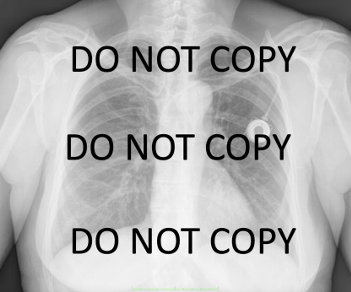
Question: Use MATLAB to: a . Reconstruct the following image from the raw data posted on blackboard ( you first need to unzip the raw data
Use MATLAB to: a Reconstruct the following image from the raw data posted on blackboard you first need to unzip the raw data text file The raw data includes xyz coordinates of each pixel in addition to the grayscale value a measure of brightnessdarkness of each pixel with lower values indicating darker pixel
Here is the data given:DO NOT COPY
DO NOT COPY
DO NOT COPY
Here is the code I have:
data textscanChestXrayRawData.txtffff 'Delimiter', ;
Extract x y z coordinates and grayscale values
x data;
y data;
z data; If needed, otherwise ignore
grayscale data;
Determine the size of the image
maxX intmaxx;
maxY intmaxy;
Normalize coordinates to fit into the pixel grid
x roundx minx;
y roundy miny;
Initialize the image matrix
imageMatrix zerosmaxY maxX;
Populate the image matrix with grayscale values
for i :lengthx
imageMatrixyi xi grayscalei;
end
Display the image
figure;
imshowimageMatrix;
titleReconstructed Image from Raw Data';
colormapgray; Use grayscale colormap
colorbar;
However, I only get the color bar and no image. How do I fix this?
Step by Step Solution
There are 3 Steps involved in it
1 Expert Approved Answer
Step: 1 Unlock

Question Has Been Solved by an Expert!
Get step-by-step solutions from verified subject matter experts
Step: 2 Unlock
Step: 3 Unlock
 Study Help