







Question: Use matlab to implement Hermite interpolation Write a MATLAB function to implement the Hermite interpolation in Algorithm 3.3. Note that the index should run from
Use matlab to implement Hermite interpolation
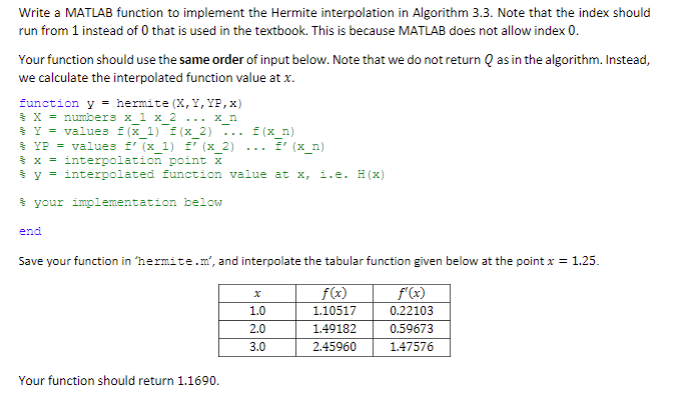
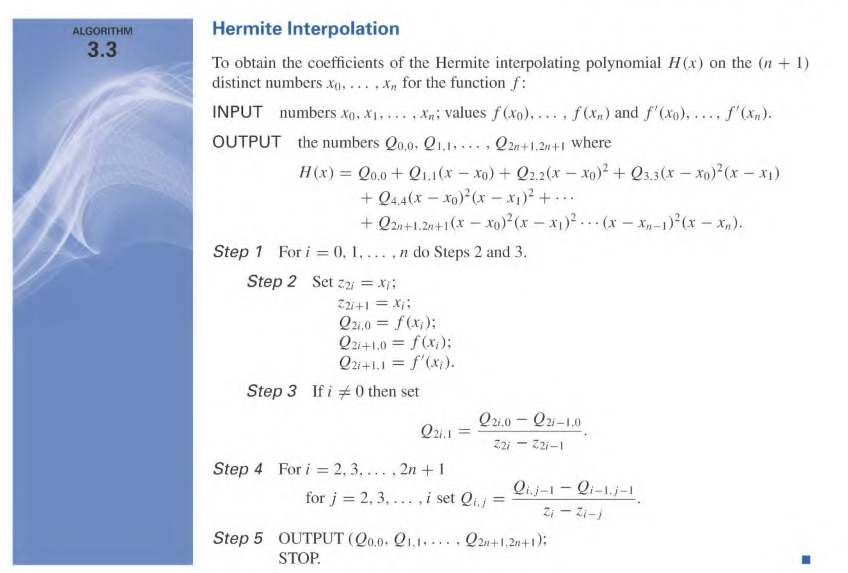
Write a MATLAB function to implement the Hermite interpolation in Algorithm 3.3. Note that the index should run from 1 instead of 0 that is used in the textbook. This is because MATLAB does not allow index 0 Your function should use the same order of input below. Note that we do not return Q as in the algorithm. Instead, we calculate the interpolated function value at x. function y hermite (X,Y,YF,x) = X=number3 x 1 x 2 x n %-= value3 f(x 1) f(x 2) f(x n) x-interpolation, (x2) f"(x y nterpolated function value at x, i.e. H(x) x 2) .. x n) x = interpolation point X your implementation below end Save your function in 'hermite.n', and interpolate the tabular function given below at the point x 1.25. f(r) 110517 f (x) 0.22103 0.59673 147576 1.0 2.0 2.45960 Your function should return 1.1690. ALGORITHM Hermite Interpolation 3.3 To obtain the coefficients of the Hermite interpolating polynomial H(x) on the (n 1) distinct numbers xo, . xn for the function f: INPUT numbers xo, xi. . . .n; values f(xo OUTPUT the numbers Q0.0. Qi.1 , f() and f(xo), . .. , f(n) where + Q44(x - xo)-(r -xi2... Step 1 For i = 0, 1, , n do Steps 2 and 3 Step 2 Set z2i = Xi; Q21.0 = f(xi); Q2i +1.0 = f(x); Q2i+1,1 = f,(xi) 0 then set Step 3 If i 2i.1 32i 22i- Step 4 Fori 2, 3, ,2n 1 Qij-1--1.j-I for j = 2.3. . . . ,i set Qi.j Step 5 OUTPUT (Qo,o. Q1,1.. . Q2n+1.2+ STOP
Step by Step Solution
There are 3 Steps involved in it

Get step-by-step solutions from verified subject matter experts
 Study Help