







Question: Use MATLAB to read an audio file. Design a low pass FIR filter with fi= fm where fm is maximum frequency component in the
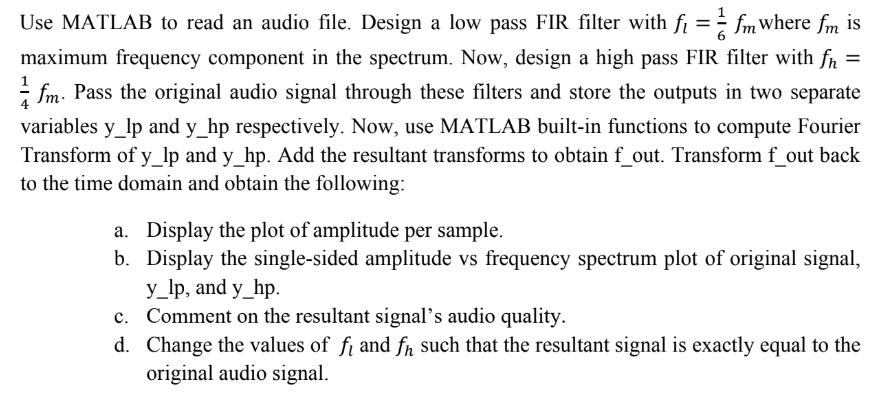
Use MATLAB to read an audio file. Design a low pass FIR filter with fi= fm where fm is maximum frequency component in the spectrum. Now, design a high pass FIR filter with fn = fm. Pass the original audio signal through these filters and store the outputs in two separate variables y_lp and y_hp respectively. Now, use MATLAB built-in functions to compute Fourier Transform of y_lp and y_hp. Add the resultant transforms to obtain f_out. Transform f_out back to the time domain and obtain the following: a. Display the plot of amplitude per sample. b. Display the single-sided amplitude vs frequency spectrum plot of original signal, y_lp, and y_hp. c. Comment on the resultant signal's audio quality. d. Change the values of fi and fn such that the resultant signal is exactly equal to the original audio signal.
Step by Step Solution
There are 3 Steps involved in it
To read an audio file in MATLAB you can use the audioread function For example if the file is named audiowav you can read it using the following code ... View full answer

Get step-by-step solutions from verified subject matter experts
 Study Help