







Question: use Microsoft excel to complete the problem take a picture after you're done thank you 3. Develop a spreadsheet using the data shown below to
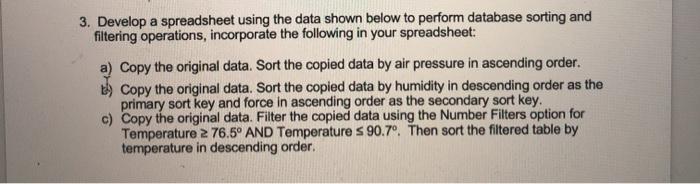
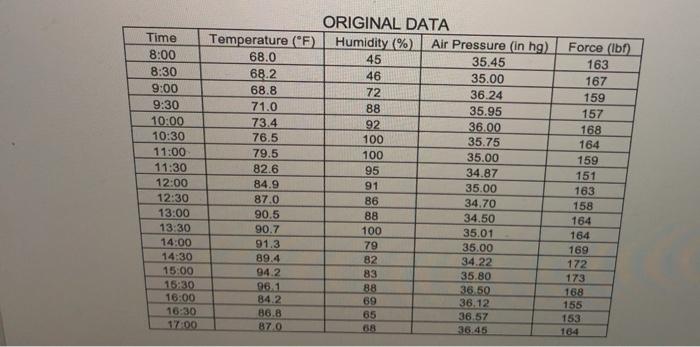
3. Develop a spreadsheet using the data shown below to perform database sorting and filtering operations, incorporate the following in your spreadsheet: a) Copy the original data. Sort the copied data by air pressure in ascending order. th) Copy the original data. Sort the copied data by humidity in descending order as the primary sort key and force in ascending order as the secondary sort key. c) Copy the original data. Filter the copied data using the Number Filters option for Temperature 2 76.5 AND Temperature s 90.7. Then sort the filtered table by temperature in descending order. Time 8:00 8:30 9:00 9:30 10:00 10:30 11:00 11:30 12:00 12:30 13:00 13:30 14:00 14:30 15:00 16:30 16:00 16:30 17:00 ORIGINAL DATA Temperature (F) Humidity (%) Air Pressure (in hg) 68.0 45 35.45 68.2 46 35.00 68.8 72 36.24 71.0 88 35.95 73.4 92 36.00 76.5 100 35.75 79.5 100 35.00 82.6 95 34.87 84.9 91 35.00 87.0 86 34.70 90.5 88 34.50 90.7 100 35.01 91.3 79 35.00 89.4 82 34.22 94.2 83 35.80 96.1 88 36 50 84.2 69 36.12 86.8 65 36.57 870 68 36.45 Force (lb) 163 167 159 157 168 164 159 151 163 158 164 164 169 172 173 168 155 153 164
Step by Step Solution
There are 3 Steps involved in it

Get step-by-step solutions from verified subject matter experts
 Study Help