







Question: Use microsoft excel VBA.. Create a Voting System...DeveloperControls: 2 Candidates for President ,2 Candidates for Vice President,4 Candidates for Mayor(4) Excel cells: Tabulation Result see
Use microsoft excel VBA..
Create a Voting System...DeveloperControls: 2 Candidates for President ,2 Candidates for Vice President,4 Candidates for Mayor(4)
Excel cells: Tabulation Result
see the photo
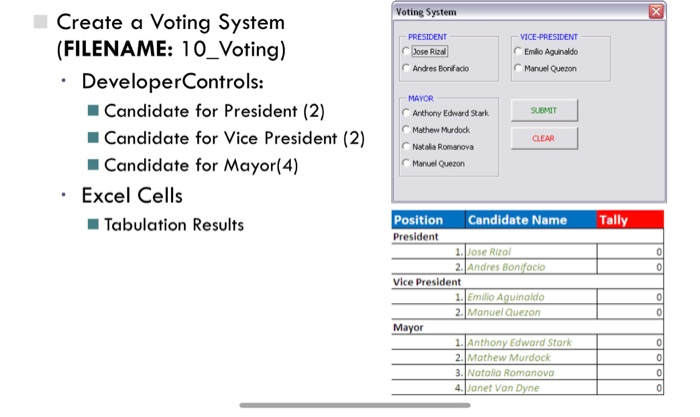
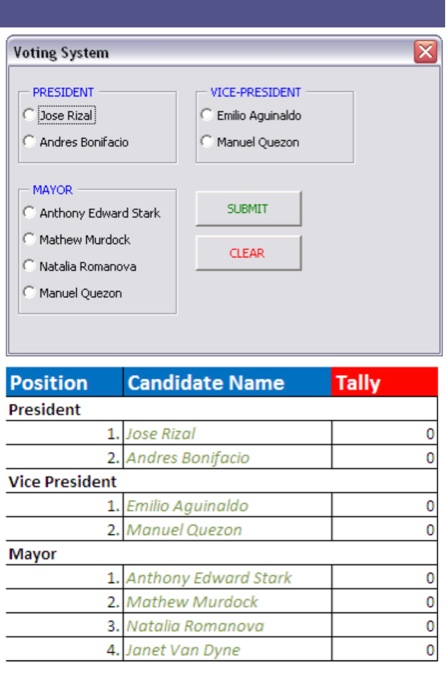
Voting System Create a Voting System (FILENAME: 10_Voting) DeveloperControls: ose Rizal Andres Bonifacio VICE-PRESIDENT Emlio Aguinaldo Manuel Quezon MAYOR Candidate for President (2) Candidate for Vice President (2) Candidate for Mayor(4) Anthony Edward Stark SUEMIT Mathew Murdock Natalia Romanova Manuel Quezon Excel Cells Tabulation Results Position Candidate Name Tally President .Jose Rizal 2.Andres Bonifocio Vice President 1.Emilio A 2. Manuel Quezon ldo .Anthony Edward Stark 3.1. talia 4. Janet Van
Step by Step Solution
There are 3 Steps involved in it
1 Expert Approved Answer
Step: 1 Unlock

Question Has Been Solved by an Expert!
Get step-by-step solutions from verified subject matter experts
Step: 2 Unlock
Step: 3 Unlock
 Study Help