







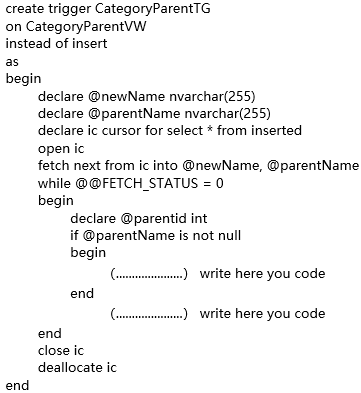
Question: Use MICROSOFT SQL SERVER language to fill the block like (...) Here is the diagram 1)Create a triggerthat allows insertinga new category through the view.
Use MICROSOFT SQL SERVER language to fill the block like (...)
Here is the diagram
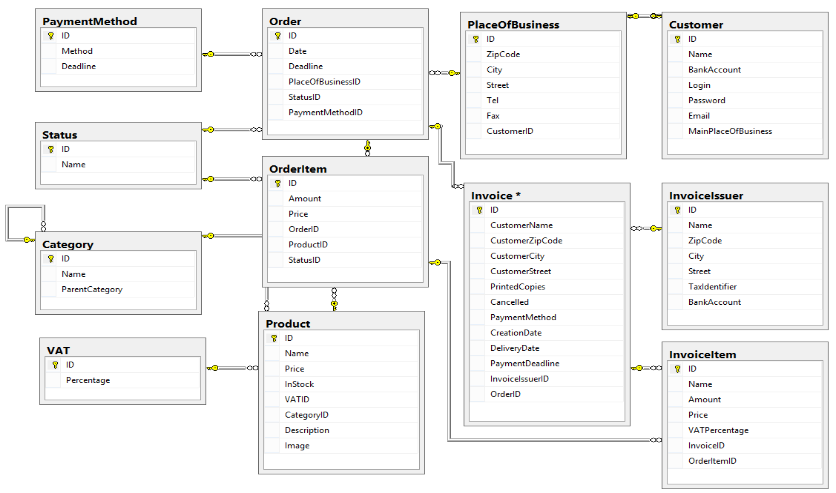
1)Create a triggerthat allows insertinga new category through the view. If the parent category is null, throw an exception and exit.
2)Test the trigger. The solution contains the commands for the test and the results as well.
Try it without a parent category
insert into..................... write here you code
... and with parent category
insert into ..................... write here you code
.... finally with an erroneous parent
insert into ..................... write here you code
Payment Method Order ID 9 ID Date Method Deadline PlaceOfBusiness ID Zip Code City Street Deadline PlaceOfBusinessID StatusID Payment Methodid Customer Y ID Name BankAccount Login Password Email MainPlaceOfBusiness Fax Customer Status 8 ID Name Invoicelssuer 9 ID Orderltem ID Amount Price Order D ProductiD StatusID Category 9 ID Invoice* Y ID CustomerName CustomerZipCode Customer City Customer Street PrintedCopies Cancelled Payment Method CreationDate DeliveryDate Payment Deadline InvoicelssuerlD Order Name ZipCode City Street Taxidentifier BankAccount Name ParentCategory Product VAT Y ID Name Invoiceltem Price Percentage Name Amount InStock VATID CategoryID Description Image Price VATPercentage InvoicelD OrderitemID create trigger CategoryParentTG on CategoryParentVW instead of insert as begin declare @newName nvarchar(255) declare @parentName nvarchar(255) declare ic cursor for select * from inserted open ic fetch next from ic into @newName, @parentName while @@FETCH_STATUS = 0 begin declare parentid int if @parentName is not null begin (..... .....) write here you code end (.............) write here you code end close ic deallocate ic end
Step by Step Solution
There are 3 Steps involved in it

Get step-by-step solutions from verified subject matter experts
 Study Help