







Question: Use Microsoft Visual Studio - Visual Basic - Windows Forms Application Objective: Practice creating and processing Task #1 : integers per range of the random
Use Microsoft Visual Studio - Visual Basic - Windows Forms Application
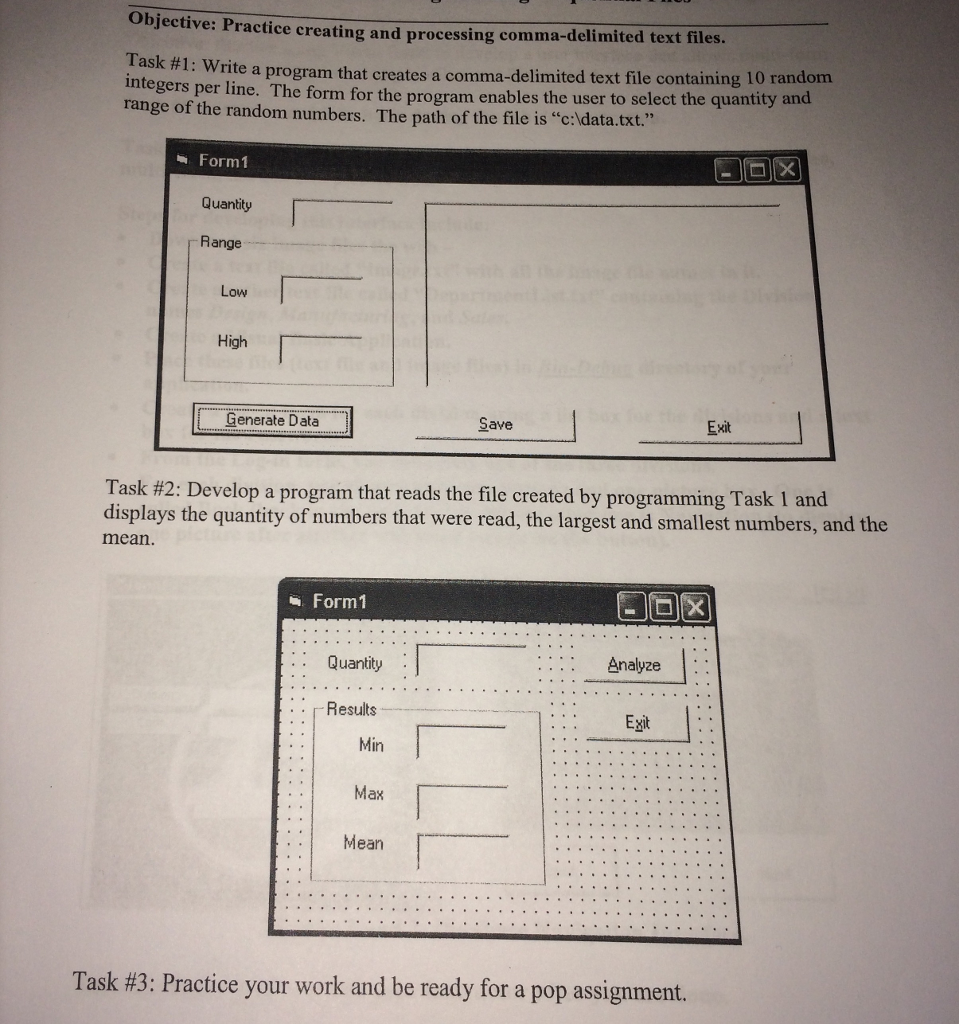
Objective: Practice creating and processing Task #1 : integers per range of the random numbers. The path of the file is "c:ldata.txt." comma-delimited text files. Write a program that creates a comma-delimited text file containing 10 random line. The form for the program enables the user to select the quantity and Form1 Quantity Range Low High Exit rat Data Save Task #2: Develop a program that reads the displays the quantity of numbers that were read, the largest and smallest numbers, and the mean. file created by programming Task 1 and Form1 Analyze. Qantity | | Results Exit Min Max Mean Task #3: Practice your work and be ready for a pop assignment. Objective: Practice creating and processing Task #1 : integers per range of the random numbers. The path of the file is "c:ldata.txt." comma-delimited text files. Write a program that creates a comma-delimited text file containing 10 random line. The form for the program enables the user to select the quantity and Form1 Quantity Range Low High Exit rat Data Save Task #2: Develop a program that reads the displays the quantity of numbers that were read, the largest and smallest numbers, and the mean. file created by programming Task 1 and Form1 Analyze. Qantity | | Results Exit Min Max Mean Task #3: Practice your work and be ready for a pop assignment
Step by Step Solution
There are 3 Steps involved in it

Get step-by-step solutions from verified subject matter experts
 Study Help