







Question: USE only MATLAB to answer the following question. IF MATLAB IS NOT USED THE ANSWER WILL BE DISLIKED. This is a question from a MATLAB
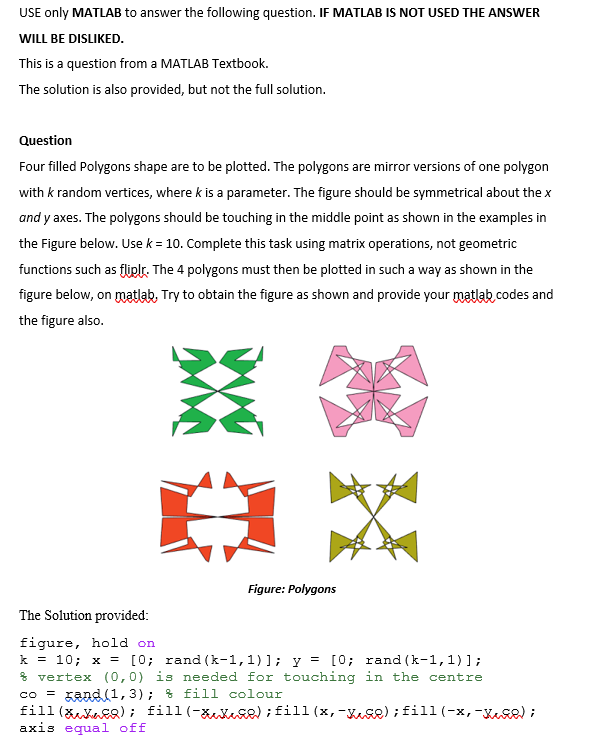
USE only MATLAB to answer the following question. IF MATLAB IS NOT USED THE ANSWER WILL BE DISLIKED. This is a question from a MATLAB Textbook. The solution is also provided, but not the full solution. Question Four filled Polygons shape are to be plotted. The polygons are mirror versions of one polygon with k random vertices, where k is a parameter. The figure should be symmetrical about the x and y axes. The polygons should be touching in the middle point as shown in the examples in the Figure below. Use k = 10. Complete this task using matrix operations, not geometric functions such as fliplr. The 4 polygons must then be plotted in such a way as shown in the figure below, on matlab, Try to obtain the figure as shown and provide your matlab codes and the figure also. Figure: Polygons The Solution provided: figure, hold on k = 10; x = [0; rand (k-1,1)]; y = [0; rand (k-1,1)]; & vertex (0,0) is needed for touching in the centre co = wand (1,3); $fill colour fill(dsen); fill(XXSR);fill(x,-Xuse);fill(x,-Xese); axis equal off USE only MATLAB to answer the following question. IF MATLAB IS NOT USED THE ANSWER WILL BE DISLIKED. This is a question from a MATLAB Textbook. The solution is also provided, but not the full solution. Question Four filled Polygons shape are to be plotted. The polygons are mirror versions of one polygon with k random vertices, where k is a parameter. The figure should be symmetrical about the x and y axes. The polygons should be touching in the middle point as shown in the examples in the Figure below. Use k = 10. Complete this task using matrix operations, not geometric functions such as fliplr. The 4 polygons must then be plotted in such a way as shown in the figure below, on matlab, Try to obtain the figure as shown and provide your matlab codes and the figure also. Figure: Polygons The Solution provided: figure, hold on k = 10; x = [0; rand (k-1,1)]; y = [0; rand (k-1,1)]; & vertex (0,0) is needed for touching in the centre co = wand (1,3); $fill colour fill(dsen); fill(XXSR);fill(x,-Xuse);fill(x,-Xese); axis equal off
Step by Step Solution
There are 3 Steps involved in it

Get step-by-step solutions from verified subject matter experts
 Study Help