







Question: use Power BI web interface... Will provide data if accepted 2. From the Power BI web interface select My Workspace from the navigation menu on
use Power BI web interface... Will provide data if accepted
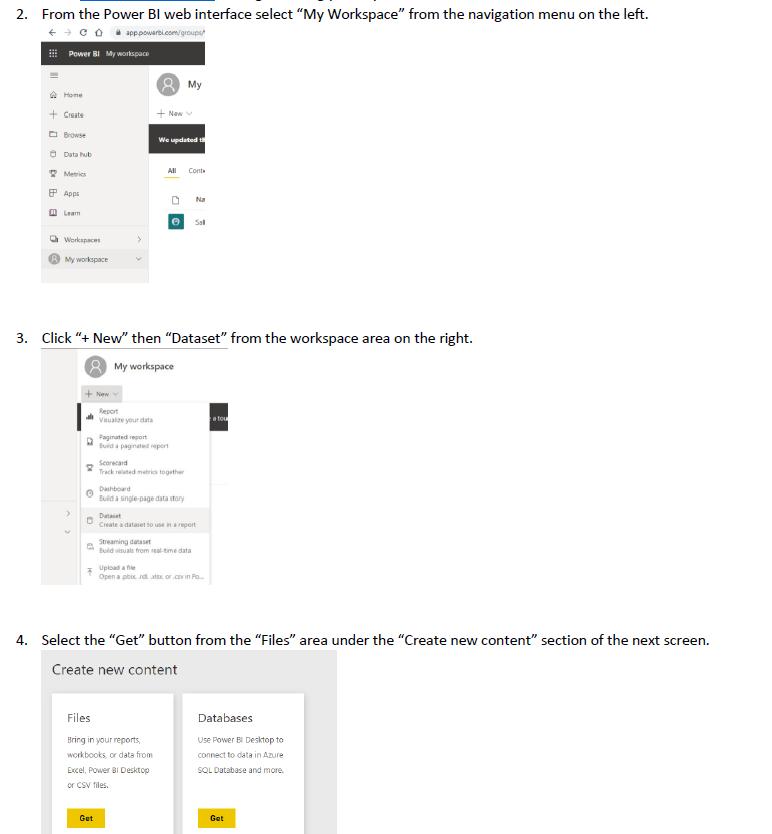
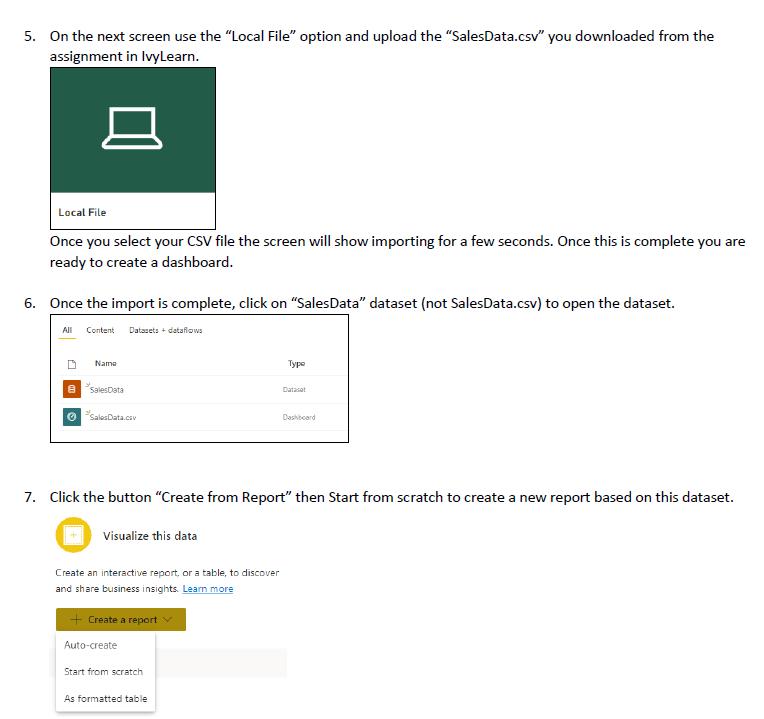

2. From the Power BI web interface select "My Workspace" from the navigation menu on the left. CO apppower.com/groups/ 11 Power BI My workspace 1 Home + Create Browse Data hub Metrics Apps Leam Workspaces My workspace New a Get + New 3. Click "+ New" then "Dataset" from the workspace area on the right. My workspace We updated t Visualize your data Paginated report Build a paginated report All Cont My Scorecard Track related metrics togather Files Bring in your reports, workbooks or data from Dashboard Build a single-page data story Excel, Power BI Desktop or CSV files. e Sal Na Data Create a dataset to use in a report Streaming dataset Build visuals from real-time data Upload a fe Open a phix nxorcin Po 4. Select the "Get" button from the "Files" area under the "Create new content" section of the next screen. Create new content a tou Databases Use Power BI Desktop to connect to data in Azure SQL Database and more. Get
Step by Step Solution
There are 3 Steps involved in it

Get step-by-step solutions from verified subject matter experts
 Study Help