







Question: Use Python 3 or above Write a function named q40 that creates a 300 x 300 Graphics window and draws a blue filled Circle object
Use Python 3 or above
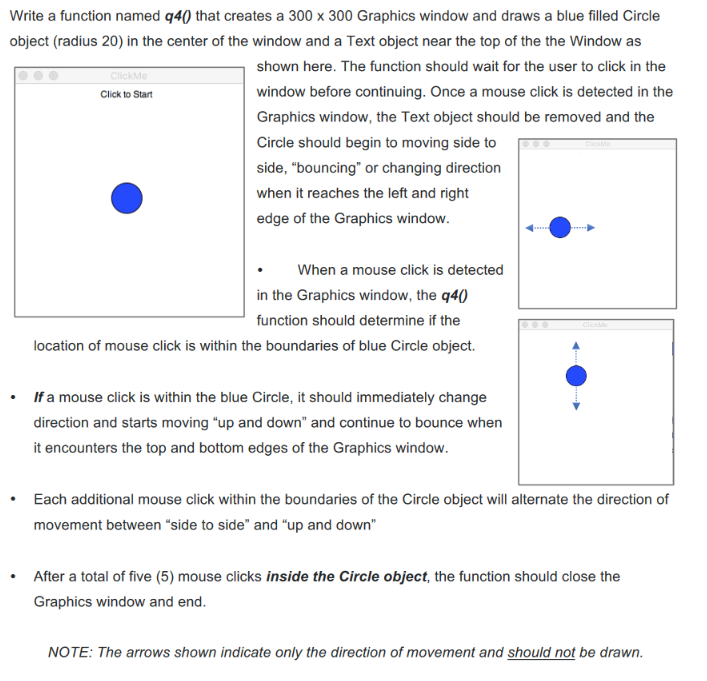
Write a function named q40 that creates a 300 x 300 Graphics window and draws a blue filled Circle object (radius 20) in the center of the window and a Text object near the top of the the Window as shown here. The function should wait for the user to click in the window before continuing. Once a mouse click is detected in the Graphics window, the Text object should be removed and the Circle should begin to moving side to side, "bouncing" or changing direction Me Click to Start edge of the Graphics window. When a mouse click is detected in the Graphics window, the q40 function should determine if the location of mouse click is within the boundaries of blue Circle object. .If a mouse click is within the blue Circle, it should immediately change direction and starts moving "up and down" and continue to bounce when it encounters the top and bottom edges of the Graphics window. .Each additional mouse click within the boundaries of the Circle object will alternate the direction of movement between "side to side" and "up and down" After a total of five (5) mouse clicks inside the Circle object, the function should close the Graphics window and end. NOTE: The arrows shown indicate only the direction of movement and should not be drawn. Write a function named q40 that creates a 300 x 300 Graphics window and draws a blue filled Circle object (radius 20) in the center of the window and a Text object near the top of the the Window as shown here. The function should wait for the user to click in the window before continuing. Once a mouse click is detected in the Graphics window, the Text object should be removed and the Circle should begin to moving side to side, "bouncing" or changing direction Me Click to Start edge of the Graphics window. When a mouse click is detected in the Graphics window, the q40 function should determine if the location of mouse click is within the boundaries of blue Circle object. .If a mouse click is within the blue Circle, it should immediately change direction and starts moving "up and down" and continue to bounce when it encounters the top and bottom edges of the Graphics window. .Each additional mouse click within the boundaries of the Circle object will alternate the direction of movement between "side to side" and "up and down" After a total of five (5) mouse clicks inside the Circle object, the function should close the Graphics window and end. NOTE: The arrows shown indicate only the direction of movement and should not be drawn
Step by Step Solution
There are 3 Steps involved in it

Get step-by-step solutions from verified subject matter experts
 Study Help