







Question: Use Python Draw a bar graph using characters printed in the console window. The JextGraph program demonstrated in this console session... prompts the user to
Use Python
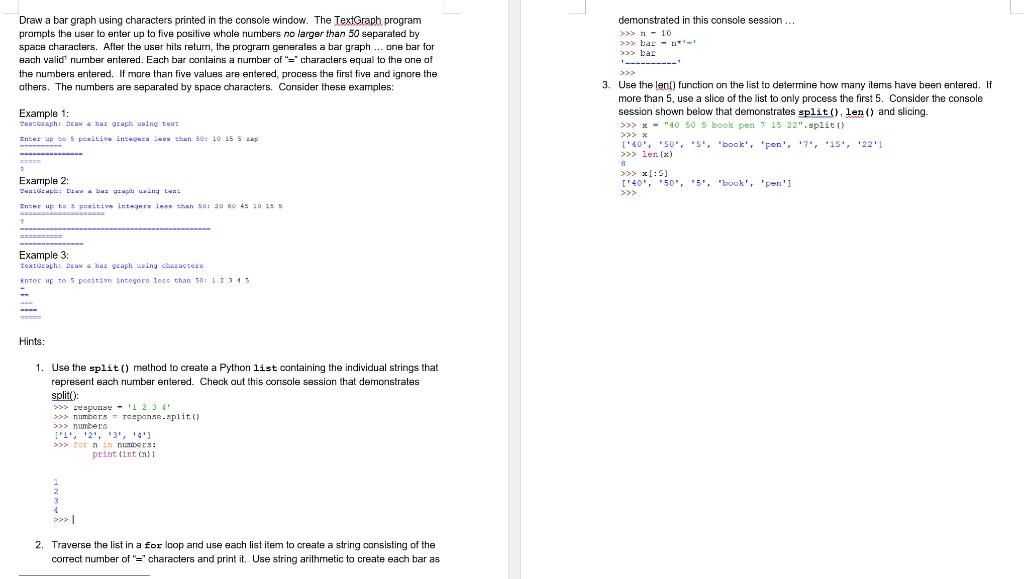
Draw a bar graph using characters printed in the console window. The JextGraph program demonstrated in this console session... prompts the user to enter up to five positive whole numbers no larger than 50 separated by space characters. After the user hits retum, the program generales a bar graph ... one bar for aach valid' number entered. Each bar contains a number of "=" characters equal to the one of the numbers entered. If mare than five values are entered, process the first five and ignore the others. The numbers are separated by space characters. Consider these examples: n10 > bar a1 >> bar 1 3. Use the lenil function on the list to determine how many itams have been entered. If more than 5 , use a slice of the list to only process the first 5 . Consider the console Example 1: session shown below that demonstrates split(), len () and slicing. x="40505 book pet 71522".8plit() Inter ap to 5 pealtive integeza less than 50=10 is 5 zkp [40,50%,5, "book', 'Een', 7 , '15', '22'] > ler (x) iss x[:5] Example 2: ['40,r "50", "5', "bouk', 'Fen'] Hints: 1. Use the split () method to create a Python list containing the individual strings that represent each number entered. Check out this console session that demonstrates spliti): SS: requguase - 122341 p numbers = response.split( [?1', 2%,13,123 p>e tor n in numbers: print \{1nt (x)} 2. Traverse the list in a for loop and use each list item to create a string consisting of the correct number of "=" characters and print it. Use string arithmetic to create each bar as
Step by Step Solution
There are 3 Steps involved in it

Get step-by-step solutions from verified subject matter experts
 Study Help