







Question: Use python. Here is the NorCal data: use python You should be able to look at the data in NorCal-1880-2018.csv your favorite text editor. Here
 Use python. Here is the NorCal data:
 use python
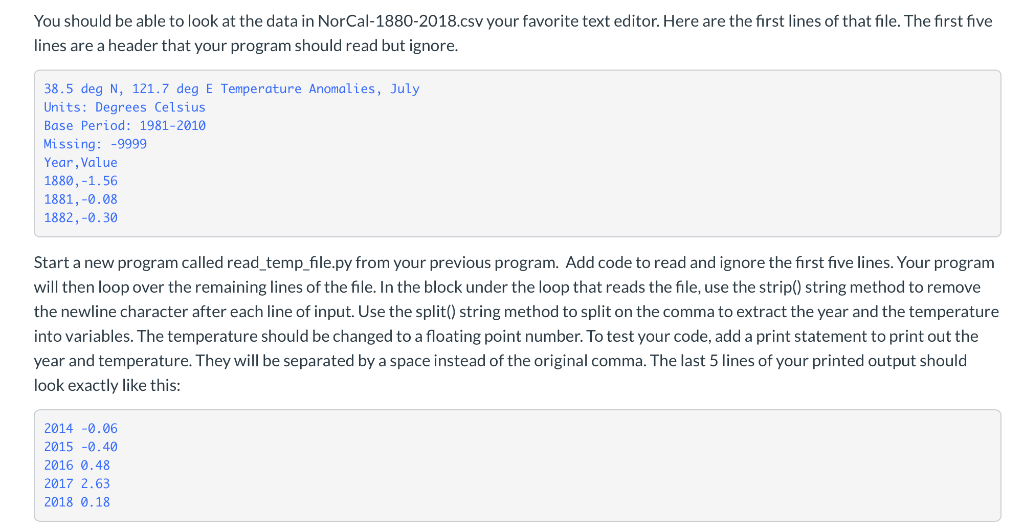
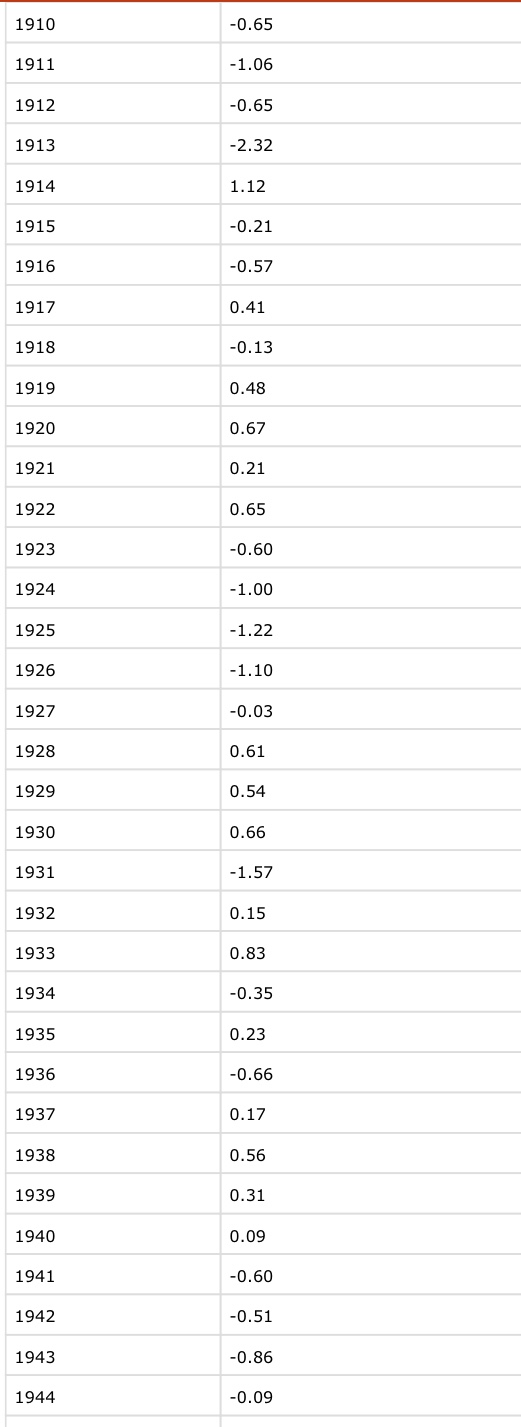
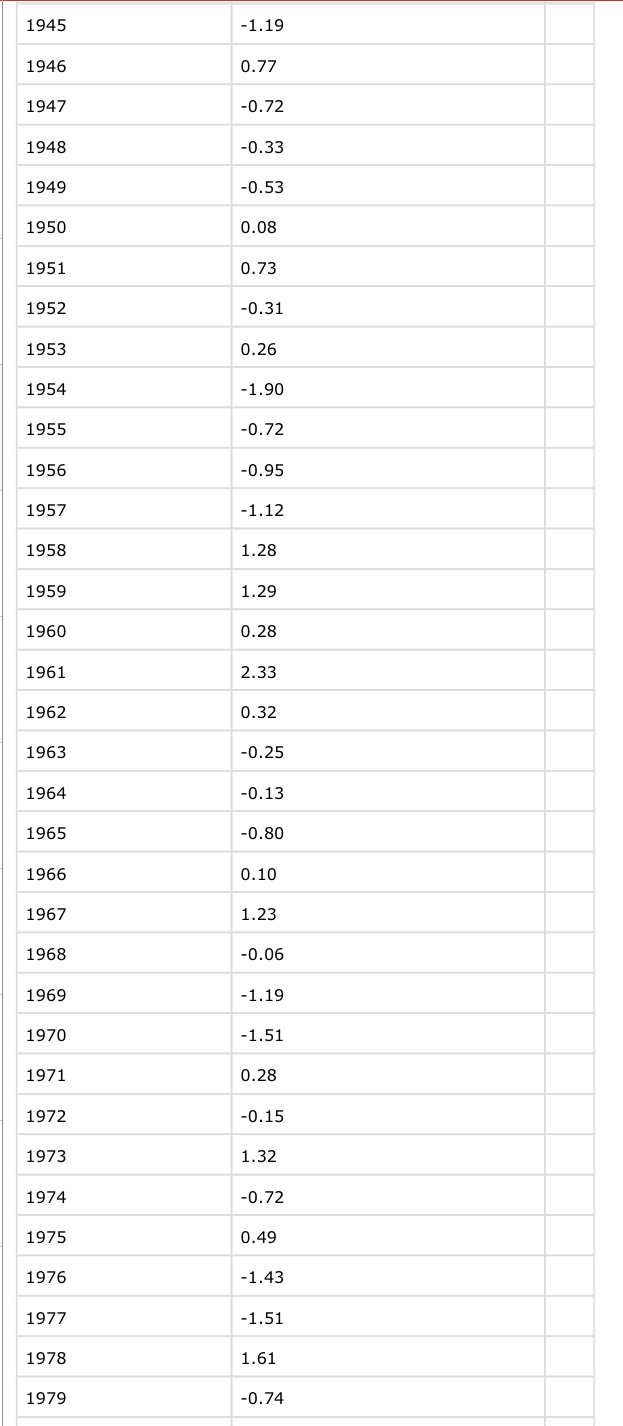
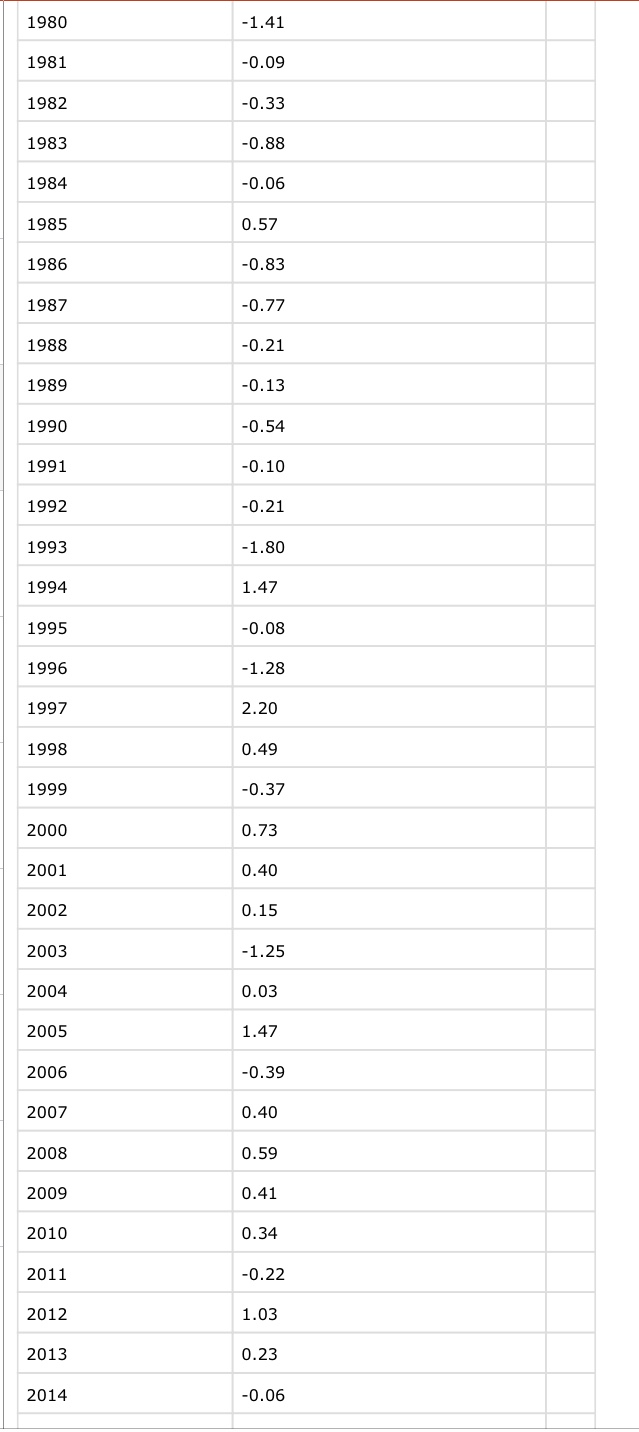
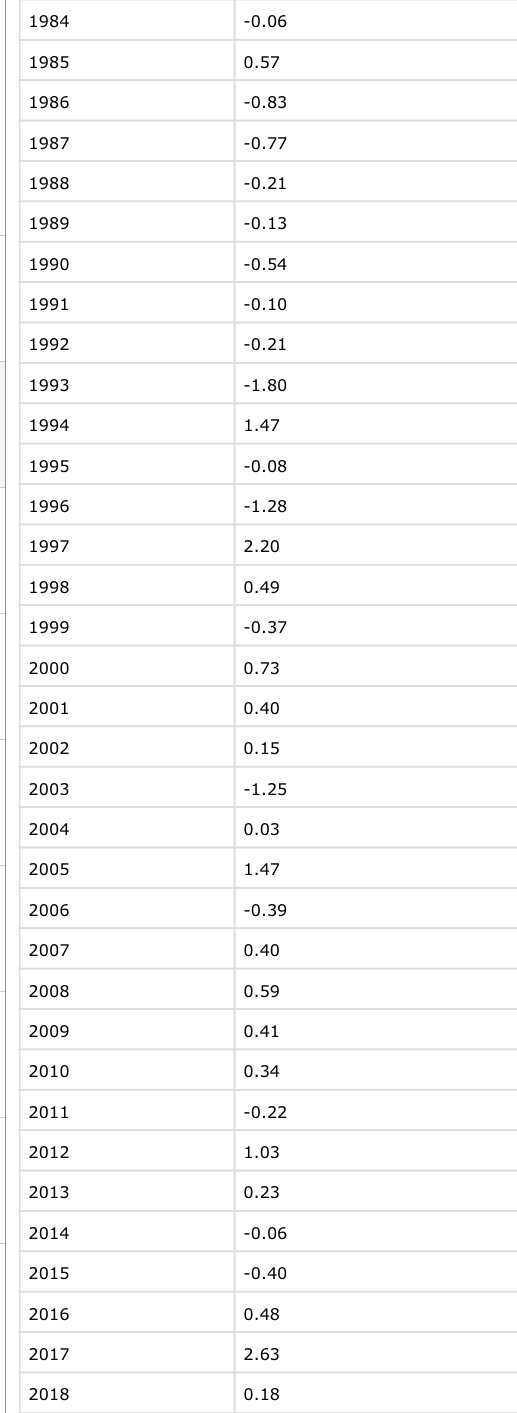
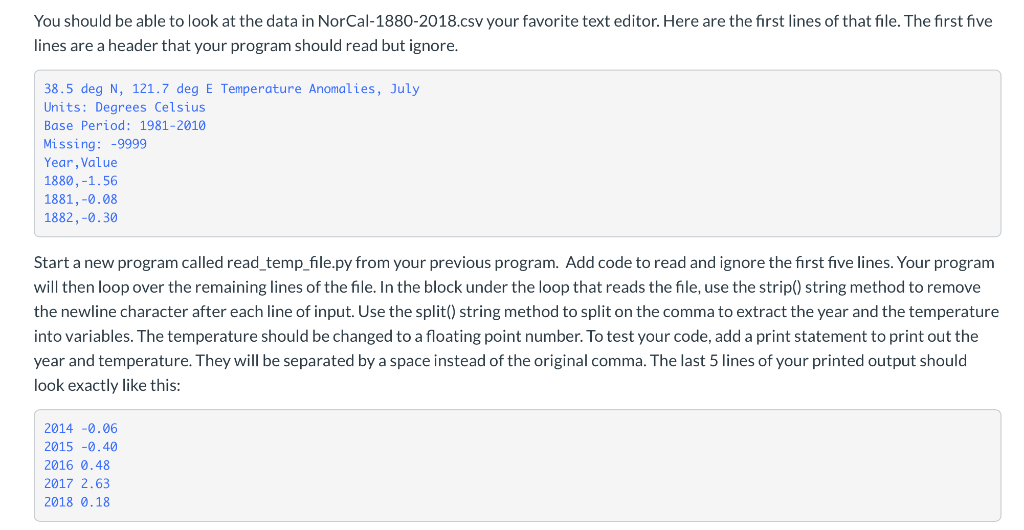
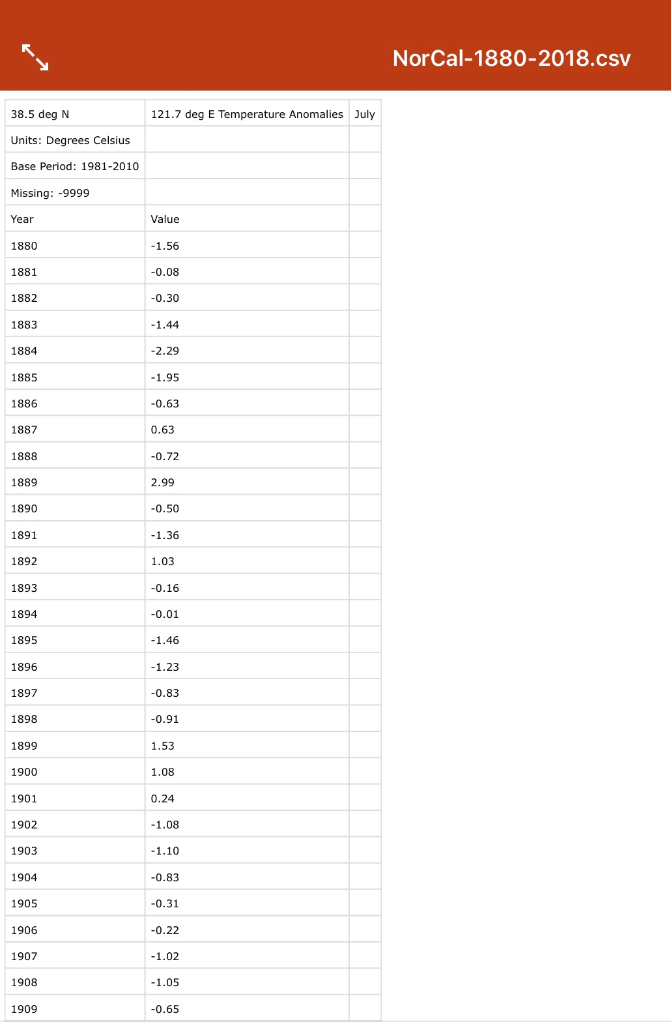
You should be able to look at the data in NorCal-1880-2018.csv your favorite text editor. Here are the first lines of that file. The first five lines are a header that your program should read but ignore. 38.5 deg N, 121.7 deg E Temperature Anomalies, July Units: Degrees Celsius Base Period: 1981-2010 Missing: -9999 Year, Value 1880,-1.56 1881,-0.08 1882,-0.30 Start a new program called read_temp_file.py from your previous program. Add code to read and ignore the first five lines. Your program will then loop over the remaining lines of the file. In the block under the loop that reads the file, use the strip() string method to remove the newline character after each line of input. Use the split() string method to split on the comma to extract the year and the temperature into variables. The temperature should be changed to a floating point number. To test your code, add a print statement to print out the year and temperature. They will be separated by a space instead of the original comma. The last 5 lines of your printed output should look exactly like this: 2014 -0.06 2015 -0.40 2016 0.48 2017 2.63 2018 0.18 1910 -0.65 1911 -1.06 1912 -0.65 11913 -2.32 1914 1.12 1915 -0.21 1916 -0.57 1917 0.41 1918 -0.13 1919 0.48 1920 0.67 1921 0.21 1922 0.65 1923 -0.60 1924 -1.00 1925 -1.22 1926 -1.10 1927 -0.03 1928 0.61 1929 0.54 1930 0.66 1931 -1.57 1932 0.15 11933 0.83 1934 -0.35 1935 0.23 1936 -0.66 1937 0.17 1938 0.56 1939 0.31 1940 0.09 1941 -0.60 1942 -0.51 1943 -0.86 1944 -0.09 1945 -1.19 1946 0.77 1947 -0.72 1948 -0.33 1949 -0.53 1950 0.08 1951 0.73 1952 -0.31 1953 0.26 1954 -1.90 1955 -0.72 1956 -0.95 1957 -1.12 1958 1.28 1959 1.29 1960 0.28 1961 2.33 1962 0.32 1963 -0.25 1964 -0.13 1965 -0.80 1966 0.10 1967 1.23 1968 -0.06 1969 -1.19 1970 -1.51 1971 0.28 1972 -0.15 1973 1.32 1974 -0.72 1975 0.49 1976 -1.43 1977 -1.51 1978 1.61 1979 -0.74 1980 -1.41 1981 -0.09 1982 -0.33 1983 -0.88 1984 -0.06 1985 0.57 1986 -0.83 1987 -0.77 1988 -0.21 1989 -0.13 1990 -0.54 1991 -0.10 1992 -0.21 1993 -1.80 1994 1.47 1995 -0.08 1996 -1.28 1997 2.20 1998 0.49 1999 -0.37 2000 0.73 2001 0.40 2002 0.15 2003 -1.25 2004 0.03 2005 1.47 2006 -0.39 2007 0.40 2008 0.59 2009 0.41 0.34 2010 2011 -0.22 2012 1.03 2013 0.23 2014 -0.06 1984 -0.06 1985 0.57 1986 -0.83 1987 -0.77 1988 -0.21 1989 -0.13 1990 -0.54 1991 -0.10 1992 -0.21 1993 -1.80 1994 1.47 1995 -0.08 1996 -1.28 1997 2.20 1998 0.49 1999 -0.37 2000 0.73 2001 0.40 2002 0.15 2003 -1.25 2004 0.03 2005 1.47 2006 -0.39 2007 0.40 2008 0.59 2009 0.41 2010 0.34 2011 -0.22 2012 1.03 2013 0.23 2014 -0.06 2015 -0.40 2016 0.48 2017 2.63 2018 0.18 You should be able to look at the data in NorCal-1880-2018.csv your favorite text editor. Here are the first lines of that file. The first five lines are a header that your program should read but ignore. 38.5 deg N, 121.7 deg E Temperature Anomalies, July Units: Degrees Celsius Base Period: 1981-2010 Missing: -9999 Year, Value 1880,-1.56 1881,-0.08 1882,-0.30 Start a new program called read_temp_file.py from your previous program. Add code to read and ignore the first five lines. Your program will then loop over the remaining lines of the file. In the block under the loop that reads the file, use the strip() string method to remove the newline character after each line of input. Use the split() string method to split on the comma to extract the year and the temperature into variables. The temperature should be changed to a floating point number. To test your code, add a print statement to print out the year and temperature. They will be separated by a space instead of the original comma. The last 5 lines of your printed output should look exactly like this: 2014 -0.06 2015 -0.40 2016 0.48 2017 2.63 2018 0.18 NorCal-1880-2018.CSV 38.5 deg N 121.7 deg E Temperature Anomalies July Units: Degrees Celsius Base Period: 1981-2010 Missing: -9999 Year Value 1880 -1.56 1881 -0.08 1882 -0.30 1883 -1.44 1884 -2.29 1885 -1.95 1886 -0.63 1887 0.63 1888 -0.72 1889 2.99 1890 -0.50 1891 -1.36 1892 1.03 1893 -0.16 -0.01 1894 1895 -1.46 1896 -1.23 1897 -0.83 1898 -0.91 1899 1.53 1900 1.08 1901 0.24 1902 -1.08 1903 - 1.10 1904 -0.83 1905 -0.31 1906 -0.22 1907 -1.02 1908 -1.05 1909 -0.65
Step by Step Solution
There are 3 Steps involved in it

Get step-by-step solutions from verified subject matter experts
 Study Help