







Question: USE PYTHON PROGRAMING Note: If you are using a mac to complete your assignment, please download the following file: http://www.cs.uni.edu/~diesburg/courses/cs1510_sp17/homework/PA09/player_career_mac.csv The purpose of this assignment
USE PYTHON PROGRAMING
Note: If you are using a mac to complete your assignment, please download the following file: http://www.cs.uni.edu/~diesburg/courses/cs1510_sp17/homework/PA09/player_career_mac.csv
The purpose of this assignment is to give you more practice with functions, files, and lists while using a real data set populated with career data from NBA players!
Remember, before you begin this project, review the new function commenting styles that I expect. Please create the function comments before beginning the actual coding.
Getting Started
Go to http://www.databasebasketball.com/stats_download.htm
Download databaseBasketball_2009_v1.zip
Unpack the zip file (most machines will do this when you double-click the file)
We will only do statistics based on player_career.csv. So copy this file into the same directory where you will be writing your python program for this assignment
The format of this file is easy to understand. Open the file by right clicking on the file and selecting "Open With" and selecting a text editor of some kind like Notepad++ or Wordpad. The first line tells you the names of all the columns (To understand the meanings of each of the abbreviations, look at the page: http://www.databasebasketball.com/about/aboutstats.htm). After that, each lines data corresponds to one players career statistics. Each field is separated by a comma.
Notice that, in addition to the very first line, which is the header information, there appears to be a blank line followed by a line of "garbage" at the bottom of the file. This will become an issue later in the assignment.
Your Assignment, Part 1
Begin by creating a file called pa09.py.
In this file create a function called readData(). This function should:
take no parameters. It will be specialized for the file that you are using.
open the file player_career.csv
each line in this data file should be read as a list, and then each line list should be then appended to a master data list.
you should ignore the "garbage" rows from the player_career.csv file and not add those lines to your list.
close the file "player_career.csv"
return the master data list, which is a list of line lists. (In other words, you should return a list of length 4051. Each element in the list is itself a list representing the career stats of a single player)
Write a function called points(). This function should:
take in one parameter - a list of player data (this will be the data you "loaded" and "cleaned" using readData())
For each player in the data list you should create a list consisting of the points the player earned and the player's name)
Each of these lists should be appended to a separate list.
When you are done processing the input data you should return this new list of lists.
Write a function called main(). This function should:
take no parameters
invoke readData() to get the data about all of the players from our stat file
send the list returned by readData() to points()
sort the list returned by points() to identify and print information about the ten players from this data file who scored the most points during their careers.
When you are all done you should be able to load and invoke main() from the shell and get a response that looks like the following:
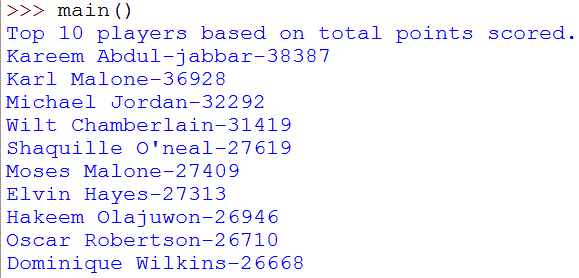
Your Assignment, Part 2
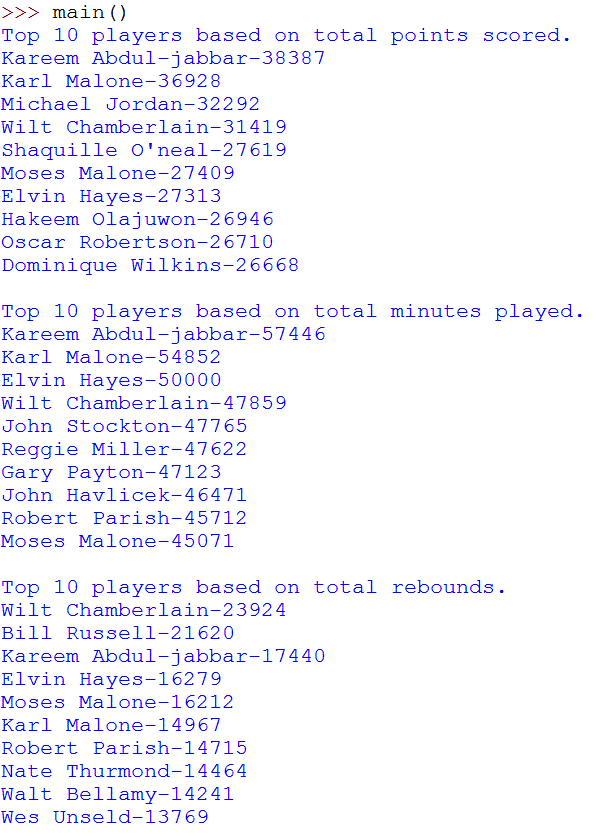
Write additional functions called minutes() and rebounds(). These functions should work just like the points() function does. That is, they should take in the main data list, process each player in the list to make appropriate lists, and return a list of these lists.
You should also modify your main() method so that it prints the ten players with the largest number of each of these items. When I run this function I should see a long screen dump of the top 10 players in each of these three statistic categories:
Your Assignment, Part 3 - The Efficiency Statistic
Each of the above statistics is interesting, but it only tells us how good a player is at one specific statistic. How do many NBA coaches quickly evaluate a player's overall game performance? They check his efficiency. This statistic is something like the QB passer rating we calculated earlier in the course. It is a calculation that tries to assign a number to how "well" a player played the game. Higher numbers mean a better performance from that player.
NBA.com evaluates all players based on the efficiency formula indicated below (and shown on the aboutstats.htm page). In this project, we will follow this efficiency formula. Since we are not evaluating a player based on one game, we need to divide the total efficiency by the number of games the player played. So the formula is:

The abbreviations on the right hand side of the equation correspond to the fields in the statistics file. Again, you can check out the the meanings of each of the abbreviations at: http://www.databasebasketball.com/about/aboutstats.htm
Create a function called efficiency(). This function should behave very similarly to the functions you wrote in parts 1 and 2 in that it should:
take in one parameter - a list of player data (this will be the data you "loaded" and "cleaned" using readData())
For each player in the data list you should create a list consisting of the player's career long efficiency and the player's name)
Each of these lists should be appended to a separate list.
When you are done processing the input data you should return this new list of lists.
Now modify main() so that it uses this as it has the prior functions.
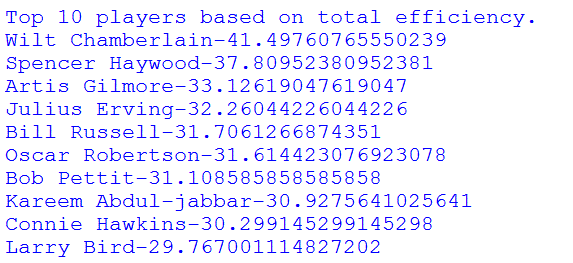
Helpful Hints:
Remember the split() function, which takes as an argument the character to split on, and returns a LIST of STRINGS
Pay attention to the type of data you are working with. Don't forget to convert Strings to numbers or vice versa as needed:
A 2-item list would be:
mylist = [x,y]
To append this list to a list you can just say myList.append(mylist). Then to access the different items in the list you index into the list twice, so for example if you appended the above list as the first item in a list: myList[0][0] would return x myList[0][1] would return y
Since there are so many fields, do some testing (E.g. output some parsed data) to make sure that you get the correct data.
Lists sort function and reverse function should be useful.
myList = [ [3,2], [1,2], [2,5]] myList.sort() # myList will be [ [1,2], [2,5], [3,2]] myList.reverse() # myList will be [ [3,2], [2,5], [1,2]]
main Top 10 players based on total points scored. Kareem Abdul-jabbar-38 387 Karl Malone-36928 Michael Jordan-32292 Wilt Chamberlain-31419 Shaquille O'neal-27619 Moses Malone -27409 Elvin Hayes-27 313 Hakeem Olajuwon-2 694 6 Oscar Robertson-26710 Dominique Wilkins-26668
Step by Step Solution
There are 3 Steps involved in it

Get step-by-step solutions from verified subject matter experts
 Study Help