







Question: USE PYTHON3; DO NOT IMPORT ANY PACKAGES Please do all of part 4 (everything in the images) Here is the code format in the text
USE PYTHON3; DO NOT IMPORT ANY PACKAGES
Please do all of part 4 (everything in the images)
Here is the code format in the text editor:
class User: """ TODO: Complete the docstring. """
##### Part 4.1 ##### def __init__(self, name, store): """ TODO: Complete the docstring. """ # YOUR CODE GOES HERE # self.name = ... self.store = ... self.balance = ... self.id = ... self.purchase_history = ... self.cart = ...
def __str__(self): """ TODO: Complete the docstring. """ # YOUR CODE GOES HERE #
def __repr__(self): """ TODO: Complete the docstring. """ # YOUR CODE GOES HERE #
def set_name(self, new_name): """ TODO: Complete the docstring. """ # YOUR CODE GOES HERE #
def get_name(self): """ TODO: Complete the docstring. """ # YOUR CODE GOES HERE #
def set_balance(self, amount): """ TODO: Complete the docstring. """ # YOUR CODE GOES HERE #
def get_balance(self): """ TODO: Complete the docstring. """ # YOUR CODE GOES HERE #
def add_balance(self, amount): """ TODO: Complete the docstring. """ # YOUR CODE GOES HERE #
def last_purchase(self): """ TODO: Complete the docstring. """ # YOUR CODE GOES HERE #
def view_history(self): """ TODO: Complete the docstring. """ # YOUR CODE GOES HERE #
def view_cart(self): """ TODO: Complete the docstring. """ # YOUR CODE GOES HERE #
def clear_cart(self): """ TODO: Complete the docstring. """ # YOUR CODE GOES HERE #
class Premium_User(User): """ TODO: Complete the docstring. """
##### Part 4.2 ##### def __str__(self): """ TODO: Complete the docstring. """ # YOUR CODE GOES HERE #
class Store: """ TODO: Complete the docstring. """
##### Part 4.3 ##### def __init__(self, warehouse): """ TODO: Complete the docstring. """ # YOUR CODE GOES HERE # self.users = ... self.warehouse = ...
def __str__(self): """ TODO: Complete the docstring. """ # YOUR CODE GOES HERE #
def get_product(self, product_id): """ TODO: Complete the docstring. """ # YOUR CODE GOES HERE #
def view_products(self, sort=False): """ TODO: Complete the docstring. """ # YOUR CODE GOES HERE #
Thank you so much for your work!
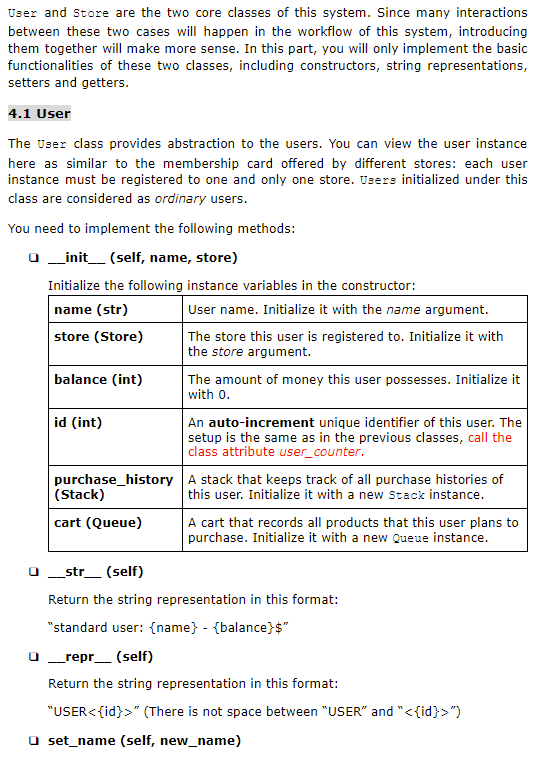
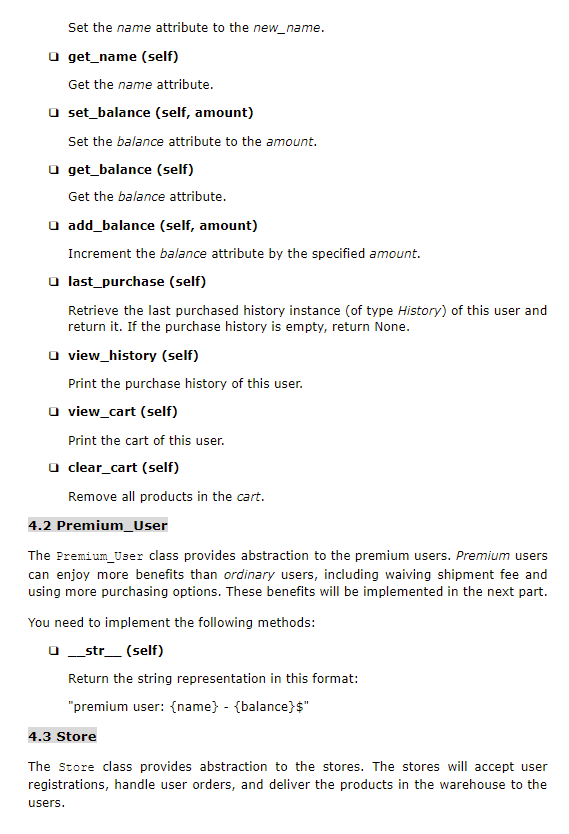
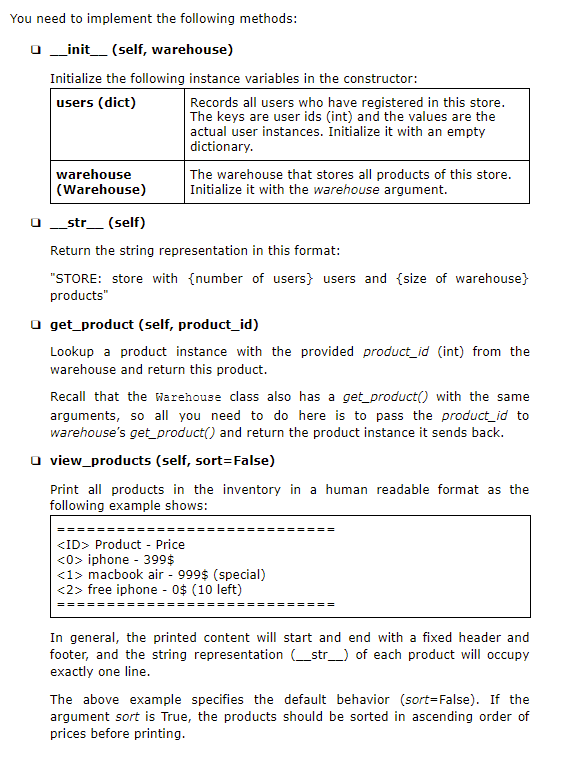
User and store are the two core classes of this system. Since many interactions between these two cases will happen in the workflow of this system, introducing them together will make more sense. In this part, you will only implement the basic functionalities of these two classes, including constructors, string representations, setters and getters. 4.1 User The User class provides abstraction to the users. You can view the user instance here as similar to the membership card offered by different stores: each user instance must be registered to one and only one store. Users initialized under this class are considered as ordinary users. You need to implement the following methods: 0 __init__(self, name, store) Initialize the following instance variables in the constructor: name (str) User name. Initialize it with the name argument. store (Store) The store this user is registered to. Initialize it with the store argument. balance (int) The amount of money this user possesses. Initialize it with 0. id (int) An auto-increment unique identifier of this user. The setup is the same as in the previous classes, call the class attribute user_counter. purchase_history A stack that keeps track of all purchase histories of (Stack) this user. Initialize it with a new Stack instance. cart (Queue) A cart that records all products that this user plans to purchase. Initialize it with a new Queue instance. str_(self) Return the string representation in this format: "standard user: {name} - {balance}$" repr__ (self) Return the string representation in this format: "USER" (There is not space between "USER" and "") set_name (self, new_name) Set the name attribute to the new_name. get_name (self) Get the name attribute. set_balance (self, amount) Set the balance attribute to the amount. get_balance (self) Get the balance attribute. O add_balance (self, amount) Increment the balance attribute by the specified amount. o last_purchase (self) Retrieve the last purchased history instance of type History) of this user and return it. If the purchase history is empty, return None. view_history (self) Print the purchase history of this user. view_cart (self) Print the cart of this user. a clear_cart (self) Remove all products in the cart. 4.2 Premium_User The Premium_User class provides abstraction to the premium users. Premium users can enjoy more benefits than ordinary users, including waiving shipment fee and using more purchasing options. These benefits will be implemented in the next part. You need to implement the following methods: 0 _str__ (self) Return the string representation in this format: "premium user: {name} - {balance}$" 4.3 Store The Store class provides abstraction to the stores. The stores will accept user registrations, handle user orders, and deliver the products in the warehouse to the users. You need to implement the following methods: 0 __init__(self, warehouse) Initialize the following instance variables in the constructor: users (dict) Records all users who have registered in this store. The keys are user ids (int) and the values are the actual user instances. Initialize it with an empty dictionary. warehouse The warehouse that stores all products of this store. (Warehouse) Initialize it with the warehouse argument. _str__ (self) Return the string representation in this format: "STORE: store with {number of users} users and {size of warehouse) products" get_product (self, product_id) Lookup a product instance with the provided product_id (int) from the warehouse and return this product. Recall that the Warehouse class also has a get_product with the same arguments, so all you need to do here is to pass the product_id to warehouse's get_product() and return the product instance it sends back. view_products (self, sort=False) Print all products in the inventory in a human readable format as the following example shows:
Step by Step Solution
There are 3 Steps involved in it

Get step-by-step solutions from verified subject matter experts
 Study Help