







Question: USE PYTHON3; DO NOT IMPORT DOCTESTS Please do all of part 5 and follow directions carefully. Here is the code format in the text editor.
USE PYTHON3; DO NOT IMPORT DOCTESTS
Please do all of part 5 and follow directions carefully.
Here is the code format in the text editor. The stuff from part 4 is already done and filled; I just included it so that you'll not miss out on any info.
class User: """ TODO: Complete the docstring. """
##### Part 4.1 ##### user_counter = 0 def __init__(self, name, store): """ TODO: Complete the docstring. """ # YOUR CODE GOES HERE # self.name = name self.store = store self.balance = 0 self.id = User.user_counter User.user_counter += 1 self.purchase_history = [] self.cart = Queue()
def __str__(self): """ TODO: Complete the docstring. """ return "standard user: {0} - {1}$".format(self.name, self.balance)
def __repr__(self): """ TODO: Complete the docstring. """ return "USER".format(self.id)
def set_name(self, new_name): """ TODO: Complete the docstring. """ self.name = new_name
def get_name(self): """ TODO: Complete the docstring. """ return self.name
def set_balance(self, amount): """ TODO: Complete the docstring. """ self.balance = amount
def get_balance(self): """ TODO: Complete the docstring. """ return self.balance
def add_balance(self, amount): """ TODO: Complete the docstring. """ self.balance += amount
def last_purchase(self): """ TODO: Complete the docstring. """ hist_instance = None if self.purchase_history: hist_instance = self.purchase_history[-1] return hist_instance
def view_history(self): """ TODO: Complete the docstring. """ for prod in self.purchase_history: print(prod.__str__())
def view_cart(self): """ TODO: Complete the docstring. """ for prod in self.cart: print(prod.__str__())
def clear_cart(self): """ TODO: Complete the docstring. """ self.cart.clear()
##### Part 5.2 ##### def add_cart(self, product_id): """ TODO: Complete the docstring. """ # YOUR CODE GOES HERE #
def checkout(self): """ TODO: Complete the docstring. """ # YOUR CODE GOES HERE #
##### Part 5.3 ##### def undo_purchase(self): """ TODO: Complete the docstring. """ # YOUR CODE GOES HERE #
class Premium_User(User): """ TODO: Complete the docstring. """
##### Part 4.2 ##### def __str__(self): """ TODO: Complete the docstring. """ return "premium user: {0} - {1}$".format(self.name, self.balance)
##### Part 5.4 ##### def buy_all(self, product_id): """ TODO: Complete the docstring. """ # YOUR CODE GOES HERE #
def undo_all(self): """ TODO: Complete the docstring. """ # YOUR CODE GOES HERE #
####################################################################### # STORE # ####################################################################### class Store: """ TODO: Complete the docstring. """
##### Part 4.3 ##### def __init__(self, warehouse): """ TODO: Complete the docstring. """ # YOUR CODE GOES HERE # self.users = {} self.warehouse = warehouse
def __str__(self): """ TODO: Complete the docstring. """ prod_set = {} return ( "STORE: with {0} number of users and {1} products" .format(str(len(self.users.keys())), str(len(warehouse.get_products()))) )
def get_product(self, product_id): """ TODO: Complete the docstring. """ return self.warehouse.get_product(product_id)
def view_products(self, sort=False): """ TODO: Complete the docstring. """ products = self.warehouse.list_products() print('============================') print("
##### Part 5.1 ##### def add_user(self, user): """ TODO: Complete the docstring. """ # YOUR CODE GOES HERE #
##### Part 5.2 ##### def order(self, user_id, product_id): """ TODO: Complete the docstring. """ # YOUR CODE GOES HERE #
##### Part 5.3 ##### def undo_order(self, user_id, product): """ TODO: Complete the docstring. """ # YOUR CODE GOES HERE #
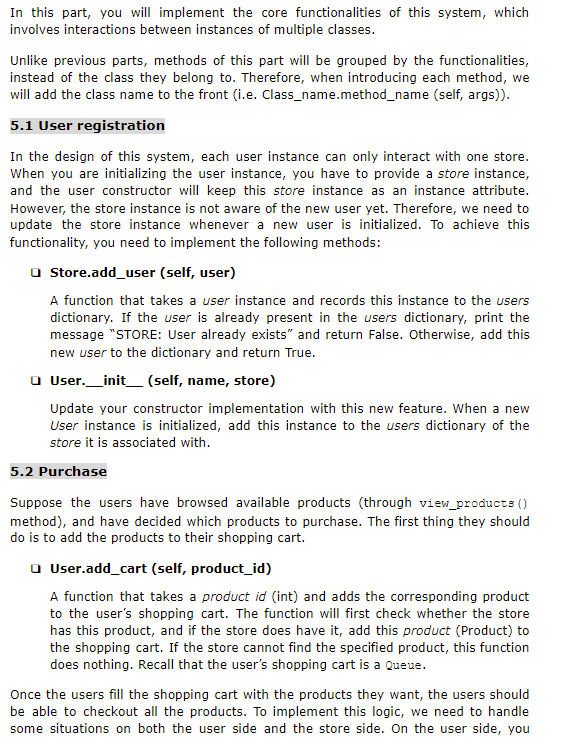
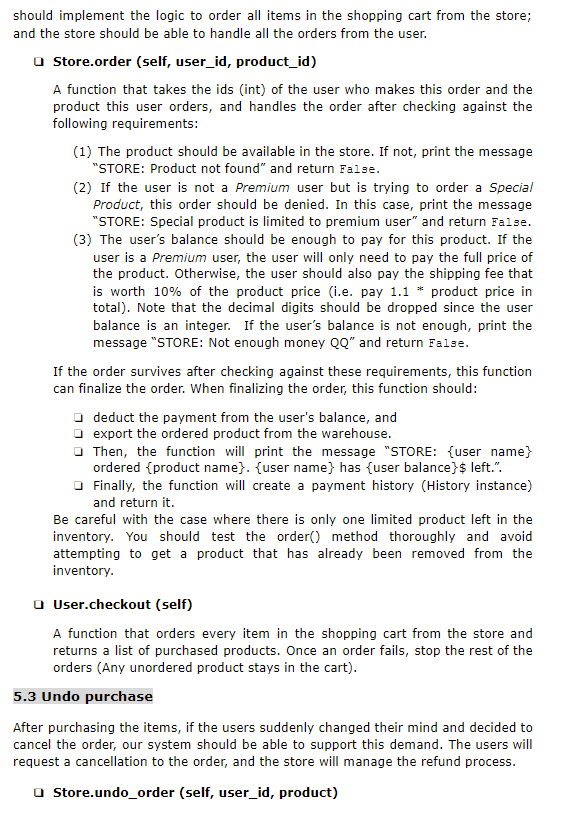
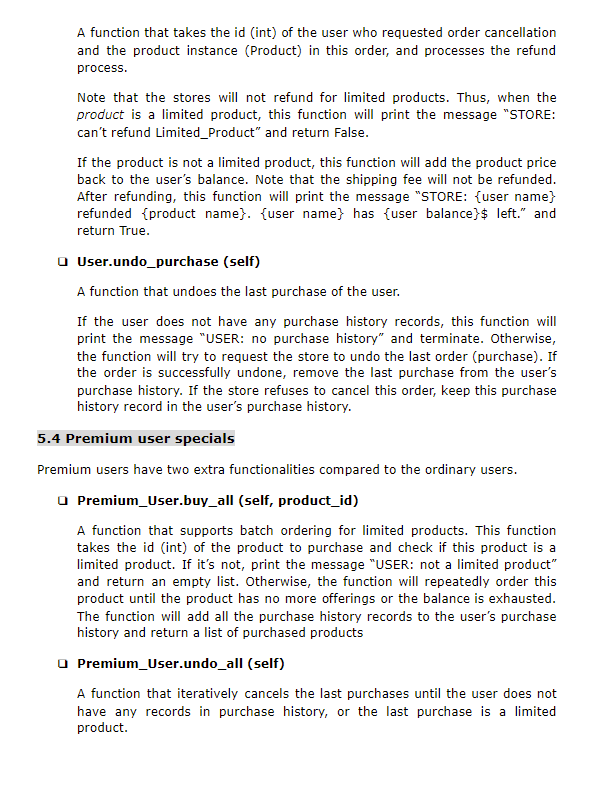
In this part, you will implement the core functionalities of this system, which involves interactions between instances of multiple classes. Unlike previous parts, methods of this part will be grouped by the functionalities, instead of the class they belong to. Therefore, when introducing each method, we will add the class name to the front (i.e. Class_name.method_name (self, args)). 5.1 User registration In the design of this system, each user instance can only interact with one store. When you are initializing the user instance, you have to provide a store instance, and the user constructor will keep this store instance as an instance attribute. However, the store instance is not aware of the new user yet. Therefore, we need to update the store instance whenever a new user is initialized. To achieve this functionality, you need to implement the following methods: O Store.add_user (self, user) A function that takes a user instance and records this instance to the users dictionary. If the user is already present in the users dictionary, print the message "STORE: User already exists" and return false. Otherwise, add this new user to the dictionary and return True. User __init__(self, name, store) Update your constructor implementation with this new feature. When a new User instance is initialized, add this instance to the users dictionary of the store it is associated with. 5.2 Purchase Suppose the users have browsed available products (through view_products() method), and have decided which products to purchase. The first thing they should do is to add the products to their shopping cart. a User.add_cart (self, product_id) A function that takes a product id (int) and adds the corresponding product to the user's shopping cart. The function will first check whether the store has this product, and if the store does have it, add this product Product) to the shopping cart. If the store cannot find the specified product, this function does nothing. Recall that the user's shopping cart is a Queue. Once the users fill the shopping cart with the products they want, the users should be able to checkout all the products. To implement this logic, we need to handle some situations on both the user side and the store side. On the user side, you should implement the logic to order all items in the shopping cart from the store; and the store should be able to handle all the orders from the user. Store.order (self, user_id, product_id) A function that takes the ids (int) of the user who makes this order and the product this user orders, and handles the order after checking against the following requirements: (1) The product should be available in the store. If not, print the message "STORE: Product not found" and return false. (2) If the user is not a Premium user but is trying to order a Special Product, this order should be denied. In this case, print the message "STORE: Special product is limited to premium user" and return False. (3) The user's balance should be enough to pay for this product. If the user is a Premium user, the user will only need to pay the full price of the product. Otherwise, the user should also pay the shipping fee that is worth 10% of the product price (i.e. pay 1.1 * product price in total). Note that the decimal digits should be dropped since the user balance is an integer. If the user's balance is not enough, print the message "STORE: Not enough money QQ" and return false. If the order survives after checking against these requirements, this function can finalize the order. When finalizing the order, this function should: deduct the payment from the user's balance, and export the ordered product from the warehouse. Then, the function will print the message "STORE: {user name} ordered {product name}. {user name} has {user balance}$ left.". Finally, the function will create a payment history (History instance) and return it. Be careful with the case where there is only one limited product left in the inventory. You should test the order() method thoroughly and avoid attempting to get a product that has already been removed from the inventory. User.checkout (self) A function that orders every item in the shopping cart from the store and returns a list of purchased products. Once an order fails, stop the rest of the orders (Any unordered product stays in the cart). 5.3 Undo purchase After purchasing the items, if the users suddenly changed their mind and decided to cancel the order, our system should be able to support this demand. The users will request a cancellation to the order, and the store will manage the refund process. Store.undo_order (self, user_id, product) A function that takes the id (int) of the user who requested order cancellation and the product instance (Product) in this order, and processes the refund process. Note that the stores will not refund for limited products. Thus, when the product is a limited product, this function will print the message "STORE: can't refund Limited_Product" and return false. If the product is not a limited product, this function will add the product price back to the user's balance. Note that the shipping fee will not be refunded. After refunding, this function will print the message "STORE: {user name} refunded {product name}. {user name} has {user balance}$ left." and return True. User.undo_purchase (self) A function that undoes the last purchase of the user. If the user does not have any purchase history records, this function will print the message "USER: no purchase history" and terminate. Otherwise, the function will try to request the store to undo the last order (purchase). If the order is successfully undone, remove the last purchase from the user's purchase history. If the store refuses to cancel this order, keep this purchase history record in the user's purchase history. 5.4 Premium user specials Premium users have two extra functionalities compared to the ordinary users. O Premium_User.buy_all (self, product_id) A function that supports batch ordering for limited products. This function takes the id (int) of the product to purchase and check if this product is a limited product. If it's not, print the message "USER: not a limited product" and return an empty list. Otherwise, the function will repeatedly order this product until the product has no more offerings or the balance is exhausted. The function will add all the purchase history records to the user's purchase history and return a list of purchased products O Premium_User.undo_all (self) A function that iteratively cancels the last purchases until the user does not have any records in purchase history, or the last purchase is a limited product
Step by Step Solution
There are 3 Steps involved in it

Get step-by-step solutions from verified subject matter experts
 Study Help