







Question: Use RATE Function in MS Excel X ? X Sis, FILE HOME of Arial Calculating rates of return - Excel FORMULAS DATA REVIEW - Sign
Use RATE 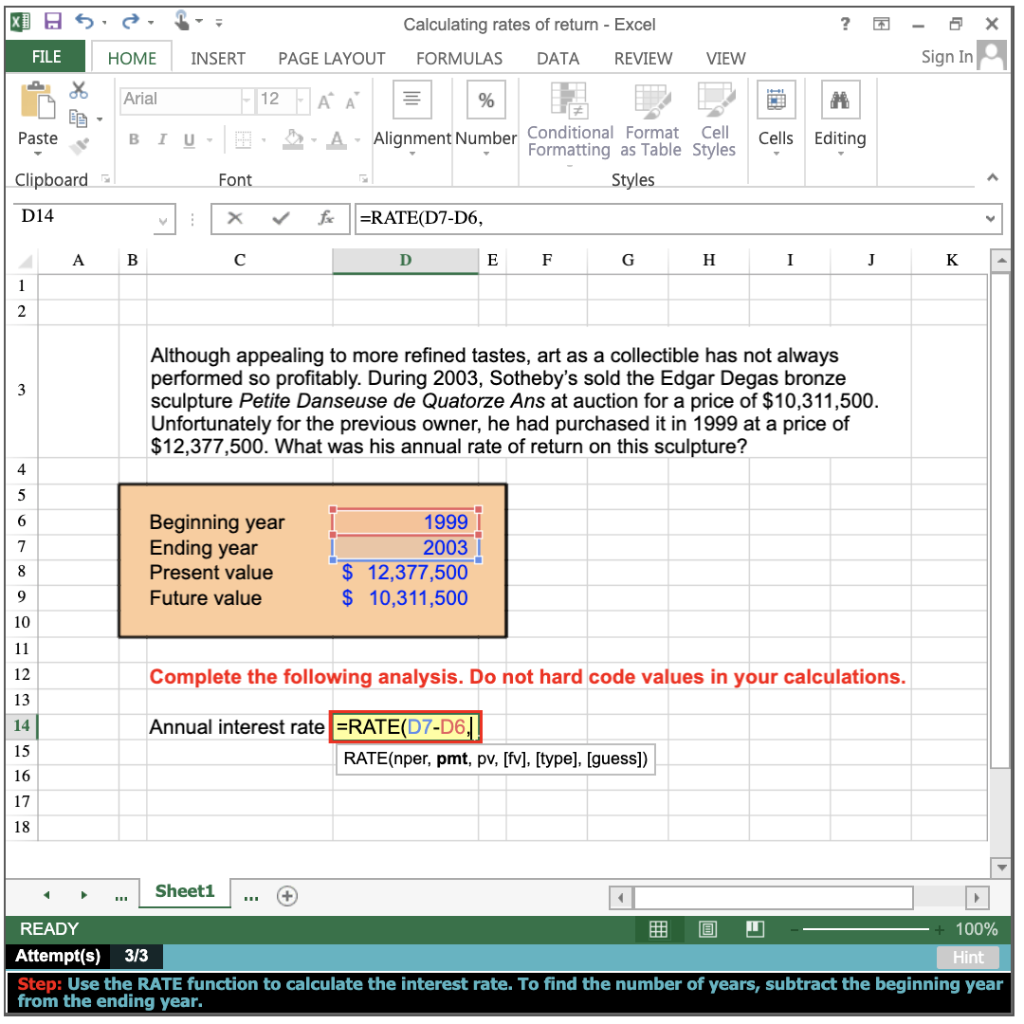 Function in MS Excel
X ? X Sis, FILE HOME of Arial Calculating rates of return - Excel FORMULAS DATA REVIEW - Sign In INSERT PAGE LAYOUT VIEW Paste B IU . Cells Editing Clipboard Font - A Alignment Number Conditional Format Cell Formatting as Table Styles Styles fc =RATE(D7-D6, D E F G H D14 x v v B A C I J K A Although appealing to more refined tastes, art as a collectible has not always performed so profitably. During 2003, Sotheby's sold the Edgar Degas bronze sculpture Petite Danseuse de Quatorze Ans at auction for a price of $10,311,500. Unfortunately for the previous owner, he had purchased it in 1999 at a price of $12,377,500. What was his annual rate of return on this sculpture? Beginning year Ending year Present value Future value 1999 1 2003 $ 12,377,500 $ 10,311,500 Complete the following analysis. Do not hard code values in your calculations. Annual interest rate =RATE(D7-D6,11 RATE(nper, pmt, pv, [fv], [type], [guess]) ... Sheet1 ... + READY + 100% Attempt(s) 3/3 Hint Step: Use the RATE function to calculate the interest rate. To find the number of years, subtract the beginning year from the ending year
Step by Step Solution
There are 3 Steps involved in it

Get step-by-step solutions from verified subject matter experts
 Study Help