







Question: Use SQL Workbench. Module 6 KimTay Pet Supplies. 1. Create a NONCAT table with the structure shown in FIgure 6-28. (Picture Below) 2. Insert into
Use SQL Workbench. Module 6 KimTay Pet Supplies.
1. Create a NONCAT table with the structure shown in FIgure 6-28. (Picture Below)
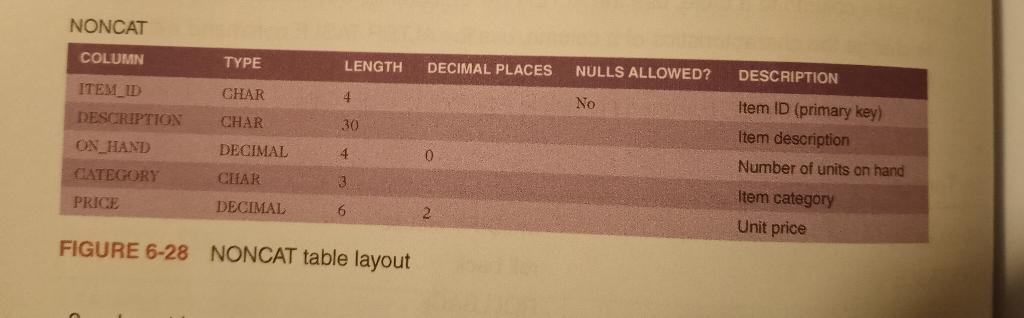 2. Insert into the NONCAT table the item ID, Description, number of units on hand, category, and unit price from the ITEM table for each item that is not in category CAT.
3. In the NONCAT table, change the description of item ID DT12 to "Dog Toy Gift Bonanza."
4. In the NONCAT table, increase the price of each item in category BRD by 5 percent. (Hint: Multiply each price by 1.05.)
5. Add the following item to the NONCAT table: item ID: FF17; description: Premium Fish Food; number of units on hand: 10; category: FSH; and price: 11.95.
NONCAT FIGURE 6-28 NONCAT table layout
Step by Step Solution
There are 3 Steps involved in it

Get step-by-step solutions from verified subject matter experts
 Study Help