





Question: Use the Conditional Formatting button on the Home tab on the Ribbon to add a pointer that shows the row that equates the years in

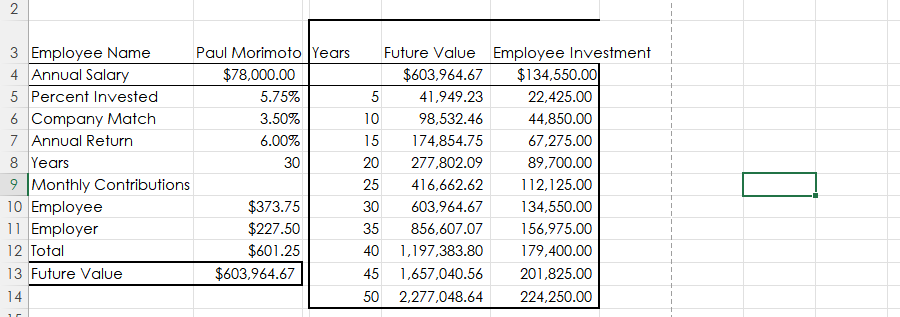
Use the Conditional Formatting button on the Home tab on the Ribbon to add a pointer that shows the row that equates the years in C8 to the Years column in the data table. Use a red fill color and a while font color for the pointer.

Thank you for your help!
Use the Conditional Formatting button on the Home

2 3 Employee Name 4 Annual Salary 5 Percent Invested 6 Company Match 7 Annual Return 8 Years 9 Monthly Contributions 10 Employee 11 Employer 12 Total 13 Future Value 14 Paul Morimoto Years $78,000.00 5.75% 3.50% 6.00% 30 $373.75 $227.50 $601.25 $603,964.67 Future Value Employee Investment $603,964.67 $134,550.00 5 41,949.23 22,425.00 10 98,532.46 44,850.00 15 174,854.75 67,275.00 20 277,802.09 89,700.00 25 416,662.62 112,125.00 30 603,964.67 134,550.00 35 856,607.07 156,975.00 40 1,197,383.80 179,400.00 45 1,657,040.56 201,825.00 50 2,277,048.64 224,250.00

Step by Step Solution

There are 3 Steps involved in it

1 Expert Approved Answer
Step: 1 Unlock blur-text-image

Question Has Been Solved by an Expert!

Get step-by-step solutions from verified subject matter experts

Step: 2 Unlock
Step: 3 Unlock

Students Have Also Explored These Related General Management Questions!