







Question: Use the excel vlookup function to fill out the data table in column E. Give the top cell the correct relative and absolute references so
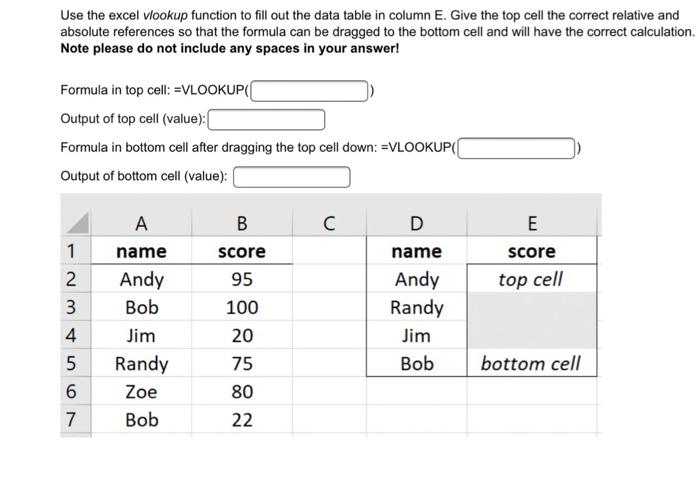
Use the excel vlookup function to fill out the data table in column E. Give the top cell the correct relative and absolute references so that the formula can be dragged to the bottom cell and will have the correct calculation. Note please do not include any spaces in your answer! Formula in top cell: =VLOOKUP( Output of top cell (value): Formula in bottom cell after dragging the top cell down: =VLOOKUP(( Output of bottom cell (value): B E score top cell 1 2 3 4 5 6 7 A name Andy Bob Jim Randy Zoe Bob score 95 100 20 75 80 22 D name Andy Randy Jim Bob bottom cell
Step by Step Solution
There are 3 Steps involved in it
1 Expert Approved Answer
Step: 1 Unlock

Question Has Been Solved by an Expert!
Get step-by-step solutions from verified subject matter experts
Step: 2 Unlock
Step: 3 Unlock
 Study Help