







Question: Use the Flowchart to write VBA code for the Sub named Degrees so that it converts Farenheit into Celcius. The Sub should run when you
Use the Flowchart to write VBA code for the Sub named Degrees so that it converts Farenheit into Celcius. The Sub should run when you click the button that's says Convert (so, you'll need to assign it to the macro). If no value is entered into B4, then a message box should pop up that says "Farenheit missing." Your code should delete the contents of cell B5 before running the calculation so that when farenheit is missing it returns no value. Please use the variable names shown in the flowchart (F and C). Farenheight and Celcius should both be declared as variable types that can handle decimals. You cannot use worksheet functions for this problem. Comment your code so that it is easy for a grader to follow. Points may be deducted if there are no comments
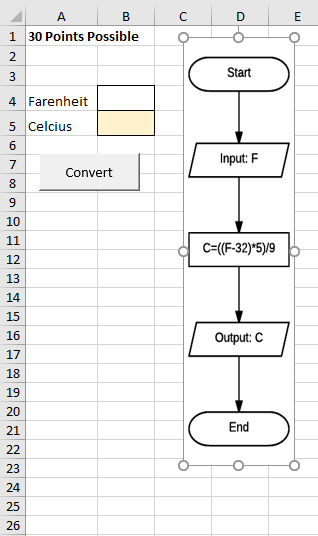
1 30 Points Possible 4 Farenheit 5 Celcius Input: F Convert 10 C ((F-32)*5)/9 12 13 15 16 17 Output: C 19 20 End 26
Step by Step Solution
There are 3 Steps involved in it

Get step-by-step solutions from verified subject matter experts
 Study Help