



Question: Use the following Excel output to answer the question. Microsoft Excel 16.41 Answer Report Worksheet: (Book2jSheet1 Objective Cell (Min) Original Value Cell Final Value Name
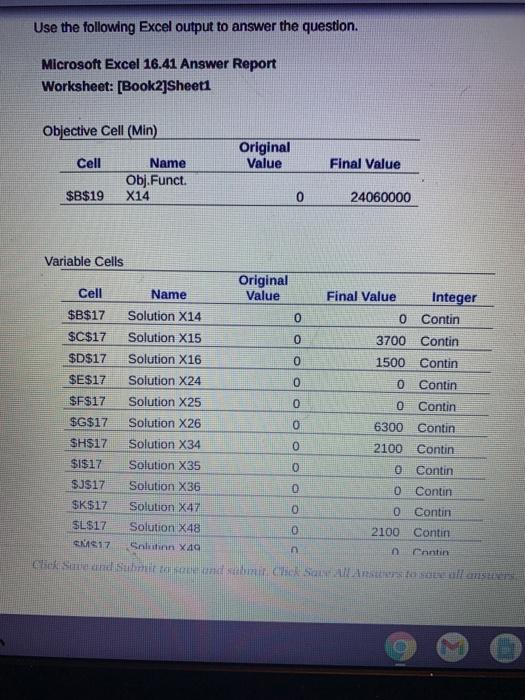
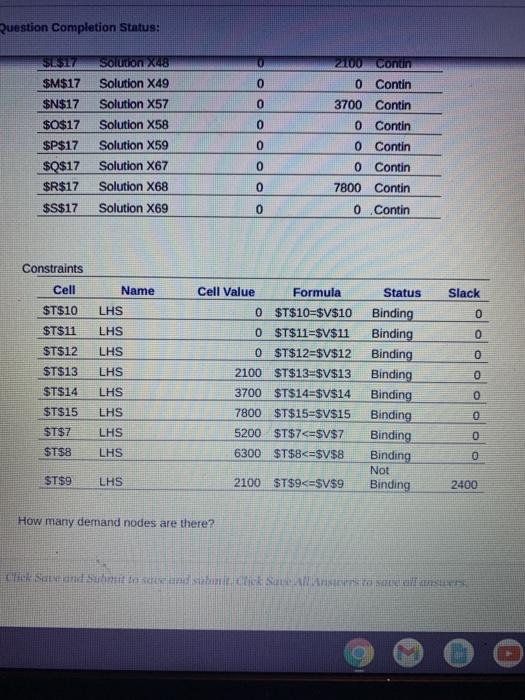
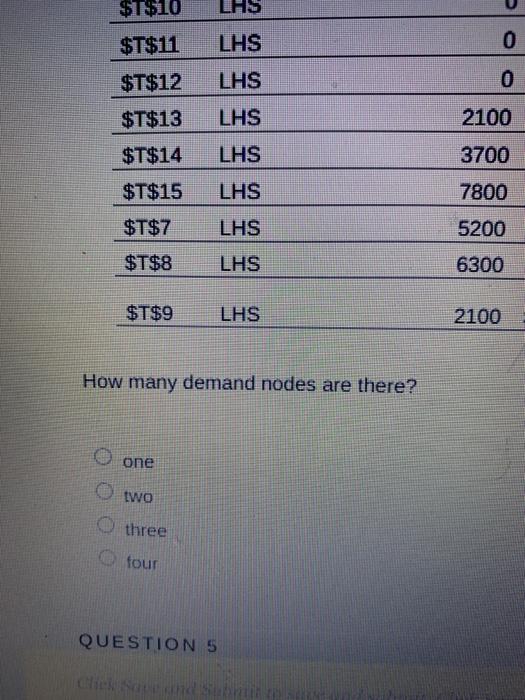
Use the following Excel output to answer the question. Microsoft Excel 16.41 Answer Report Worksheet: (Book2jSheet1 Objective Cell (Min) Original Value Cell Final Value Name Obj.Funct. X14 $B$19 0 24060000 Variable Cells Original Cell Name Value Final Value Integer $B$17 Solution X14 0 0 Contin $C$17 Solution X15 0 3700 Contin $D$17 Solution X16 0 1500 Contin $E$17 Solution X24 0 0 Contin $F$17 Solution X25 0 0 Contin $G$17 Solution X26 0 6300 Contin SH$17 Solution X34 0 2100 Contin $1$17 Solution X35 0 Contin $J$17 Solution X36 0 Contin $K$17 Solution X47 0 Contin SL$17 Solution X48 0 2100 Contin N17 Salon X4 Cantin Click Save and submit and Saras Question Completion Status: S7 Solution X48 0 21100 Contin 0 $M$17 $N$17 $0$17 0 0 Solution X49 Solution X57 Solution X58 Solution X59 Solution X67 Solution X68 Solution X69 0 Contin 3700 Contin O Contin 0 Contin 0 Contin 7800 Contin $P$17 $0$17 $R$17 0 0 0 $S$17 0 0 Contin Constraints Cell Slack Cell Value Formula 0 $T$10-$V$10 Name LHS LHS $T$10 $T$11 0 0 $T$12 LHS LHS 0 0 $T$11=$V$11 0 $T$12=$V$12 2100 $T$13-$V$13 0 ST$13 $T$14 LHS Status Binding Binding Binding Binding Binding Binding Binding Binding Not Binding $T$15 3700 $T$14=$V$14 7800 $T$15=$V$15 5200 $T$7
Step by Step Solution
There are 3 Steps involved in it

Get step-by-step solutions from verified subject matter experts