







Question: Use the fprintf function to display the unit conversions as shown in the following table. Follow the example shown in the top row of the
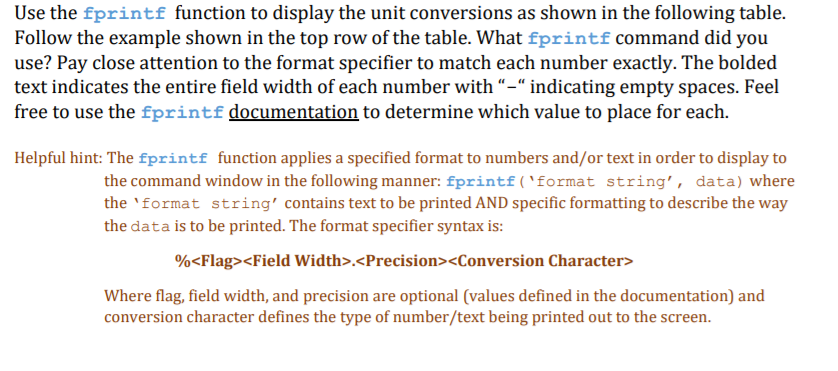
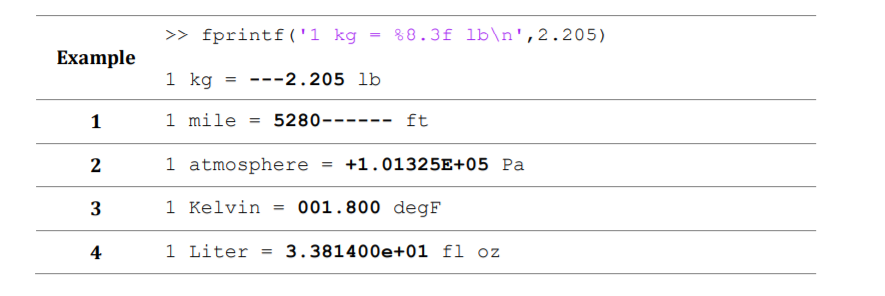
Use the fprintf function to display the unit conversions as shown in the following table. Follow the example shown in the top row of the table. What fprintf command did you use? Pay close attention to the format specifier to match each number exactly. The bolded text indicates the entire field width of each number with "-" indicating empty spaces. Feel free to use the fprintf documentation to determine which value to place for each. you tt to bw in The Helpful hint: The fprintf function applies a specified format to numbers and/or text in order to display to the command window in the following manner: fprintf ('format string', data) where the 'format string' contains text to be printed AND specific formatting to describe the way the data is to be printed. The format specifier syntax is %
Step by Step Solution
There are 3 Steps involved in it

Get step-by-step solutions from verified subject matter experts
 Study Help