





Question: Use the free google analytics application. Add 'segments to the existing Google Analytics for Google Merchandise Store reports to answer the following questions with clear'
Use the free google analytics application. AddUse the free google analytics application. AddUse the free google analytics application.

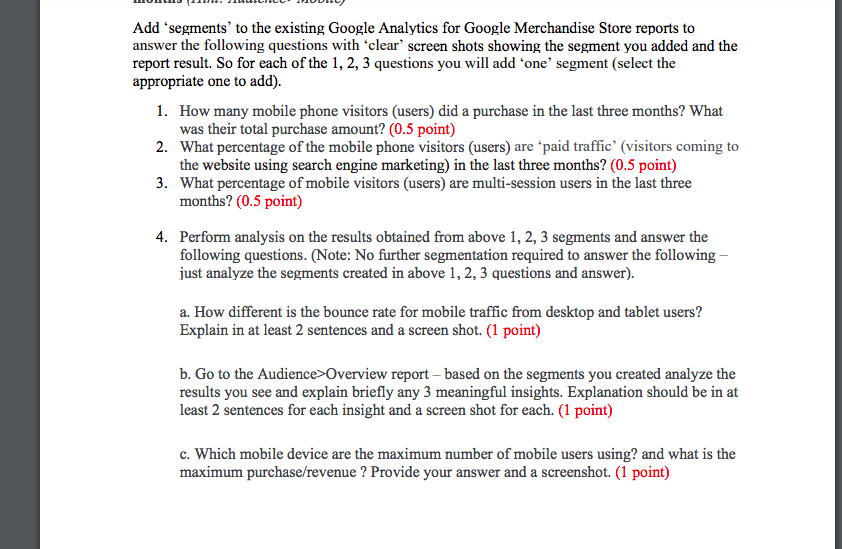
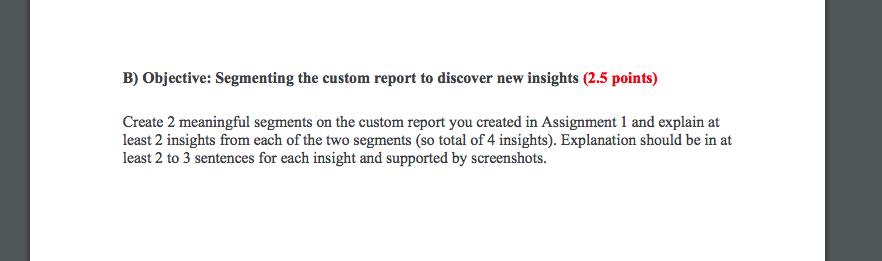
Add 'segments to the existing Google Analytics for Google Merchandise Store reports to answer the following questions with clear' screen shots showing the segment you added and the report result. So for each of the 1, 2, 3 questions you will add 'one' segment (select the appropriate one to add). 1. How many mobile phone visitors (users) did a purchase in the last three months? What was their total purchase amount? (0.5 point) 2. What percentage of the mobile phone visitors (users) are paid traffic' (visitors coming to the website using search engine marketing) in the last three months? (0.5 point) 3. What percentage of mobile visitors (users) are multi-session users in the last three months? (0.5 point) 4. Perform analysis on the results obtained from above 1, 2, 3 segments and answer the following questions. (Note: No further segmentation required to answer the following - just analyze the segments created in above 1, 2, 3 questions and answer). a. How different is the bounce rate for mobile traffic from desktop and tablet users? Explain in at least 2 sentences and a screen shot. (1 point) b. Go to the Audience> Overview report based on the segments you created analyze the results you see and explain briefly any 3 meaningful insights. Explanation should be in at least 2 sentences for each insight and a screen shot for each. (1 point) c. Which mobile device are the maximum number of mobile users using? and what is the maximum purchase/revenue ? Provide your answer and a screenshot. (1 point) B) Objective: Segmenting the custom report to discover new insights (2.5 points) Create 2 meaningful segments on the custom report you created in Assignment 1 and explain at least 2 insights from each of the two segments (so total of 4 insights). Explanation should be in at least 2 to 3 sentences for each insight and supported by screenshots. Add 'segments to the existing Google Analytics for Google Merchandise Store reports to answer the following questions with clear' screen shots showing the segment you added and the report result. So for each of the 1, 2, 3 questions you will add 'one' segment (select the appropriate one to add). 1. How many mobile phone visitors (users) did a purchase in the last three months? What was their total purchase amount? (0.5 point) 2. What percentage of the mobile phone visitors (users) are paid traffic' (visitors coming to the website using search engine marketing) in the last three months? (0.5 point) 3. What percentage of mobile visitors (users) are multi-session users in the last three months? (0.5 point) 4. Perform analysis on the results obtained from above 1, 2, 3 segments and answer the following questions. (Note: No further segmentation required to answer the following - just analyze the segments created in above 1, 2, 3 questions and answer). a. How different is the bounce rate for mobile traffic from desktop and tablet users? Explain in at least 2 sentences and a screen shot. (1 point) b. Go to the Audience> Overview report based on the segments you created analyze the results you see and explain briefly any 3 meaningful insights. Explanation should be in at least 2 sentences for each insight and a screen shot for each. (1 point) c. Which mobile device are the maximum number of mobile users using? and what is the maximum purchase/revenue ? Provide your answer and a screenshot. (1 point) B) Objective: Segmenting the custom report to discover new insights (2.5 points) Create 2 meaningful segments on the custom report you created in Assignment 1 and explain at least 2 insights from each of the two segments (so total of 4 insights). Explanation should be in at least 2 to 3 sentences for each insight and supported by screenshots

Step by Step Solution

There are 3 Steps involved in it

1 Expert Approved Answer
Step: 1 Unlock blur-text-image

Question Has Been Solved by an Expert!

Get step-by-step solutions from verified subject matter experts

Step: 2 Unlock
Step: 3 Unlock

Students Have Also Explored These Related General Management Questions!