







Question: Use the given starter code to create a program that displays what God created on a given day of the first week of creation. The
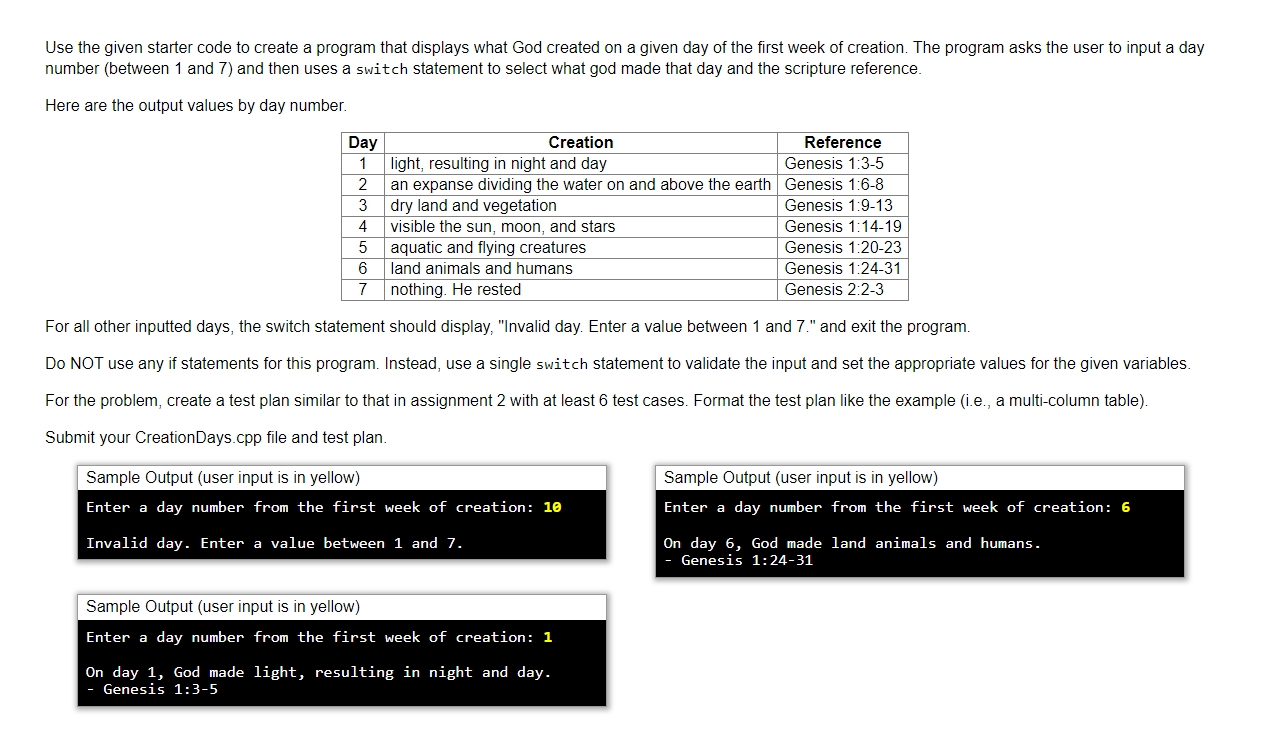
Use the given starter code to create a program that displays what God created on a given day of the first week of creation. The program asks the user to input a day
number between and and then uses a switch statement to select what god made that day and the scripture reference.
Here are the output values by day number.
For all other inputted days, the switch statement should display, "Invalid day. Enter a value between and and exit the program.
Do NOT use any if statements for this program. Instead, use a single switch statement to validate the input and set the appropriate values for the given variables.
For the problem, create a test plan similar to that in assignment with at least test cases. Format the test plan like the example ie a multicolumn table
Submit your CreationDays.cpp file and test plan.
Sample Output user input is in yellow
Enter a day number from the first week of creation:
Invalid day. Enter a value between and
Sample Output user input is in yellow
Enter a day number from the first week of creation:
On day God made light, resulting in night and day.
Genesis :
Step by Step Solution
There are 3 Steps involved in it
1 Expert Approved Answer
Step: 1 Unlock

Question Has Been Solved by an Expert!
Get step-by-step solutions from verified subject matter experts
Step: 2 Unlock
Step: 3 Unlock
 Study Help