







Question: Use the korn shell for this project. Using the select command from the korn shell, write a menu driven script that calls your trash script
Use the korn shell for this project. Using the select command from the korn shell, write a menu driven script that calls your trash script from Project 4 in the following manner:
Menu item 1 calls trash l
Menu item 2 calls trashp
Menu item 3 asks the user for a file or a list of files, and calls trash sending those files.
Menu item 4 should exit the script.
Do not have a menu item for the empty string.
Be careful of your trash scripts location and permissions of the trash folder and the trash script. I must be able to access and run the trash script and create the trash folder. For the menu script to access your trash script, you will need to include the path to your trash script in each call in the menu script. You will also need to have your trash script in an accessible directory.
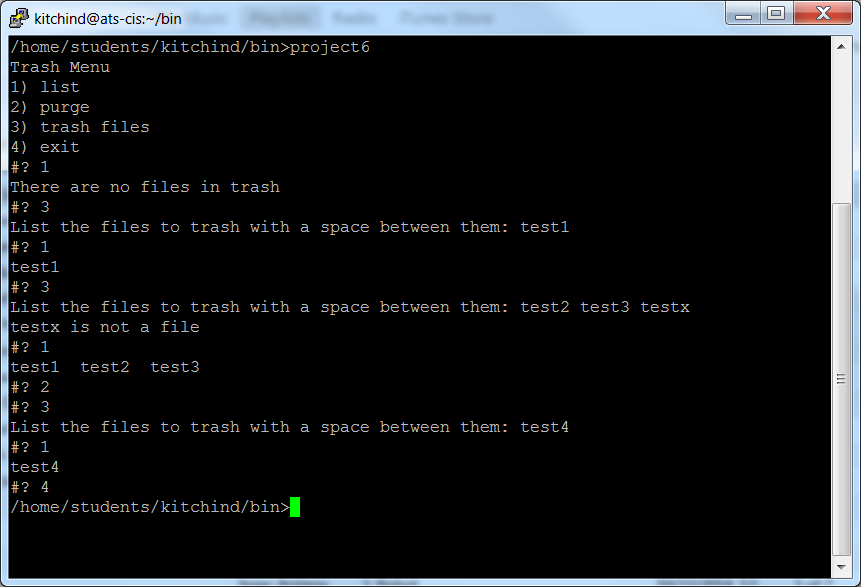
kitchind@ats-cis:~/bin /home/students/kitchind/bin>project6 Trash Menu 1) list 2) purge 3) trash files 4) exit #? 1 There are no files in trash #? 3 List the files to trash with a space between them: testl #? 1 testl #? 3 List the files to trash with a space between them: test2 test3 testx testx is not a file #? 1 testl test2 test3 #? 2 #? 3 List the files to trash with a space between them: test4 #? 1 test4 #? 4 home/students/kitchind/bin
Step by Step Solution
There are 3 Steps involved in it

Get step-by-step solutions from verified subject matter experts
 Study Help