



Question: Use the process description below to draw a model of the ICT helpdesk process in Signavio and run the simulation using the setup explained after
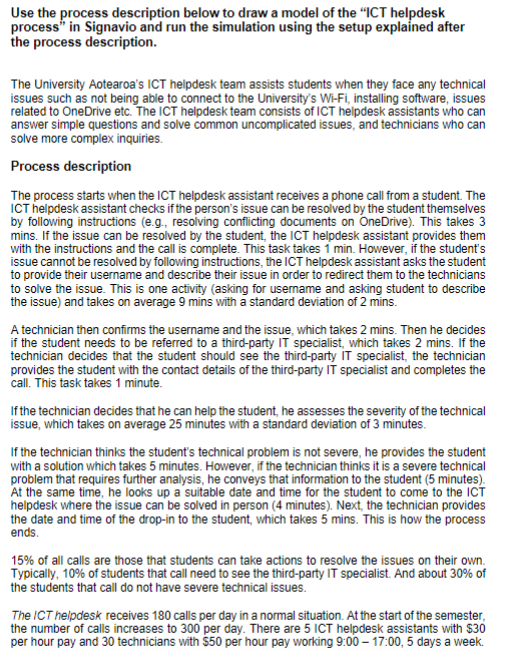
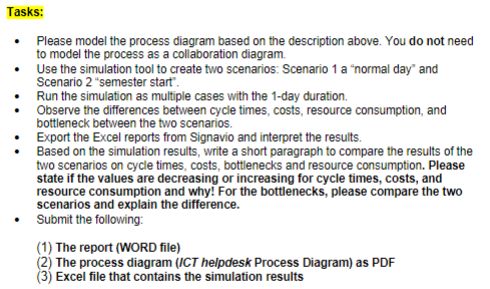
Use the process description below to draw a model of the "ICT helpdesk process" in Signavio and run the simulation using the setup explained after the process description. The University Aotearoa's ICT helpdesk team assists students when they face any technical issues such as not being able to connect to the University's Wi-Fi, installing software, issues related to OneDrive etc. The ICT helpdesk team consists of ICT helpdesk assistants who can answer simple questions and solve common uncomplicated issues, and technicians who can solve more complex inquiries. Process description The process starts when the ICT helpdesk assistant receives a phone call from a student. The ICT helpdesk assistant checks if the person's issue can be resolved by the student themselves by following instructions (e.g., resolving conflicting documents on OneDrive). This takes 3 mins. If the issue can be resolved by the student, the ICT helpdesk assistant provides them with the instructions and the call is complete. This task takes 1 min. However, if the student's issue cannot be resolved by following instructions, the ICT helpdesk assistant asks the student to provide their username and describe their issue in order to redirect them to the technicians to solve the issue. This is one activity (asking for username and asking student to describe the issue) and takes on average 9 mins with a standard deviation of 2 mins. A technician then confirms the username and the issue, which takes 2 mins. Then he decides if the student needs to be referred to a third-party IT specialist, which takes 2 mins. If the technician decides that the student should see the third-party IT specialist, the technician provides the student with the contact details of the third-party IT specialist and completes the call. This task takes 1 minute. If the technician decides that he can help the student, he assesses the severity of the technical issue, which takes on average 25 minutes with a standard deviation of 3 minutes. If the technician thinks the student's technical problem is not severe, he provides the student with a solution which takes 5 minutes. However, if the technician thinks it is a severe technical problem that requires further analysis, he conveys that information to the student ( 5 minutes). At the same time, he looks up a suitable date and time for the student to come to the ICT helpdesk where the issue can be solved in person ( 4 minutes). Next, the technician provides the date and time of the drop-in to the student, which takes 5 mins. This is how the process ends. 15% of all calls are those that students can take actions to resolve the issues on their own. Typically, 10% of students that call need to see the third-party IT specialist. And about 30% of the students that call do not have severe technical issues. The ICT helpdesk receives 180 calls per day in a normal situation. At the start of the semester, the number of calls increases to 300 per day. There are 5 ICT helpdesk assistants with $30 per hour pay and 30 technicians with $50 per hour pay working 9:0017:00,5 days a week. - Please model the process diagram based on the description above. You do not need to model the process as a collaboration diagram. - Use the simulation tool to create two scenarios: Scenario 1 a "normal day" and Scenario 2 "semester start". - Run the simulation as multiple cases with the 1-day duration. - Observe the differences between cycle times, costs, resource consumption, and bottleneck between the two scenarios. - Export the Excel reports from Signavio and interpret the results. - Based on the simulation results, write a short paragraph to compare the results of the two scenarios on cycle times, costs, bottlenecks and resource consumption. Please state if the values are decreasing or increasing for cycle times, costs, and resource consumption and why! For the bottlenecks, please compare the two scenarios and explain the difference. - Submit the following: (1) The report (WORD file) (2) The process diagram (ICT helpdesk Process Diagram) as PDF (3) Excel file that contains the simulation results
Step by Step Solution
There are 3 Steps involved in it

Get step-by-step solutions from verified subject matter experts