





Question: Use the Work Breakdown Structure (WBS) you previously developed and submitted to create a Gantt chart for the project using Microsoft Project 2016 that you

Use the Work Breakdown Structure (WBS) you previously developed and submitted to create a Gantt chart for the project using Microsoft Project 2016 that you downloaded from the Azure Education Site. The tasks in MS Project need to match those that you listed in your WBS. Use the end of this semester as your start date. Make sure you enter duration's and any dependencies for your individual tasks.
Use the Work Breakdown Structure (WBS) you

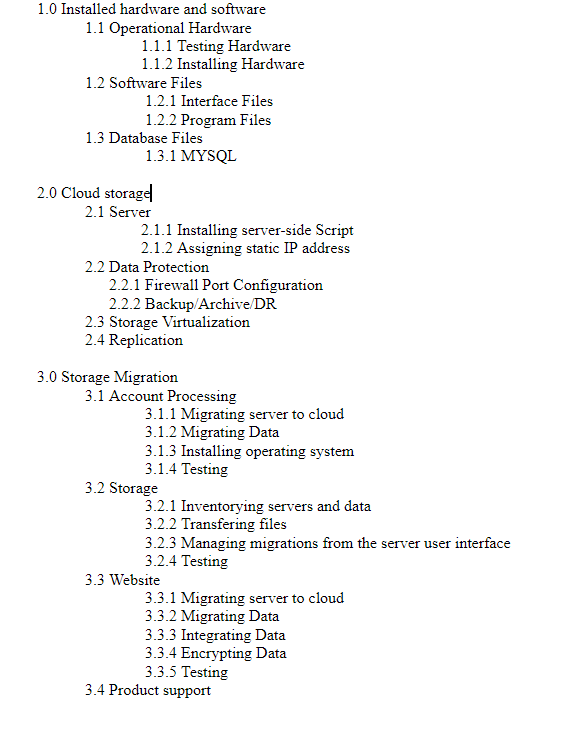
1.0 Installed hardware and software 1.1 Operational Hardware 1.1.1 Testing Hardware 1.1.2 Installing Hardware 1.2 Software Files 1.2.1 Interface Files 1.2.2 Program Files 1.3 Database Files 1.3.1 MYSQL 2.0 Cloud storage 2.1 Server 2.1.1 Installing server-side Script 2.1.2 Assigning static IP address 2.2 Data Protection 2.2.1 Firewall Port Configuration 2.2.2 Backup Archive DR 2.3 Storage Virtualization 2.4 Replication 3.0 Storage Migration 3.1 Account Processing 3.1.1 Migrating server to cloud 3.1.2 Migrating Data 3.1.3 Installing operating system 3.1.4 Testing 3.2 Storage 3.2.1 Inventorying servers and data 3.2.2 Transfering files 3.2.3 Managing migrations from the server user interface 3.2.4 Testing 3.3 Website 3.3.1 Migrating server to cloud 3.3.2 Migrating Data 3.3.3 Integrating Data 3.3.4 Encrypting Data 3.3.5 Testing 3.4 Product support

Step by Step Solution

There are 3 Steps involved in it

1 Expert Approved Answer
Step: 1 Unlock blur-text-image

Question Has Been Solved by an Expert!

Get step-by-step solutions from verified subject matter experts

Step: 2 Unlock
Step: 3 Unlock

Students Have Also Explored These Related General Management Questions!