







Question: use this code to continue #include #include #include Date.h using namespace std; int getMenuChoice() { int option; cout > option; cout > month; cout >
 use this code to continue
#include#include "Date.h" using namespace std; int getMenuChoice() { int option; cout > option; cout > month; cout > day; cout > year; date.setYear(year); date.setMonth(month); date.setDay(day); break; case 2: cout > monthName; cout > day; cout > year; date.setYear(year); date.convertFromMonthName(monthName); date.setDay(day); break; } string date1 = date.toMonthDayYear(); string date2 = date.toMonthNameDate(); cout
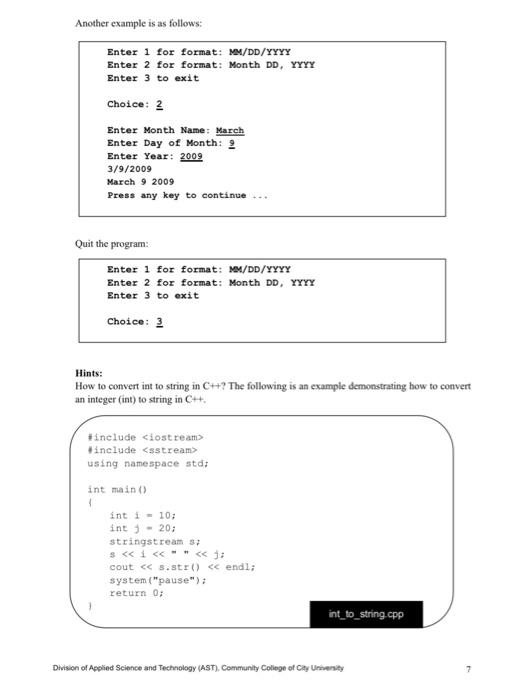
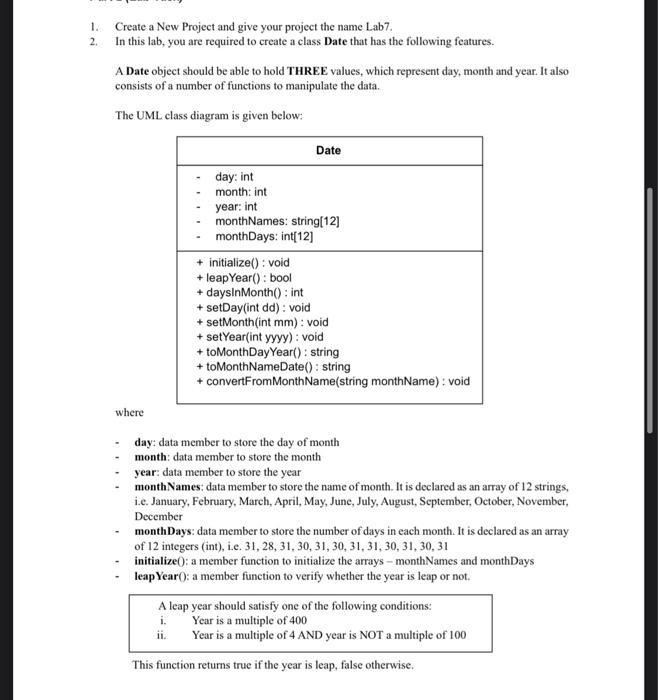
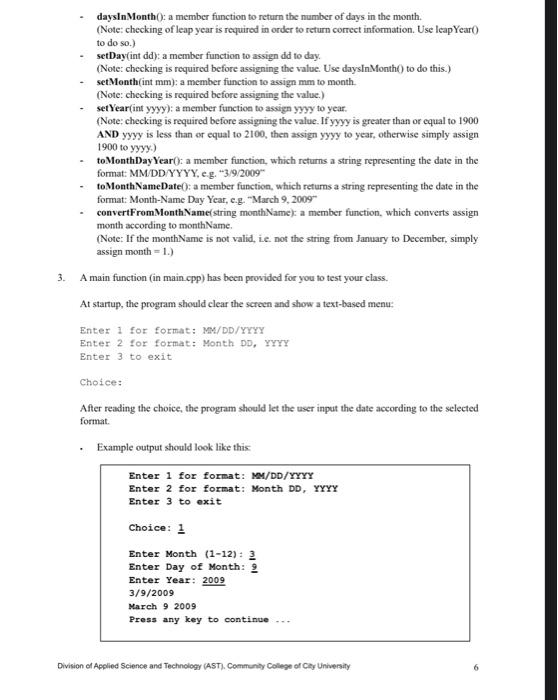
1. 2. Create a New Project and give your project the name Lab7. In this lab, you are required to create a class Date that has the following features. A Date object should be able to hold THREE values, which represent day, month and year. It also consists of a number of functions to manipulate the data. The UML class diagram is given below: Date day: int month: int year: int monthNames: string[12] monthDays: int[12] + initialize(): void + leap Year(): bool + daysInMonth(): int + setDay(int dd): void + setMonth(int mm): void + setYear(int yyyy): void +toMonth Day Year(): string + to MonthNameDate(): string + convertFrom MonthName(string monthName): void where day: data member to store the day of month month: data member to store the month year: data member to store the year monthNames: data member to store the name of month. It is declared as an array of 12 strings, i.e. January, February March April May June July, August, September October, November, December monthDays: data member to store the number of days in each month. It is declared as an array of 12 integers (int), i.e. 31, 28, 31, 30, 31, 30, 31, 31, 30, 31, 30,31 initialize(): a member function to initialize the arrays - monthNames and monthDays leap Year(): a member function to verify whether the year is leap or not. A leap year should satisfy one of the following conditions: i. Year is a multiple of 400 ii. Year is a multiple of 4 AND year is NOT a multiple of 100 This function returns true if the year is leap, false otherwise, daysInMonth(): a member function to return the number of days in the month. (Note: checking of leap year is required in order to return correct information. Use leap Year) to do so.) setDay(int dd): a member function to assign dd to day (Note: checking is required before assigning the value. Use daysInMonth) to do this.) - set Month(int mm): a member function to assign mm to month. (Note: checking is required before assigning the value.) - set Year(int yyyy): a member function to assign yyyy to year. (Note: checking is required before assigning the value. If yyyy is greater than or equal to 1900 AND yyyy is less than or equal to 2100, then assign yyyy to year, otherwise simply assign 1900 to yyyy.) - to Month Day Year(): a member function, which returns a string representing the date in the format: MM/DD/YYYY, eg. *3/9/2009 .toMonthNameDate(): a member function, which returns a string representing the date in the format: Month-Name Day Year, c.g. "March 9, 2009 convertFrom MonthName string monthName} a member function, which converts assign month according to monthName (Note: If the monthName is not valid, i.e. not the string from January to December, simply assign month= 1.) 3. A main function (in main.cpp) has been provided for you to test your class. At startup, the program should clear the screen and show a text-based menu: Enter 1 for format: MM/DD/YYYY Enter 2 for format: Month DD, YYYY Enter 3 to exit Choice: After reading the choice, the program should let the user input the date according to the selected format. Example output should look like this Enter 1 for format: MM/DD/YYYY Enter 2 for format: Month DD, YYYY Enter 3 to exit Choice: 1 Enter Month (1-12): 3 Enter Day of Month: 2 Enter Year: 2009 3/9/2009 March 9 2009 Press any key to continue Division of Applied Science and Technology (AST). Community College of City University Another example is as follows: Enter 1 for format: M/DD/YYYY Enter 2 for format: Month DD, YYYY Enter 3 to exit Choice: 2 Enter Month Name : March Enter Day of Month: 2 Enter Year: 2009 3/9/2009 March 9 2009 Press any key to continue Quit the program: Enter 1 for format: M/DD/YYYY Enter 2 for format: Month DD, YYYY Enter 3 to exit Choice: 2 Hints: How to convert int to string in Ch? The following is an example demonstrating how to convert an integer (int) to string in C++ #include
Step by Step Solution
There are 3 Steps involved in it

Get step-by-step solutions from verified subject matter experts
 Study Help