







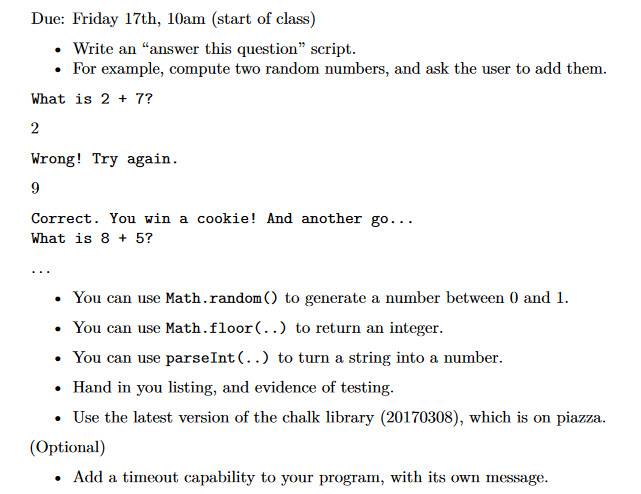
Question: Use this library: var chalk = { print: function(str) { $(#chalk).append(str.replace(/&/g, '&') .replace(/, '/g, '>')); }, newline: function() { $(#chalk).append( ); }, hr: function() {
Use this library:
var chalk = { print: function(str) { $("#chalk").append(str.replace(/&/g, '&') .replace(/, '/g, '>')); }, newline: function() { $("#chalk").append("
"); }, hr: function() { $("#chalk").append("
"); }, println: function(str) { chalk.print(str); chalk.newline(); }, canvas: function(w,h) { var canvas = $(""); $("#chalk").append(canvas); $("#chalk").append("
"); canvas.css("border","1pt solid black"); canvas.css("background","white"); canvas.attr("width",w); canvas.attr("height",h); return canvas[0].getContext("2d"); }, entrybox: function() { return new Promise(function (fulfill, reject){ var input = $(""); $("#chalk").append(input); $("#chalk").append("
"); input.attr("size",72); input.css("color","red"); input.focus(); input.on('keyup',function(e) { if (e.keyCode == 13) { input.off(); var str = input.val(); input.attr("disabled",true); input.css("color","gray"); input.css("background","#f8f8f8"); fulfill(str); } if (e.keyCode == 27) { input.off(); var str = input.val(); input.attr("disabled",true); input.css("color","gray"); input.css("background","#FF8800"); reject(str); } }); }) }, delay: function(time) { return new Promise(function (fulfill) { setTimeout(fulfill, time); }); } } // Do this when document is ready $(function(){ $("#chalk").css("border","solid black 1px"); $("#chalk").css("background","#eeeeee"); main(); }); Due: Friday 17th, 10am (start of class) Write an "answer this question" script. For example, compute two random numbers, and ask the user to add them What is 2 7? wrong! Try again Correct You win a cookie And another go What is 8 5? You can use Math.random C) to generate a number between 0 and 1. You can use Math.floor(..) to return an integer. You can use parselnt to turn a string into a number Hand in you listing, and evidence of testing. Use the latest version of the chalk library (20170308), which is on piazza. (Optional) Add a timeout capability to your program, with its own message
Step by Step Solution
There are 3 Steps involved in it
1 Expert Approved Answer
Step: 1 Unlock

Question Has Been Solved by an Expert!
Get step-by-step solutions from verified subject matter experts
Step: 2 Unlock
Step: 3 Unlock
 Study Help