







Question: Use this seed code to complete the code for a digital on/off control system using an FRDM-KL25Z mBed //Reads input through the ADC, and transfers
Use this seed code to complete the code for a digital on/off control system using an FRDM-KL25Z mBed
//Reads input through the ADC, and transfers to PC terminal
#include "mbed.h"
#include
AnalogIn AI_in(PTB0); // AI analog in pin
DigitalOut myled(LED1);// ON digital out pin
float AI; // data type is floating for AI_in variable
int loopcounter = 1;
string status = "undefined";
int main()
{
while(1) // run indefinitely
{
{
AI = AI_in; //reassign as a floating value
//cout
AI = AI * 1000; // Multiply by 1000
//cout
if (AI > 500)
{
myled = 1;
status = "OFF";
//cout
//wait (1.0);
}
else
{
myled = 0;
status = "ON";
//cout
//wait (1.0);
}
loopcounter = loopcounter + 1;
}
if (loopcounter == 10000)
{cout
cout
cout
loopcounter = 1;}
}
}
Use this seed code to complete the code for a digital on/off control system using an FRDM-KL25Z mBed
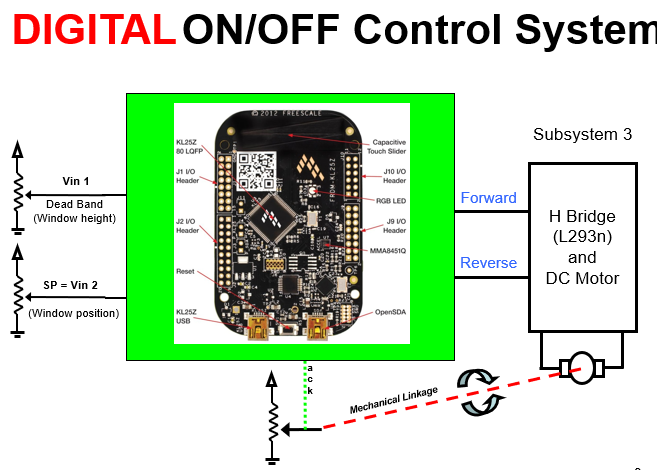
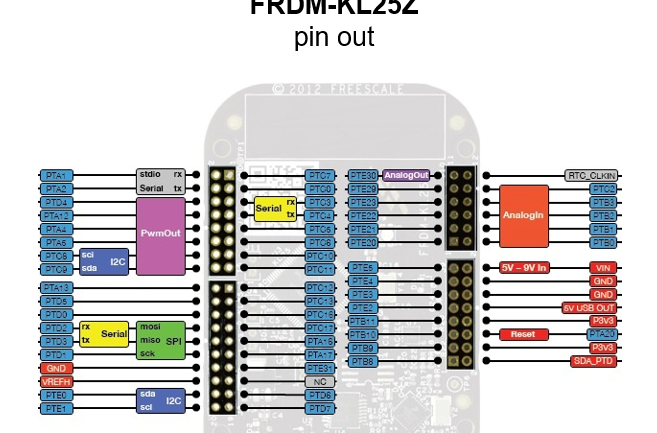
DIGITALON/OFF Control System KL252 O LOFP Subsystem 3 Touch Slider J10 VO Vin 1 Dead Band (Window height) Header ROB LED Forward H Bridge (L293n) and DC Motor 2 VO Reverse SP Vin 2 (Window position) KL252 USB OpenSDA ILinkage DIGITALON/OFF Control System KL252 O LOFP Subsystem 3 Touch Slider J10 VO Vin 1 Dead Band (Window height) Header ROB LED Forward H Bridge (L293n) and DC Motor 2 VO Reverse SP Vin 2 (Window position) KL252 USB OpenSDA ILinkage
Step by Step Solution
There are 3 Steps involved in it

Get step-by-step solutions from verified subject matter experts
 Study Help